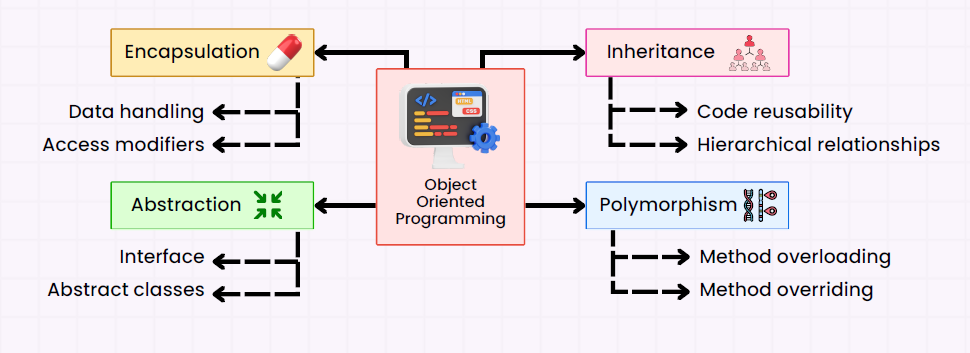
Encapsulation is one of the four core OOP concepts (along with Inheritance, Polymorphism, and Abstraction).
It is the mechanism of restricting direct access to some of an object’s components and providing controlled access through methods.
Key points:
Data (fields) of a class are made private.
Access to these fields is provided via public getter and setter methods.
This helps control how the data is accessed or modified, improving security and maintainability.
2. Why use Encapsulation?
Encapsulation provides several benefits:
Data Hiding – Prevents external classes from directly modifying sensitive data.
Control Access – You can validate inputs before modifying a variable.
Flexibility – Internal implementation can change without affecting external code.
Improved Maintainability – Changes in one class do not affect others if encapsulation is properly used.
3. How Encapsulation Works
Encapsulation works by:
Declaring class variables as private.
Providing public getter and setter methods to access or modify these variables.
Optionally, applying logic in setters to validate or restrict data.
4. Example: Encapsulation in a POJO
Here’s a simple example of a POJO with encapsulation:
public class Student {
    // Step 1: Make fields private
    private String name;
    private int age;

    // Step 2: Provide public getters
    public String getName() {
        return name;
    }

    public int getAge() {
        return age;
    }

    // Step 3: Provide public setters with validation
    public void setName(String name) {
        if (name != null && name.length() > 0) {
            this.name = name;
        } else {
            System.out.println("Invalid name.");
        }
    }

    public void setAge(int age) {
        if (age > 0) {
            this.age = age;
        } else {
            System.out.println("Age must be positive.");
        }
    }
}
5. Using the Encapsulated Class
public class Main {
    public static void main(String[] args) {
        Student student = new Student();

        // Trying to directly access the fields (won't work)
        // student.name = "John"; // ERROR: name has private access

        // Using setter methods
        student.setName("John");  // Allowed
        student.setAge(25);       // Allowed
        student.setAge(-5);       // Rejected due to validation

        // Using getter methods
        System.out.println("Student Name: " + student.getName());
        System.out.println("Student Age: " + student.getAge());
    }
}
Output:
Age must be positive.
Student Name: John
Student Age: 25
6. How it Restricts Data
Direct modification is blocked:private keyword prevents other classes from accessing the variables.
Controlled modification: The setter validates the data before setting it.
Read-only or write-only access: You can provide only getter (read-only) or setter (write-only) if needed.
Example: Read-only field
private final String studentId; // Cannot be changed once assigned

public String getStudentId() {
    return studentId;
}

// No setter method, so it’s read-only
7. Real-world analogy
Think of encapsulation like a bank account:
Your balance is private.
You can’t just change it directly.
You deposit or withdraw through controlled methods.
The bank validates your transactions before updating your balance.
Method Overloading is a feature in Java that allows a class to have more than one method with the same name, but with different parameter lists. It is a part of compile-time polymorphism or static polymorphism. Method overloading improves code readability and usability.
1. Key Rules for Method Overloading
Method name must be same.
Parameter list must be different:
Different number of parameters
Different data types of parameters
Different sequence of parameters
Return type can be different, but it alone cannot distinguish overloaded methods.
Access modifiers can differ.
Overloaded methods can throw different exceptions.
2. Scenarios for Method Overloading
Let’s discuss all possible scenarios with examples.
2.1. Overloading by Number of Parameters
class Calculator {
    // Method with 2 parameters
    int add(int a, int b) {
        return a + b;
    }

    // Method with 3 parameters
    int add(int a, int b, int c) {
        return a + b + c;
    }
}

public class Main {
    public static void main(String[] args) {
        Calculator calc = new Calculator();
        System.out.println(calc.add(10, 20));       // Output: 30
        System.out.println(calc.add(10, 20, 30));   // Output: 60
    }
}
Explanation: Java determines which method to call based on the number of arguments.
2.2. Overloading by Data Type of Parameters
class Calculator {
    int multiply(int a, int b) {
        return a * b;
    }

    double multiply(double a, double b) {
        return a * b;
    }
}

public class Main {
    public static void main(String[] args) {
        Calculator calc = new Calculator();
        System.out.println(calc.multiply(5, 10));      // Output: 50
        System.out.println(calc.multiply(5.5, 2.0));   // Output: 11.0
    }
}
Explanation: The compiler chooses the method based on parameter type matching.
2.3. Overloading by Sequence of Parameters
class Calculator {
    void display(int a, double b) {
        System.out.println("int-double: " + a + ", " + b);
    }

    void display(double a, int b) {
        System.out.println("double-int: " + a + ", " + b);
    }
}

public class Main {
    public static void main(String[] args) {
        Calculator calc = new Calculator();
        calc.display(10, 5.5);  // Output: int-double: 10, 5.5
        calc.display(5.5, 10);  // Output: double-int: 5.5, 10
    }
}
Explanation: Even with the same number and type of parameters, order matters.
2.4. Overloading with Varargs
class Calculator {
    int sum(int... numbers) {
        int total = 0;
        for (int n : numbers) total += n;
        return total;
    }

    int sum(int a, int b) {
        return a + b;
    }
}

public class Main {
    public static void main(String[] args) {
        Calculator calc = new Calculator();
        System.out.println(calc.sum(10, 20));       // Calls sum(int a, int b) → 30
        System.out.println(calc.sum(10, 20, 30));   // Calls sum(int... numbers) → 60
    }
}
Explanation: Varargs methods can accept any number of arguments, but the compiler prefers exact match first.
2.5. Overloading with Different Return Types (Not Alone)
class Test {
    int compute(int a, int b) {
        return a + b;
    }

    // int compute(int a, int b) { return a * b; } // ❌ Not allowed

    double compute(int a, double b) {
        return a * b;
    }
}
Explanation: Java cannot differentiate methods by return type alone. You must change the parameters to overload.
2.6. Overloading with Access Modifiers & Exceptions
class Example {
    public void show(int a) {
        System.out.println("Public method: " + a);
    }

    private void show(int a, int b) {
        System.out.println("Private method: " + (a + b));
    }

    void show(String s) throws Exception {
        System.out.println("Throws exception: " + s);
    }
}
Explanation: Access modifiers and exceptions do not affect overloading. Only the parameter list matters.
2.7. Real-Time Example – Online Shopping
class ShoppingCart {
    void addItem(String item) {
        System.out.println(item + " added to cart.");
    }

    void addItem(String item, int quantity) {
        System.out.println(quantity + " " + item + "(s) added to cart.");
    }

    void addItem(String item, double price) {
        System.out.println(item + " added with price $" + price);
    }
}

public class Main {
    public static void main(String[] args) {
        ShoppingCart cart = new ShoppingCart();
        cart.addItem("Book");               // Single item
        cart.addItem("Pen", 10);            // Multiple quantity
        cart.addItem("Laptop", 1500.50);    // With price
    }
}
Explanation: Overloading provides a flexible API for different input scenarios.
3. Points to Remember
Method overloading is resolved at compile time (Static Polymorphism).
Cannot overload methods only by return type.
Can overload constructors as well.
Can combine varargs, different types, and number of parameters for flexible API design.
4. Overloading vs Overriding
Feature
Overloading
Overriding
Occurs in
Same class
Subclass
Method name
Same
Same
Parameter
Must differ
Must be same
Return type
Can differ (but not alone)
Must be same or covariant
Compile/Runtime
Compile time
Runtime
Inheritance
Not required
Required
5. Conclusion
Method overloading in Java enhances code readability and flexibility, allowing the same method to handle different types or numbers of inputs. It is a core part of compile-time polymorphism in object-oriented programming.
Method overriding is a core concept in Java, allowing a subclass to provide a specific implementation for a method already defined in its superclass. It plays a crucial role in achieving runtime polymorphism.
1. What is Method Overriding?
Method overriding occurs when a subclass defines a method with the same name, return type, and parameters as a method in its superclass.
Key Points:
Overridden method must have same name, return type, and parameters.
Access level cannot be more restrictive than the superclass method.
Only instance methods can be overridden (static, final, and private methods cannot be overridden).
Supports runtime polymorphism.
2. Method Overriding Syntax
class SuperClass {
    void display() {
        System.out.println("Display from SuperClass");
    }
}

class SubClass extends SuperClass {
    @Override
    void display() {
        System.out.println("Display from SubClass");
    }
}

public class Test {
    public static void main(String[] args) {
        SuperClass obj = new SubClass();
        obj.display();  // Calls SubClass's display()
    }
}
Explanation:
@Override is optional but recommended. It ensures you are actually overriding a method.
The method in SubClassreplaces the SuperClass version when called on a subclass object.
3. Rules of Method Overriding
Rule
Explanation
Example
Method signature must be same
Name + parameters must match
void display() cannot override void show()
Return type must be compatible
Can be same or a subtype (covariant return type)
String getName() in subclass can override Object getName() in superclass
Access level
Cannot be more restrictive
protected in superclass → public in subclass ✅; private → protected ❌
Final method cannot be overridden
final void print() cannot be overridden
Compile-time error
Static methods cannot be overridden
Static methods are hidden, not overridden
static void show() in subclass hides superclass method
Private methods cannot be overridden
They are not inherited
private void msg() cannot be overridden
Constructor cannot be overridden
Constructors are not inherited
–
4. Covariant Return Type
Java allows overriding methods to return a subclass type of the original method’s return type.
class SuperClass {
    SuperClass getInstance() {
        return new SuperClass();
    }
}

class SubClass extends SuperClass {
    @Override
    SubClass getInstance() {
        return new SubClass();
    }
}
Explanation: SubClass getInstance() overrides SuperClass getInstance() because SubClass is a subtype of SuperClass.
5. Access Modifier Scenarios
Superclass method is private → cannot override.
Superclass method is default/package-private → can override in the same package.
Superclass method is protected → can override with protected or public.
Superclass method is public → can override only with public.
6. Final Method Scenario
class SuperClass {
    final void show() {
        System.out.println("Final method");
    }
}

class SubClass extends SuperClass {
    // void show() { } // ❌ Compile-time error
}
Explanation: Final methods cannot be overridden.
7. Static Method Hiding
Static methods cannot be overridden; they are hidden.
class SuperClass {
    static void greet() {
        System.out.println("Hello from SuperClass");
    }
}

class SubClass extends SuperClass {
    static void greet() {
        System.out.println("Hello from SubClass");
    }
}

public class Test {
    public static void main(String[] args) {
        SuperClass.greet(); // SuperClass version
        SubClass.greet();   // SubClass version
    }
}
Explanation: This is method hiding, not overriding. The version called depends on the class reference, not the object.
8. Real-Time Example: Overriding in a Banking System
class Bank {
    double getInterestRate() {
        return 5.0;
    }
}

class SBI extends Bank {
    @Override
    double getInterestRate() {
        return 6.5;
    }
}

class ICICI extends Bank {
    @Override
    double getInterestRate() {
        return 7.0;
    }
}

public class TestBank {
    public static void main(String[] args) {
        Bank b1 = new SBI();
        Bank b2 = new ICICI();
        System.out.println("SBI Interest: " + b1.getInterestRate());
        System.out.println("ICICI Interest: " + b2.getInterestRate());
    }
}
Explanation:
Runtime polymorphism allows different bank types to provide their own interest rates.
The same method getInterestRate() behaves differently depending on the subclass object.
9. Super Keyword Usage in Overriding
You can call the parent class method from the subclass using super.
Polymorphism is an Object-Oriented Programming (OOP) concept that allows objects to take multiple forms. The word “polymorphism” comes from Greek: “poly” (many) + “morph” (forms).
In Java, polymorphism allows:
One interface, multiple implementations
Methods to behave differently based on the object that invokes them
It provides flexibility and reusability in code.
Types of Polymorphism in Java
Polymorphism in Java is of two types:
Compile-time Polymorphism (Static Polymorphism)
Runtime Polymorphism (Dynamic Polymorphism)
1. Compile-time Polymorphism (Method Overloading)
Occurs when multiple methods in the same class have the same name but different parameters (number or type).
Example:
class Calculator {

    // Method to add two integers
    int add(int a, int b) {
        return a + b;
    }

    // Method to add three integers
    int add(int a, int b, int c) {
        return a + b + c;
    }

    // Method to add two double numbers
    double add(double a, double b) {
        return a + b;
    }
}

public class TestPolymorphism {
    public static void main(String[] args) {
        Calculator calc = new Calculator();

        System.out.println(calc.add(5, 10));        // Calls add(int, int)
        System.out.println(calc.add(5, 10, 15));    // Calls add(int, int, int)
        System.out.println(calc.add(5.5, 10.5));    // Calls add(double, double)
    }
}
Explanation: The method add behaves differently depending on the arguments passed. This is compile-time polymorphism, decided during compilation.
2. Runtime Polymorphism (Method Overriding)
Occurs when a subclass provides a specific implementation of a method that is already defined in its superclass. The method to call is determined at runtime based on the actual object type.
Real-world analogy:
Think of a Bird class. All birds can makeSound(). But a Sparrow chirps and a Parrot talks. The same method name produces different behaviors depending on the bird.
Example:
// Superclass
class Bird {
    void makeSound() {
        System.out.println("Some generic bird sound");
    }
}

// Subclass 1
class Sparrow extends Bird {
    @Override
    void makeSound() {
        System.out.println("Chirp chirp");
    }
}

// Subclass 2
class Parrot extends Bird {
    @Override
    void makeSound() {
        System.out.println("Squawk! Hello!");
    }
}

public class TestPolymorphism {
    public static void main(String[] args) {
        Bird myBird1 = new Sparrow();
        Bird myBird2 = new Parrot();

        myBird1.makeSound();   // Output: Chirp chirp
        myBird2.makeSound();   // Output: Squawk! Hello!
    }
}
Explanation: Even though both myBird1 and myBird2 are declared as type Bird, the actual object type (Sparrow or Parrot) determines which makeSound() method is called. This is runtime polymorphism.
Benefits of Polymorphism
Code reusability – Write one interface and reuse it with different objects.
Flexibility – New classes can be introduced without changing existing code.
Maintainability – Less coupling between classes.
Simplifies code – You can write generic code that works with different object types.
Key Points to Mention in a Blog Tutorial
Polymorphism allows a single method name to perform different tasks.
Compile-time polymorphism = method overloading (decided at compile-time).
Runtime polymorphism = method overriding (decided at runtime).
Always involves inheritance and interfaces in runtime polymorphism.
Real-world analogy makes understanding easier (like birds making different sounds).
Inheritance is an Object-Oriented Programming (OOP) concept where a class (child/subclass) acquires the properties and behaviors (fields and methods) of another class (parent/superclass).
Purpose:
Reusability: Avoids rewriting code.
Extensibility: Add new features easily.
Polymorphism Support: Enables overriding methods.
Syntax:
class Parent {
    int a = 10;
    void display() {
        System.out.println("Parent method");
    }
}

class Child extends Parent {
    void show() {
        System.out.println("Child method");
    }
}

public class Main {
    public static void main(String[] args) {
        Child c = new Child();
        c.display(); // inherited from Parent
        c.show();    // Child's own method
    }
}
2. Types of Inheritance in Java
Java supports multiple types of inheritance except multiple inheritance using classes (to avoid ambiguity, e.g., Diamond problem).
A. Single Inheritance
Definition: A child class inherits from one parent class.
Example:
class Vehicle {
    void start() { System.out.println("Vehicle started"); }
}

class Car extends Vehicle {
    void honk() { System.out.println("Car honks"); }
}

public class Main {
    public static void main(String[] args) {
        Car c = new Car();
        c.start();
        c.honk();
    }
}
Real-time Example: Car is a Vehicle. Car inherits features of Vehicle (start engine, fuel system).
Diagram:
Vehicle
   |
   V
  Car
B. Multilevel Inheritance
Definition: A class inherits from a class, which in turn inherits from another class.
Example:
class Animal {
    void eat() { System.out.println("Animal eats"); }
}

class Mammal extends Animal {
    void walk() { System.out.println("Mammal walks"); }
}

class Dog extends Mammal {
    void bark() { System.out.println("Dog barks"); }
}

public class Main {
    public static void main(String[] args) {
        Dog d = new Dog();
        d.eat();
        d.walk();
        d.bark();
    }
}
Real-time Example: Dog is a Mammal, Mammal is an Animal. So Dog inherits features of Mammal and Animal.
Diagram:
Animal
   |
Mammal
   |
  Dog
C. Hierarchical Inheritance
Definition: Multiple classes inherit from one parent class.
Example:
class Vehicle {
    void start() { System.out.println("Vehicle starts"); }
}

class Car extends Vehicle {
    void honk() { System.out.println("Car honks"); }
}

class Bike extends Vehicle {
    void kick() { System.out.println("Bike kicks"); }
}

public class Main {
    public static void main(String[] args) {
        Car c = new Car();
        c.start();
        c.honk();

        Bike b = new Bike();
        b.start();
        b.kick();
    }
}
Real-time Example: Car and Bike are Vehicles. Both inherit Vehicle’s start() feature.
Diagram:
        Vehicle
       /      \
     Car      Bike
D. Multiple Inheritance (Through Interfaces)
Note: Java does not allow multiple inheritance with classes to avoid ambiguity (diamond problem). But we can achieve it using interfaces.
Example:
interface Engine {
    void engineStart();
}

interface Fuel {
    void fuelType();
}

class Car implements Engine, Fuel {
    public void engineStart() { System.out.println("Engine starts"); }
    public void fuelType() { System.out.println("Uses petrol"); }
}

public class Main {
    public static void main(String[] args) {
        Car c = new Car();
        c.engineStart();
        c.fuelType();
    }
}
Real-time Example: Car can have features of both Engine and Fuel.
Diagram:
Engine       Fuel
   \         /
       Car
E. Hybrid Inheritance
Definition: Combination of two or more inheritance types. Java implements it via classes + interfaces.
Example:
interface A {
    void methodA();
}

class B {
    void methodB() { System.out.println("Method B"); }
}

class C extends B implements A {
    public void methodA() { System.out.println("Method A"); }
}

public class Main {
    public static void main(String[] args) {
        C obj = new C();
        obj.methodA();
        obj.methodB();
    }
}
Real-time Example: C class inherits B (single) and A (interface), combining behaviors.
Object-Oriented Programming (OOP) is a programming paradigm that uses objects and classes to model real-world entities. Java is a purely object-oriented language (except for primitive types), making it ideal for understanding OOPs concepts.
We’ll discuss each principle in detail with examples.
1. Class and Object
Class is a blueprint for creating objects. It defines properties (fields) and behaviors (methods) of an object.
Object is an instance of a class. Each object has its own state and behavior.
Example:
// Class definition
class Car {
    String color;
    String model;

    void displayDetails() {
        System.out.println("Car model: " + model + ", Color: " + color);
    }
}

// Main class
public class Main {
    public static void main(String[] args) {
        // Object creation
        Car car1 = new Car();
        car1.color = "Red";
        car1.model = "Toyota";

        Car car2 = new Car();
        car2.color = "Blue";
        car2.model = "Honda";

        car1.displayDetails();
        car2.displayDetails();
    }
}
Explanation:
Car is a class.
car1 and car2 are objects of the Car class.
Each object has its own values for color and model.
Encapsulation is the wrapping of data (variables) and code (methods) together as a single unit. It also restricts direct access to some of the object’s components, making the class more secure.
Access Modifiers like private, public, and protected control access.
Getters and Setters are used to access private variables.
Example:
class Person {
    private String name;
    private int age;

    // Getter for name
    public String getName() {
        return name;
    }

    // Setter for name
    public void setName(String name) {
        this.name = name;
    }

    public int getAge() {
        return age;
    }

    public void setAge(int age) {
        if(age > 0) {
            this.age = age;
        } else {
            System.out.println("Age must be positive");
        }
    }
}

public class Main {
    public static void main(String[] args) {
        Person person = new Person();
        person.setName("Alice");
        person.setAge(25);

        System.out.println("Name: " + person.getName());
        System.out.println("Age: " + person.getAge());
    }
}
Explanation:
The Person class uses private fields to restrict direct access.
Getters and setters allow controlled access to these fields.
Inheritance allows a class to inherit properties and methods from another class, promoting code reusability.
Super Class (Parent class) – The class whose features are inherited.
Sub Class (Child class) – The class that inherits features.
Example:
// Parent class
class Animal {
    void eat() {
        System.out.println("This animal eats food.");
    }
}

// Child class
class Dog extends Animal {
    void bark() {
        System.out.println("Dog barks");
    }
}

public class Main {
    public static void main(String[] args) {
        Dog dog = new Dog();
        dog.eat(); // inherited from Animal
        dog.bark(); // own method
    }
}
Polymorphism means “many forms.” In Java, it allows objects to take multiple forms. There are two types:
Compile-time polymorphism (Method Overloading)
Runtime polymorphism (Method Overriding)
Example 1: Method Overloading
class Calculator {
    int add(int a, int b) {
        return a + b;
    }

    double add(double a, double b) {
        return a + b;
    }
}

public class Main {
    public static void main(String[] args) {
        Calculator calc = new Calculator();
        System.out.println(calc.add(5, 10));      // Calls int method
        System.out.println(calc.add(5.5, 10.5));  // Calls double method
    }
}
Example 2: Method Overriding
class Animal {
    void sound() {
        System.out.println("Animal makes sound");
    }
}

class Cat extends Animal {
    @Override
    void sound() {
        System.out.println("Cat meows");
    }
}

public class Main {
    public static void main(String[] args) {
        Animal myCat = new Cat();
        myCat.sound(); // Runtime polymorphism
    }
}
Explanation:
Overloading – Same method name, different parameters.
Overriding – Child class provides its own implementation of a parent method.
Abstraction is the concept of hiding implementation details and showing only functionality.
Achieved using abstract classes or interfaces.
Example 1: Abstract Class
abstract class Shape {
    abstract void area(); // abstract method
}

class Circle extends Shape {
    double radius;

    Circle(double radius) {
        this.radius = radius;
    }

    void area() {
        System.out.println("Circle area: " + (3.14 * radius * radius));
    }
}

public class Main {
    public static void main(String[] args) {
        Shape shape = new Circle(5);
        shape.area();
    }
}
Example 2: Interface
interface Vehicle {
    void run();
}

class Bike implements Vehicle {
    public void run() {
        System.out.println("Bike is running");
    }
}

public class Main {
    public static void main(String[] args) {
        Vehicle bike = new Bike();
        bike.run();
    }
}
Explanation:
Abstract classes and interfaces allow you to define “what” a class should do, without specifying “how.”
The String object is one of the most commonly used classes in the Java programming language.
In this article, we’ll explore the String Constant Pool(or String Pool)— a special memory region where the JVM stores String literals to optimize memory usage and performance.
✅ Why String Pool Is Important
➤ Memory Efficiency
Prevents duplicate string objects.
Saves memory by reusing existing strings.
➤ Performance Optimization
String comparison using == works for string literals since they reference the same object.
➤ Immutable Design Enables Pooling
Since strings are immutable, sharing the same object across the application is safe.
✅ 2. String Interning
Because Strings in Java are immutable, the JVM can save memory by storing only one copy of each string literal in a special area called the String Pool. This process is called interning.
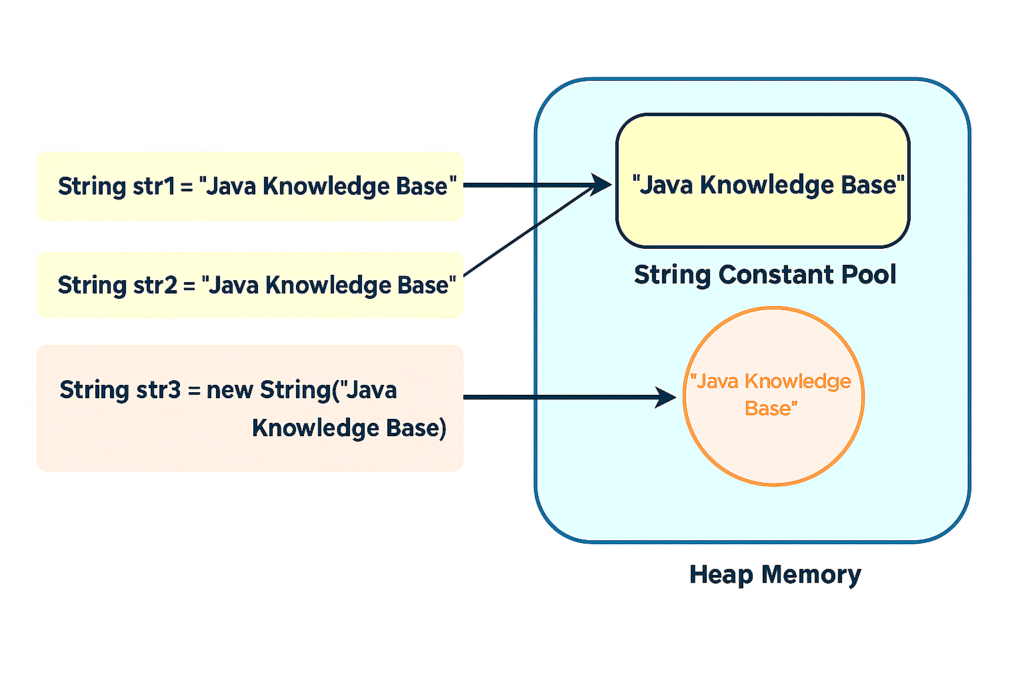
When we create a String variable and assign a value using a literal, the JVM first checks the String Pool to see if the same string already exists.
If it exists, the JVM returns a reference to the existing string without creating a new object.
If it doesn’t exist, the new string is added to the pool, and its reference is returned.
Let’s see a simple example to understand how this works.
✔️ Example:
public class StringInterningExample {
    public static void main(String[] args) {
        String str1 = "Java Knowledge Base";
        String str2 = "Java Knowledge Base";

        System.out.println(str1 == str2);  // Output: true
    }
}
👉 Both str1 and str2 point to the same object in the String Pool.
✅ 3. Strings Allocated Using the Constructor
When we create a String using the new operator, the JVM always creates a new object in the heap, separate from the String Pool.
✔️ Example:
public class NewStringExample {
    public static void main(String[] args) {
        String literalString = "Java Knowledge Base";
        String constructedString = new String("Java Knowledge Base");

        System.out.println(literalString == constructedString);  // Output: false
    }
}
👉 Explanation:
literalString points to the interned string in the pool.
constructedString points to a new object in heap memory.
✅ 4. String Literal vs String Object
When we create a String using the new() operator, a new object is always created in heap memory. But when we use a String literal like "Java Knowledge Base", the JVM checks the String Pool first — if the string already exists, it reuses it; otherwise, it adds the new string to the pool for future use.
Creation Type
Location in Memory
Reuses Existing Object?
String Literal
String constant Pool
Yes
new String()
Heap Memory
No
✔️ Example Comparison:
public class StringComparisonExample {
    public static void main(String[] args) {
        String first = "Java Knowledge Base";
        String second = "Java Knowledge Base";
        System.out.println(first == second);  // Output: true

        String third = new String("Java Knowledge Base");
        String fourth = new String("Java Knowledge Base");
        System.out.println(third == fourth);  // Output: false

        String fifth = "Java Knowledge Base";
        String sixth = new String("Java Knowledge Base");
        System.out.println(fifth == sixth);  // Output: false
    }
}
👉 Conclusion: Prefer using string literals for better performance and memory usage.
✅ 5. Manual Interning
We can manually add a String to the Java String Pool by using the intern() method.
When we intern a String, its reference is stored in the pool, and the JVM will use this reference whenever the same string is needed.
👉 Manual interning ensures the string reference points to the pool object.
✅ 6. Garbage Collection
Before Java 7, the String Pool was stored in the PermGen space, which has a fixed size and cannot grow during program execution. It also could not be garbage collected.
This meant that if we interned too many strings, we could get an OutOfMemoryError.
From Java 7 onwards, the String Pool is stored in the Heap memory, which can be garbage collected. This allows unused strings to be removed, reducing the chance of running out of memor
👉 Benefit: Reduces the risk of OutOfMemoryError when interning many strings.
✅ 7. Performance and Optimizations
In Java 6, the only way to optimize the String Pool was by increasing the PermGen space using the JVM option:
-XX:MaxPermSize=1G
From Java 7 onwards, we have better ways to manage and view the String Pool.
Here are two useful JVM options to see the String Pool details:
If we want to increase the pool size (number of buckets), we can use this option:
-XX:StringTableSize=4901
Before Java 7u40, the default pool size was 1009 buckets. From Java 7u40 to Java 11, the default size was 60013 buckets, and in newer versions, it increased to 65536 buckets.
👉 Keep in mind: Increasing the pool size uses more memory but makes inserting strings into the pool faster.
💡 Note:
Until Java 8, Strings were stored as a char[] using UTF-16 encoding, where each character used 2 bytes of memory.
From Java 9 onwards, Java introduced Compact Strings. Depending on the content, it uses either byte[] or char[] internally.
This helps save heap memory and reduces the work of the Garbage Collector, making Java programs more efficient.
🎯Conclusion
In this guide, we explored how the JVM optimizes memory for String objects using the String Pool and Interning, and why immutability is a core part of the design.
By leveraging string literals and the intern() method, we can improve both performance and memory efficiency in Java applications.
A String in Java is a widely used object that stores a sequence of characters. One of the most important properties of the String class in Java is that it is immutable.
✅ What Is an Immutable Object?
An immutable object is an object whose state (data) cannot be changed after it is created.
Once a string is created, its content cannot be altered.
Any modification creates a new string object.
✔️ Example of Immutable Behavior
public class ImmutableStringExample {
    public static void main(String[] args) {
        String str = "Java";
        str.concat("Knowledge Base");  // This does NOT modify the original str

        System.out.println(str);  // Output: Java
    }
}
👉 To get the modified string, you must explicitly assign it:
str = str.concat("Knowledge Base");
System.out.println(str);  // Output: Java Knowledge Base
✅ Why Is String Immutable in Java?
1️⃣ String Pool Benefit
When dealing with strings in Java, a key concept that improves performance and memory management is the String Constant Pool (or String Pool).
✅ What Is the String Pool?
The String Pool is a special memory region in the Java heap.
It stores unique string literals.
Every time a string literal is created using double quotes (" "), the JVM checks the pool first:
If the string already exists → It reuses the same reference.
If the string doesn’t exist → It adds the string to the pool.
✅ Example: String Pool Behavior (literals)
public class StringPoolExample {
    public static void main(String[] args) {
        String str1 = "Java Knowledge Base";
        String str2 = "Java Knowledge Base";
        System.out.println(str1 == str2);  // Output: true
    }
}
👉 Explanation:
Both str1 and str2 point to the same object in the String Pool.
The == operator returns true because both variables reference the same memory address.
✅ Example: Using new Keyword
public class StringPoolExample2 {
    public static void main(String[] args) {
        String str1 = "Java Knowledge Base";
        String str3 = new String("Java Knowledge Base");

        System.out.println(str1 == str3);  // Output: false
    }
}
👉 Explanation:
str1 refers to the pooled string object.
str3 refers to a new object in the heap memory.
Therefore, str1 == str3 is false.
2️⃣ Security
Key Use Cases Where Strings Play a Critical Role:
Database connection URLs
Usernames and passwords
Network connections
If strings were mutable, any malicious code running in the same application or process could modify the string content unexpectedly, leading to potential security breaches.
✅ Example: Password in String (Immutable)
public class SecurityExample {
    public static void main(String[] args) {
        String password = "SuperSecret123";  // Stored in String Constant Pool

        // Imagine some malicious code tries to change the password
        // Since String is immutable, the original value remains unchanged
        password.concat("MaliciousPart");  // Creates a new String object, does not alter original

        System.out.println("Password: " + password);  // Output: SuperSecret123
    }
}
👉 Explanation:
The call to password.concat("MaliciousPart") creates a new string but does NOT modify the original password.
This behavior protects sensitive data from being tampered with by malicious code.
✅ Contrast: Mutable Example (Hypothetical MutableString)
class MutableString {
    String value;

    MutableString(String value) {
        this.value = value;
    }

    void setValue(String newValue) {
        this.value = newValue;
    }
}

public class MutableExample {
    public static void main(String[] args) {
        MutableString password = new MutableString("SuperSecret123");

        // Malicious code can change the value
        password.setValue("HackedPassword!");

        System.out.println("Password: " + password.value);  // Output: HackedPassword!
    }
}
👉 Why This Is Dangerous:
Sensitive data like passwords can be altered at runtime.
Could allow attackers to inject values or manipulate security-critical variables.
3️⃣ Hashcode Synchronization
One of the important reasons why Java’s String class is immutable is to ensure hashcode consistency.
The hashCode() method for a string is computed only once and cached for future use.
Immutability guarantees that the string’s hashcode remains constant throughout its lifetime, which is essential for reliably storing and retrieving strings in hash-based collections like HashMap.
✅ What Is hashCode()?
The hashCode() method returns an integer value representing the content of the object.
It is heavily used in hash-based collections like:
HashMap
HashSet
Hashtable
✅ Why Hashcode Consistency Matters
Collections like HashMap store key-value pairs in buckets based on the hashcode of the key.
If the content of a key (a string, in this case) were to change after being added to a map:
The hashcode would change.
The object would be stored in the wrong bucket.
Retrieving the key later would fail.
Example:
public class HashcodeExample {
    public static void main(String[] args) {
        String str = "Java";

        // First computation of hashcode
        int hash1 = str.hashCode();

        // Second computation of hashcode
        int hash2 = str.hashCode();

        System.out.println("Hash1: " + hash1);
        System.out.println("Hash2: " + hash2);
        System.out.println("Hashes are equal: " + (hash1 == hash2));  // Output: true
    }
}
👉 Why This Works:
Subsequent calls return the same value without recomputation.
The string content "Java" cannot change because of immutability.
The JVM computes the hashcode only once and caches it.
4️⃣ Thread Safety
Immutable strings are inherently thread-safe:
Multiple threads can share the same String object safely without the need for explicit synchronization.
This prevents race conditions or unexpected behavior in a multithreaded environment.
No risk of data inconsistency or corruption.
5️⃣ Performance Optimization
✔️ How Does Immutability Improve Performance?
Because strings are immutable, they can be safely reused from the string pool.
Avoids unnecessary object creation when using literals.
In Java, String is a widely used class that represents a sequence of characters. Strings are immutable objects, meaning once created, their values cannot be changed.
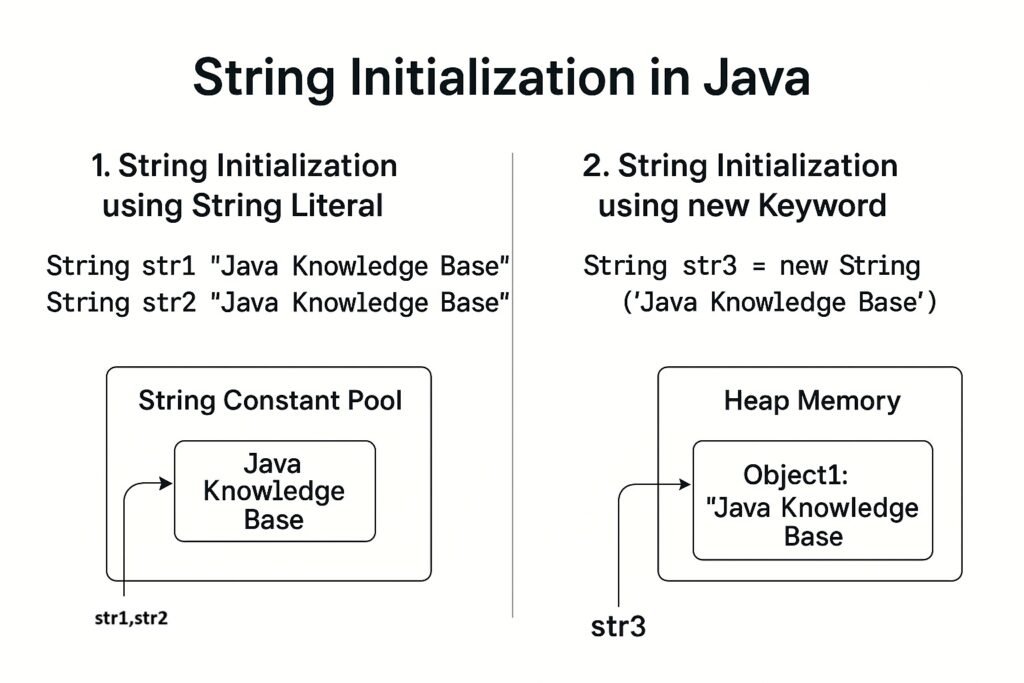
There are two common ways to initialize a String in Java:
Using String Literal
Using new Keyword
1️⃣. String Initialization using String Literal
When you initialize a string using a literal, Java checks the 👉String Constant Pool first. If the string already exists in the pool, Java reuses it. Otherwise, a new string is created in the pool.
✔️ Syntax:
String str1 = "Java Knowledge Base";
✔️ Example:
public class StringInitializationExample {
    public static void main(String[] args) {
        String str1 = "Java Knowledge Base";
        String str2 = "Java Knowledge Base";

        System.out.println(str1 == str2);  // Output: true
    }
}
👉 Explanation:
Both str1 and str2 point to the same object in the String Pool.
The == operator returns true because they reference the same memory location.
2️⃣. String Initialization using new Keyword
When using the new keyword, Java creates a new String object in the heap memory, even if an identical string exists in the pool.
✔️ Syntax:
String str3 = new String("Java Knowledge Base");
✔️ Example:
public class StringInitializationExample {
    public static void main(String[] args) {
        String str1 = "Java Knowledge Base";
        String str3 = new String("Java Knowledge Base");

        System.out.println(str1 == str3);  // Output: false
    }
}
👉 Explanation:
str1 points to the String Pool object.
str3 points to a different object in the heap.
The == operator returns false because they reference different memory locations.
⚡ Key Differences Between Literal and new Keyword Initialization
Property
String Literal
new Keyword
Memory Location
String Pool
Heap
Memory Reuse
Yes
No
Performance
Faster
Slightly slower due to object creation
Comparison (==) Result
true (if same content)
false (different objects)
✅ Image Diagram
Here is a simple diagram illustrating the two types of initialization:
3️⃣. String Declaration
When you declare a string variable without assigning any value, it just reserves a reference in memory but doesn’t point to any object yet.
✔️ Syntax:
String str;
✔️ Example:
public class StringDeclarationExample {
    public static void main(String[] args) {
        String str;  // Only declared, not initialized

        // System.out.println(str); // ❌ Compilation Error: variable str might not have been initialized
    }
}
👉 Important Points:
For local variables, Java does NOT assign a default value, so accessing str without initializing it causes a compilation error.
For instance (class member) variables, Java automatically assigns null by default.
✅ Example with Class Member:
public class Example {
    String str;  // Class member variable

    public void printString() {
        System.out.println(str);  // Output: null
    }

    public static void main(String[] args) {
        Example example = new Example();
        example.printString();
    }
}
👉 Output:
null
4️⃣. Empty String
An empty string is a string that contains no characters but is a valid String object in memory. It is explicitly initialized as "" (double quotes with no characters inside).
✔️ Syntax:
String emptyStr = "";
✔️ Example:
public class EmptyStringExample {
    public static void main(String[] args) {
        String emptyStr = "";  // Initialized as an empty string

        System.out.println("Length of emptyStr: " + emptyStr.length());  // Output: 0
        System.out.println("Empty String: '" + emptyStr + "'");          // Output: ''
    }
}
👉 Key Points:
emptyStr is a valid object.
Its length is 0.
You can safely call methods on it, like length(), isEmpty(), etc.
5️⃣. Null Value
A null string is a reference that does NOT point to any object in memory. It indicates the absence of any string object.
✔️ Syntax:
String nullStr = null;
✔️ Example:
public class NullStringExample {
    public static void main(String[] args) {
        String nullStr = null;

        System.out.println(nullStr);  // Output: null

        // The following line throws NullPointerException
        // System.out.println(nullStr.length());
    }
}
👉 Important Notes:
You can safely print a null string reference: it prints null.
But calling methods on it (like .length(), .isEmpty()) will throw a NullPointerException.
✅ Comparison Table: Empty String vs Null Value
Property
Empty String ("")
Null Value (null)
Memory Allocation
Yes (an object in memory)
No object, just a reference
String Length
0
Accessing length causes NullPointerException
Usage Example
String s = "";
String s = null;
Method Calls
Safe (e.g., s.length())
Unsafe (throws NullPointerException)
Purpose
Represents no characters
Represents absence of object
✅ Best Practices
Use empty strings ("") when you want to represent an empty text field or no characters.
Use null values when the reference should be uninitialized or explicitly indicate “no object”.
Always perform null checks before invoking methods on a String variable to avoid exceptions.
✅🚨 Key Points:
Scenario
Example Code
Declaration only
String str; (Must be initialized before use)
Empty String
String emptyStr = "";
Null Value
String nullStr = null;
Understanding the difference helps in writing robust and error-free code.
🎯Conclusion
Prefer using String literals when possible to save memory and improve performance.
Use the new keyword when a distinct String object is required.
In Java, operators are special symbols or keywords used to perform operations on variables and values. They are essential in writing expressions and manipulating data in a program.
1️⃣. Arithmetic Operators
Arithmetic operators in Java are used to perform basic mathematical calculations(like addition, subtraction, multiplication, division, and modulus) on numeric data types like int, float, double, etc. These operators form the foundation of most computations in programming.
Relational operators are used to compare two values and return a result of type boolean — either true or false. They are essential when you want to make decisions in your code, such as in conditional statements (if, while, etc.).
Operator
Description
Syntax
Example
==
Equal to
a == b
5 == 3 → false
!=
Not equal to
a != b
5 != 3 → true
>
Greater than
a > b
5 > 3 → true
<
Less than
a < b
5 < 3 → false
>=
Greater or equal
a >= b
5 >= 3 → true
<=
Less or equal
a <= b
5 <= 3 → false
✅ Example:
int a = 5, b = 10;
System.out.println(a == b);  // false
System.out.println(a != b);  // true
System.out.println(a < b);   // true
System.out.println(a >= b);  // false
3️⃣. Logical Operators
Logical operators are used to combine multiple boolean expressions or conditions and return a result of type boolean (true or false). They are especially useful when you need to make decisions based on multiple conditions in your program
Operator
Description
Syntax
Example Expression
&&
Logical AND
(a > b) && (b > c)
true if both conditions are true
||
Logical OR
`(a > b)
!
Logical NOT
!(a > b)
Inverts boolean value (true → false, false → true)
✅ Example:
int a = 5, b = 10, c = 3;
System.out.println((a < b) && (b > c));  // true
System.out.println((a > b) || (b > c));  // true
System.out.println(!(a > b));            // true
4️⃣. Assignment Operators
Assignment operators are used in Java to assign values to variables. They take the value on the right-hand side and store it in the variable on the left-hand side.
The simplest assignment operator is the = operator.
Syntax:
variable = value;
Example:
int a = 10; // assigns the value 10 to variable a
Here, 10 is assigned to a. The expression a = 10 not only assigns the value but also returns the assigned value (10), which can be used in other expressions.
Operator
Description
Syntax
Example
=
Assign
a = b
a = 5;
+=
Add and assign
a += b
a = a + b;
-=
Subtract and assign
a -= b
a = a - b;
*=
Multiply and assign
a *= b
a = a * b;
/=
Divide and assign
a /= b
a = a / b;
%=
Modulus and assign
a %= b
a = a % b;
✅ Example:
int a = 5;
a += 3;  // a = a + 3 → a becomes 8
System.out.println(a);  // Output: 8
5️⃣. Unary Operators
Unary operators are operators that operate on a single operand to produce a new value or change the state of a variable. They are typically used for incrementing, decrementing, negating, or inverting values.
Syntax:
operator operand;
or
operand operator;
Operator
Description
Syntax
Example
+
Unary plus
+a
+5 → 5
–
Unary minus
-a
-5 → -5
++
Increment by 1
a++ / ++a
Increment a
—
Decrement by 1
a-- / --a
Decrement a
!
Logical NOT
!true
false
✅ Example:
int a = 5;
System.out.println(++a);  // Output: 6 (pre-increment)
System.out.println(a--);  // Output: 6 (post-decrement; a becomes 5 after)
6️⃣. Ternary Operator
6.1. Ternary Operator
The ternary operator is a shortcut for the if-else statement. It’s called “ternary” because it takes three operands.
condition → a boolean expression that evaluates to true or false.
valueIfTrue → value assigned if the condition is true.
valueIfFalse → value assigned if the condition is false.
It returns a value, unlike if-else, which is a statement.
6.2. How It Works
Evaluate the condition.
If the condition is true, the first value (valueIfTrue) is used.
If the condition is false, the second value (valueIfFalse) is used.
✅ Example:
int a = 10;
int b = 20;

int max = (a > b) ? a : b;  // check which is larger
System.out.println("Maximum: " + max);
Output:
Maximum: 20
Explanation:
(a > b) → 10 > 20 → false
So valueIfFalse (b) is assigned to max.
6.3. Ternary Operator vs if-else
Using if-else:
int a = 10;
int b = 20;
int max;

if(a > b) {
    max = a;
} else {
    max = b;
}
System.out.println("Maximum: " + max);
Using Ternary Operator (shorter and cleaner):
int max = (a > b) ? a : b;
The ternary operator is concise, making it useful for simple conditional assignments.
6.4. Nested Ternary Operator
You can nest ternary operators to check multiple conditions, but be careful—it can reduce readability.
Example:
int a = 5, b = 10, c = 7;

int max = (a > b) ? a : (b > c ? b : c);
System.out.println("Maximum: " + max);
Output:
Maximum: 10
Explanation:
(a > b) → 5 > 10 → false → evaluate (b > c ? b : c)
(b > c) → 10 > 7 → true → b is chosen
6.5. Key Points
Ternary operator always returns a value.
Can be used in assignments, print statements, or return statements.
For multiple conditions, nest carefully—too much nesting reduces readability.
Works with any data type: int, double, boolean, String, etc.
7️⃣. Bitwise Operators
7.1. Bitwise Operators
Bitwise operators operate on binary representations of integers at the bit level. They are used to manipulate individual bits of numbers, which is very useful in low-level programming, flags, and performance optimization.
Applicable data types:int, long, short, byte, char.
7.2. Types of Bitwise Operators
A. Bitwise AND (&)
Performs AND operation on each pair of corresponding bits.
Result is 1 if both bits are 1, else 0.
Example:
int a = 5;   // 0101 in binary
int b = 3;   // 0011 in binary
int c = a & b;
System.out.println(c); // 1 (0001 in binary)
Explanation:
Bit of a
0
1
0
1
Bit of b
0
0
1
1
a & b
0
0
0
1 → 1
B. Bitwise OR (|)
Performs OR operation on each pair of bits.
Result is 1 if at least one bit is 1, else 0.
int c = a | b;
System.out.println(c); // 7 (0111 in binary)
C. Bitwise XOR (^)
Performs XOR operation on each pair of bits.
Result is 1 if bits are different, else 0.
int c = a ^ b;
System.out.println(c); // 6 (0110 in binary)
D. Bitwise Complement (~)
Inverts all bits (1 → 0, 0 → 1).
For signed integers, result = -(n+1) because of two’s complement.
int a = 5;       // 0000 0101
int c = ~a;      // 1111 1010 → -6
System.out.println(c); // -6
E. Left Shift (<<)
Shifts all bits to the left by a certain number of positions.
Vacant bits are filled with 0.
Equivalent to multiplying by 2^n.
int a = 5;       // 0101
int c = a << 2;  // 0101 << 2 → 10100 (20 in decimal)
System.out.println(c); // 20
F. Right Shift (>>)
Shifts all bits to the right.
For positive numbers, fills leftmost bits with 0.
For negative numbers, fills leftmost bits with 1 (sign extension).
Equivalent to dividing by 2^n.
int a = 20;      // 10100
int c = a >> 2;  // 10100 >> 2 → 0101 (5)
System.out.println(c); // 5
G. Unsigned Right Shift (>>>)
Shifts bits to the right without considering sign.
Fills leftmost bits with 0.
Only differs from >> for negative numbers.
int a = -20;
int c = a >>> 2;
System.out.println(c); // large positive number
Operator
Description
Syntax
Example
&
Bitwise AND
a & b
5 & 3 → 1
|
Bitwise OR
a | b
`a
^
Bitwise XOR
a ^ b
5 ^ 3 → 6
~
Bitwise Complement
~a
~5 → -6
<<
Left shift
a << 2
5 << 2 → 20
>>
Right shift
a >> 2
5 >> 2 → 1
✅ Example:
int a = 5;  // 0101 in binary
int b = 3;  // 0011 in binary
System.out.println(a & b);  // Output: 1 (0001)
System.out.println(a | b);  // Output: 7 (0111)
🎯Summary
Java provides a comprehensive set of operators that simplify performing calculations, comparisons, logical decisions, and bitwise manipulations. Understanding their syntax and proper usage is essential for writing clean, efficient, and maintainable Java code.