Introduction to OOPs Concepts in Java
Object-Oriented Programming (OOP) is a programming paradigm that uses objects and classes to model real-world entities. Java is a purely object-oriented language (except for primitive types), making it ideal for understanding OOPs concepts.
The main principles of OOPs in Java are:
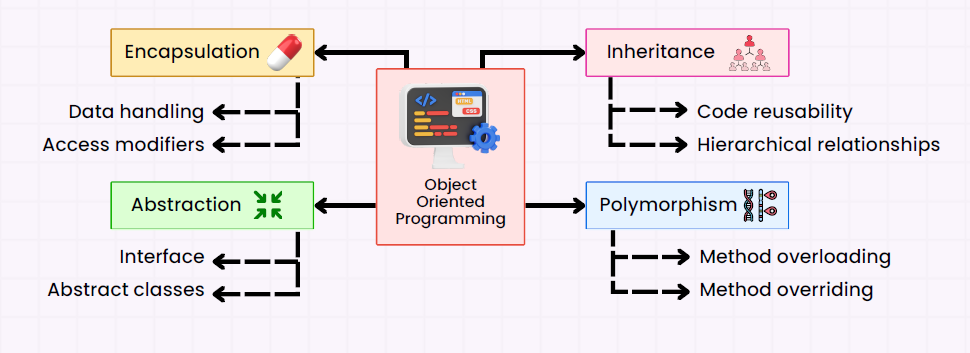
We’ll discuss each principle in detail with examples.
1. Class and Object
Class is a blueprint for creating objects. It defines properties (fields) and behaviors (methods) of an object.
Object is an instance of a class. Each object has its own state and behavior.
Example:
// Class definition
class Car {
    String color;
    String model;

    void displayDetails() {
        System.out.println("Car model: " + model + ", Color: " + color);
    }
}

// Main class
public class Main {
    public static void main(String[] args) {
        // Object creation
        Car car1 = new Car();
        car1.color = "Red";
        car1.model = "Toyota";

        Car car2 = new Car();
        car2.color = "Blue";
        car2.model = "Honda";

        car1.displayDetails();
        car2.displayDetails();
    }
}
Explanation:
Caris a class.car1andcar2are objects of theCarclass.- Each object has its own values for
colorandmodel.
👉 To learn more about Objects and Classes in Java with examples, visit this detailed guide on Object and Class in Java.
2. Encapsulation
Encapsulation is the wrapping of data (variables) and code (methods) together as a single unit. It also restricts direct access to some of the object’s components, making the class more secure.
- Access Modifiers like
private,public, andprotectedcontrol access. - Getters and Setters are used to access private variables.
Example:
class Person {
    private String name;
    private int age;

    // Getter for name
    public String getName() {
        return name;
    }

    // Setter for name
    public void setName(String name) {
        this.name = name;
    }

    public int getAge() {
        return age;
    }

    public void setAge(int age) {
        if(age > 0) {
            this.age = age;
        } else {
            System.out.println("Age must be positive");
        }
    }
}

public class Main {
    public static void main(String[] args) {
        Person person = new Person();
        person.setName("Alice");
        person.setAge(25);

        System.out.println("Name: " + person.getName());
        System.out.println("Age: " + person.getAge());
    }
}
Explanation:
- The
Personclass uses private fields to restrict direct access. - Getters and setters allow controlled access to these fields.
👉 To explore Encapsulation in detail with examples, check out this guide on Encapsulation in Java.
3. Inheritance
Inheritance allows a class to inherit properties and methods from another class, promoting code reusability.
- Super Class (Parent class) – The class whose features are inherited.
- Sub Class (Child class) – The class that inherits features.
Example:
// Parent class
class Animal {
    void eat() {
        System.out.println("This animal eats food.");
    }
}

// Child class
class Dog extends Animal {
    void bark() {
        System.out.println("Dog barks");
    }
}

public class Main {
    public static void main(String[] args) {
        Dog dog = new Dog();
        dog.eat(); // inherited from Animal
        dog.bark(); // own method
    }
}
Explanation:
Doginherits theeat()method fromAnimal.- This demonstrates code reuse.
👉 To explore Inheritance in detail with examples, check out this guide on Inheritence in Java.
4. Polymorphism
Polymorphism means “many forms.” In Java, it allows objects to take multiple forms. There are two types:
- Compile-time polymorphism (Method Overloading)
- Runtime polymorphism (Method Overriding)
Example 1: Method Overloading
class Calculator {
    int add(int a, int b) {
        return a + b;
    }

    double add(double a, double b) {
        return a + b;
    }
}

public class Main {
    public static void main(String[] args) {
        Calculator calc = new Calculator();
        System.out.println(calc.add(5, 10));      // Calls int method
        System.out.println(calc.add(5.5, 10.5));  // Calls double method
    }
}
Example 2: Method Overriding
class Animal {
    void sound() {
        System.out.println("Animal makes sound");
    }
}

class Cat extends Animal {
    @Override
    void sound() {
        System.out.println("Cat meows");
    }
}

public class Main {
    public static void main(String[] args) {
        Animal myCat = new Cat();
        myCat.sound(); // Runtime polymorphism
    }
}
Explanation:
- Overloading – Same method name, different parameters.
- Overriding – Child class provides its own implementation of a parent method.
👉 To explore Polymorphism in detail with examples, check out this guide on Polymorphism in Java.
5. Abstraction
Abstraction is the concept of hiding implementation details and showing only functionality.
- Achieved using abstract classes or interfaces.
Example 1: Abstract Class
abstract class Shape {
    abstract void area(); // abstract method
}

class Circle extends Shape {
    double radius;

    Circle(double radius) {
        this.radius = radius;
    }

    void area() {
        System.out.println("Circle area: " + (3.14 * radius * radius));
    }
}

public class Main {
    public static void main(String[] args) {
        Shape shape = new Circle(5);
        shape.area();
    }
}
Example 2: Interface
interface Vehicle {
    void run();
}

class Bike implements Vehicle {
    public void run() {
        System.out.println("Bike is running");
    }
}

public class Main {
    public static void main(String[] args) {
        Vehicle bike = new Bike();
        bike.run();
    }
}
Explanation:
- Abstract classes and interfaces allow you to define “what” a class should do, without specifying “how.”
To dive deeper into Abstraction with practical examples, check out this guide on Abstraction in Java .
Other Important OOP Concepts in Java
- Constructors – Special methods to initialize objects.
- This Keyword – Refers to the current object instance.
- Super Keyword – Refers to the parent class object.
- Final Keyword – Used to declare constants, prevent inheritance or method overriding.
- Static Keyword – For class-level variables and methods.
OOPs Concepts in Real World Example
Imagine a Banking System:
- Class:
BankAccount - Object:
account1for John,account2for Alice - Encapsulation:
balanceis private; access via getters/setters - Inheritance:
SavingsAccountextendsBankAccount - Polymorphism: Different types of accounts have different
calculateInterest()methods - Abstraction: Interface
Transactiondefinesdeposit()andwithdraw()methods
Conclusion
OOPs concepts in Java make programs:
- Modular – Code is divided into classes/objects
- Reusable – Through inheritance and polymorphism
- Secure – Through encapsulation
- Easy to maintain – Abstraction hides complex logic
Understanding these principles is crucial to mastering Java and building scalable applications.