Java Tutorial

  • Association, Composition, and Aggregation in Java

    🔹Introduction

    In Object-Oriented Programming (OOP), classes often need to work together. For example, a Car is made of Engine, Wheels, and Seats. Similarly, a University has Students and Departments.

    In Java, these relationships are represented using:

    • Association
    • Composition
    • Aggregation

    Understanding these relationships helps us design systems that are closer to real-world modeling and easier to maintain.


    🔹1. Association in Java

    Definition:
    Association represents a relationship between two separate classes that are connected through their objects. It can be one-to-one, one-to-many, many-to-one, or many-to-many.

    👉 In simple words:

    “Association means two classes are related, but neither owns the other.”

    ✅ Example: Teacher and Student

    A teacher can teach many students, and a student can learn from multiple teachers. Both can exist independently, but they share a relationship.

    class Teacher {
        private String name;
    
        public Teacher(String name) {
            this.name = name;
        }
    
        public String getName() {
            return name;
        }
    }
    
    class Student {
        private String name;
    
        public Student(String name) {
            this.name = name;
        }
    
        public String getName() {
            return name;
        }
    }
    
    public class AssociationExample {
        public static void main(String[] args) {
            Teacher teacher = new Teacher("Mr. Sharma");
            Student student = new Student("Rahul");
    
            // Association - both exist independently
            System.out.println(student.getName() + " is taught by " + teacher.getName());
        }
    }
    

    🏆 Real-world use case:

    • Doctors and Patients
    • Employees and Departments
    • Bank and Customers

    🔹2. Aggregation in Java (HAS-A Relationship)

    Definition:
    Aggregation is a special form of Association where one class contains a reference to another class. However, the contained object can exist independently of the container.

    👉 In simple words:

    “Aggregation means HAS-A relationship, but the lifecycles are independent.”

    ✅ Example: Department and Professor

    A Department has Professors , but Professors can also work in other departments or exist even if the Department is deleted.

    • A Department may have several Professors.
    • If the Department is closed, the Professor objects can still exist independently (they may move to another Department).
    • Since a Professor can exist without being tied to a specific Department, this represents a weak association — also known as Aggregation.
    import java.util.*;
    
    class Professor  {
        String name;
    
        Professor (String name) {
            this.name = name;
        }
    }
    
    class Department {
        String name;
        List<Professor> professors;
    
        Department(String name, List<Professor> professors) {
            this.name = name;
            this.teachers = professors;
        }
    }
    
    public class AggregationExample {
        public static void main(String[] args) {
            Professor p1 = new Professor("Mr. Sharma");
            Professor p2 = new Professor("Ms. Gupta");
    
            List<Professor> professors = new ArrayList<>();
            professors.add(p1);
            professors.add(p2);
    
            Department dept = new Department("Computer Science", professors);
    
            System.out.println("Department: " + dept.name);
            for (Professor p : dept.professors) {
                System.out.println("Professor: " + p.name);
            }
        }
    }
    

    🏆 Real-world use case:

    • Library and Books (Books can exist without Library)
    • Team and Players (Players can exist without a Team)
    • Company and Employees

    🔹3. Composition in Java (Strong HAS-A Relationship)

    Definition:
    Composition is a stronger form of Aggregation where the contained object cannot exist without the container. If the container object is destroyed, the contained object is also destroyed.

    👉 In simple words:

    “Composition means HAS-A relationship with dependency. The child object cannot live without the parent object.”

    ✅ Example: House and Rooms

    A Room cannot exist without a House. If the House is destroyed, Rooms are also gone.

    • A House consists of several Rooms.
    • If the House object is destroyed, all its Room objects will also be destroyed.
    • Since a Room cannot exist without its House, this represents a strong association — also known as Composition.
    class Room {
        private String name;
    
        Room(String name) {
            this.name = name;
        }
    
        public String getName() {
            return name;
        }
    }
    
    class House {
        private Room room;
    
        House(String roomName) {
            this.room = new Room(roomName); // strong dependency
        }
    
        public Room getRoom() {
            return room;
        }
    }
    
    public class CompositionExample {
        public static void main(String[] args) {
            House house = new House("Living Room");
            System.out.println("House has a " + house.getRoom().getName());
        }
    }
    

    🏆 Real-world use case:

    • Car and Engine (Engine cannot exist without Car in this context)
    • Human and Heart (Heart cannot exist independently)
    • Laptop and Keyboard

    🔹Key Differences: Association vs Aggregation vs Composition

    FeatureAssociationAggregationComposition
    TypeGeneral relationshipWeak HAS-AStrong HAS-A
    DependencyObjects are independentContained object can exist without containerContained object cannot exist without container
    LifecycleIndependentSeparate lifecycleDependent lifecycle
    ExampleTeacher ↔ StudentDepartment → TeacherHouse → Room

    🎯Summary

    • Association: Simple relationship, objects are independent.
    • Aggregation: HAS-A relationship, weaker, independent lifecycle.
    • Composition: Strong HAS-A, dependent lifecycle.

    By choosing the correct relationship, you can design better, maintainable, and real-world-like applications in Java.

  • Java super Keyword – A Complete Guide with Examples

    Introduction

    In Java, the super keyword is a reference variable used to access members (fields, methods, and constructors) of a parent class (also known as the superclass). It plays a crucial role in inheritance, allowing a subclass to interact with its parent class in different ways.

    Think of super as a bridge that connects the child class with its immediate parent class.

    Why Use super?

    • To avoid naming conflicts between superclass and subclass members.
    • To invoke the parent class constructor explicitly.
    • To reuse code from the parent class without rewriting it.

    Types of Usage of super in Java

    1. Accessing Parent Class Variables

    If a subclass defines a variable with the same name as the parent class, super helps access the parent version.

    Example:

    class Animal {
        String name = "Animal";
    }
    
    class Dog extends Animal {
        String name = "Dog";
    
        void displayNames() {
            System.out.println("Subclass name: " + name);
            System.out.println("Superclass name: " + super.name);
        }
    }
    
    public class SuperVariableExample {
        public static void main(String[] args) {
            Dog d = new Dog();
            d.displayNames();
        }
    }
    

    Output:

    Subclass name: Dog
    Superclass name: Animal
    

    👉 Here, super.name resolves the conflict between the child and parent class variables.

    2. Accessing Parent Class Methods

    When a subclass overrides a method, super can call the overridden method of the parent class.

    Example:

    class Animal {
        void sound() {
            System.out.println("Animal makes a sound");
        }
    }
    
    class Dog extends Animal {
        @Override
        void sound() {
            System.out.println("Dog barks");
        }
    
        void printParentSound() {
            super.sound(); // Calls parent class method
        }
    }
    
    public class SuperMethodExample {
        public static void main(String[] args) {
            Dog d = new Dog();
            d.sound();          // Subclass method
            d.printParentSound(); // Superclass method
        }
    }
    

    Output:

    Dog barks
    Animal makes a sound
    

    3. Calling Parent Class Constructor

    A subclass constructor can explicitly call the parent class constructor using super().
    If not specified, the compiler automatically inserts a super() call to the default constructor of the parent class.

    Example:

    class Animal {
        Animal() {
            System.out.println("Animal constructor called");
        }
    }
    
    class Dog extends Animal {
        Dog() {
            super(); // Calls Animal constructor
            System.out.println("Dog constructor called");
        }
    }
    
    public class SuperConstructorExample {
        public static void main(String[] args) {
            Dog d = new Dog();
        }
    }
    

    Output:

    Animal constructor called
    Dog constructor called
    

    4. Calling Parameterized Constructor of Parent Class

    You can use super(parameterList) to call a parent class constructor with arguments.

    Example:

    class Animal {
        Animal(String type) {
            System.out.println("Animal type: " + type);
        }
    }
    
    class Dog extends Animal {
        Dog(String breed) {
            super("Mammal"); // Calling parent constructor with argument
            System.out.println("Dog breed: " + breed);
        }
    }
    
    public class SuperParameterizedConstructor {
        public static void main(String[] args) {
            Dog d = new Dog("Labrador");
        }
    }
    

    Output:

    Animal type: Mammal
    Dog breed: Labrador
    

    5. super with Method Overriding and Polymorphism

    In real-world applications, we often use super inside overridden methods to extend functionality instead of completely replacing it.

    Example:

    class Vehicle {
        void start() {
            System.out.println("Vehicle is starting...");
        }
    }
    
    class Car extends Vehicle {
        @Override
        void start() {
            super.start(); // Call parent implementation
            System.out.println("Car engine is warming up...");
        }
    }
    
    public class SuperPolymorphism {
        public static void main(String[] args) {
            Car car = new Car();
            car.start();
        }
    }
    

    Output:

    Vehicle is starting...
    Car engine is warming up...
    

    6. Restrictions of super

    • super() must be the first statement in the subclass constructor (until Java 24).
    • You cannot use super in static methods because super refers to an object instance.
    • super can only access immediate parent class members, not grandparents directly.

    Real-Time Example: Employee Management

    Let’s consider a real-world example where super helps reuse parent functionality.

    class Employee {
        String name;
        double salary;
    
        Employee(String name, double salary) {
            this.name = name;
            this.salary = salary;
        }
    
        void displayInfo() {
            System.out.println("Employee: " + name + ", Salary: " + salary);
        }
    }
    
    class Manager extends Employee {
        double bonus;
    
        Manager(String name, double salary, double bonus) {
            super(name, salary); // Call parent constructor
            this.bonus = bonus;
        }
    
        @Override
        void displayInfo() {
            super.displayInfo(); // Reuse parent method
            System.out.println("Bonus: " + bonus);
        }
    }
    
    public class SuperRealTimeExample {
        public static void main(String[] args) {
            Manager m = new Manager("Ashish", 80000, 10000);
            m.displayInfo();
        }
    }
    

    Output:

    Employee: Ashish, Salary: 80000.0
    Bonus: 10000.0

    🚀 New in Java 25: Flexible Constructor Bodies (JEP 513)

    Starting with Java 25, the rule that super(...) or this(...) must be the first statement in a constructor has been relaxed.

    Now you can write statements before calling super(...), as long as you don’t use the partially constructed object (e.g., accessing this fields/methods prematurely).

    This makes it easier to perform validation, pre-computations, or initializing subclass fields before delegating to the parent constructor.

    👎 Before Java 25

    public class Child extends Parent {
        public Child(String name) {
            super(validate(name)); // validation must be static
        }
    
        private static String validate(String name) {
            if (name == null) throw new IllegalArgumentException();
            return name;
        }
    }
    

    🚀 From Java 25 Onwards

    public class Child extends Parent {
        public Child(String name) {
            if (name == null) throw new IllegalArgumentException(); // direct validation
            super(name);  // cleaner & more natural
        }
    }
    

    ✅ Key Benefits

    • Perform validation directly inside constructors.
    • Initialize subclass fields before calling the parent constructor.
    • Write cleaner, more natural, and less error-prone code.

    This feature is part of Java 25. You can read more in the official Java 25 Release Notes.

    Key Takeaways

    • super is used to access parent class variables, methods, and constructors.
    • It helps resolve conflicts when subclass members override parent members.
    • In Java 25, you can now write code before super(...) calls, making constructors much more flexible.
    • super ensures code reusability, clarity, and better design in inheritance.

    Conclusion

    The super keyword in Java is a powerful tool in object-oriented programming. It allows developers to build on existing functionality instead of rewriting everything from scratch. Whether you’re handling constructors, methods, or variables, super ensures smooth interaction between child and parent classes.

  • Java Final Keyword – A Complete Guide with Examples

    Introduction

    In Java, the final keyword is a non-access modifier that can be applied to variables, methods, and classes. It is used to impose restrictions and ensure certain values, behaviors, or structures remain unchanged during program execution.

    In simple words:

    • Final variable → Constant value (cannot be changed once assigned).
    • Final method → Cannot be overridden.
    • Final class → Cannot be inherited.

    This makes final a very powerful tool in ensuring immutability, security, and proper design in Java applications.

    1. Final Variables in Java

    When a variable is declared as final, its value cannot be changed once assigned.

    Syntax:

    final double INTEREST_RATE = 0.05;

    Example: Final Variable

    In banking, the interest rate is usually fixed and should not change once set.

    class BankAccount {
        private String accountHolder;
        private double balance;
        final double INTEREST_RATE = 0.05;  // 5% fixed interest rate
    
        BankAccount(String holder, double amount) {
            this.accountHolder = holder;
            this.balance = amount;
        }
    
        void calculateInterest() {
            double interest = balance * INTEREST_RATE;
            System.out.println("Interest for " + accountHolder + " is: " + interest);
        }
    }
    
    public class FinalVariableRealExample {
        public static void main(String[] args) {
            BankAccount acc1 = new BankAccount("Alice", 10000);
            acc1.calculateInterest();
        }
    }

    Key Points:

    • A final variable must be initialized at the time of declaration or inside a constructor.
    • Once assigned, its value cannot be modified.
    • Commonly used for constants (e.g., PI, MAX_VALUE).

    2. Final Methods in Java

    When a method is declared as final, it cannot be overridden by subclasses.

    Example: Final Method

    class Vehicle {
        final void startEngine() {
            System.out.println("Engine started");
        }
    }
    
    class Car extends Vehicle {
        // ❌ This will cause an error
        // void startEngine() {  
        //     System.out.println("Car engine started");
        // }
    }
    
    public class FinalMethodExample {
        public static void main(String[] args) {
            Car car = new Car();
            car.startEngine();
        }
    }

    Why use Final Methods?

    • To prevent subclasses from changing critical methods.
    • Ensures consistent behavior across inheritance hierarchy.

    3. Final Classes in Java

    When a class is declared as final, it cannot be extended (inherited).

    Example: Final Class

    final class Bank {
        void displayBankName() {
            System.out.println("Welcome to XYZ Bank");
        }
    }
    
    // ❌ Compile-time error: Cannot inherit from final class
    // class MyBank extends Bank { }
    
    public class FinalClassExample {
        public static void main(String[] args) {
            Bank bank = new Bank();
            bank.displayBankName();
        }
    }

    Why use Final Classes?

    • To prevent inheritance for security or design reasons.
    • Commonly used in classes like java.lang.String, java.lang.Math, and java.lang.System.

    4. Final Parameters in Java

    You can also declare method parameters as final. This ensures that the parameter’s value cannot be modified inside the method.

    Example: Final Parameter

    public class FinalParameterExample {
        void calculateSquare(final int number) {
            // number = number * number;  // ❌ Error: cannot assign a value to final variable
            System.out.println("Square: " + (number * number));
        }
    
        public static void main(String[] args) {
            FinalParameterExample obj = new FinalParameterExample();
            obj.calculateSquare(5);
        }
    }
    

    5. Blank Final Variable (Uninitialized Final Variable)

    A final variable that is not initialized at declaration time is called a blank final variable.
    It must be initialized in the constructor.

    Example:

    class Student {
        final int rollNumber;  // blank final variable
    
        Student(int roll) {
            rollNumber = roll;  // initialized in constructor
        }
    
        void display() {
            System.out.println("Roll Number: " + rollNumber);
        }
    }
    
    public class BlankFinalExample {
        public static void main(String[] args) {
            Student s1 = new Student(101);
            Student s2 = new Student(102);
    
            s1.display();
            s2.display();
        }
    }

    6. Static Final Variables (Constants)

    A static final variable is used to define constants (commonly written in uppercase).

    Example:

    class Constants {
        static final double PI = 3.14159;
        static final int MAX_USERS = 100;
    }
    
    public class StaticFinalExample {
        public static void main(String[] args) {
            System.out.println("PI: " + Constants.PI);
            System.out.println("Max Users: " + Constants.MAX_USERS);
        }
    }
    

    7. Final with Inheritance and Polymorphism

    • Final variable → value cannot change.
    • Final method → cannot override, but can be inherited.
    • Final class → cannot be subclassed at all.

    This provides control and security in object-oriented design.

    8. Real-world Use Cases of Final Keyword

    1. Constants definition: public static final String COMPANY_NAME = "Google";
    2. Immutable classes: The String class is final to prevent modification.
    3. Preventing override: Security-sensitive methods (e.g., Object.wait(), Object.notify()).
    4. Performance optimization: JVM can optimize final classes and methods better.

    🎯Conclusion

    The final keyword in Java is a simple yet powerful tool to restrict modification, inheritance, and overriding.

    • Use it for constants (final variables).
    • Secure critical methods (final methods).
    • Prevent unwanted inheritance (final classes).

    By understanding and using final effectively, you can write more secure, maintainable, and efficient Java programs.

  • Java static Keyword – A Complete Guide with Examples

    Introduction

    In Java, the static keyword is used for memory management and is one of the most commonly used modifiers. It can be applied to variables, methods, blocks, and nested classes.

    When a member is declared as static, it belongs to the class rather than an instance of the class. This means you can access it without creating an object.

    In this guide, we’ll explore:

    • What is static in Java?
    • Static Variables
    • Static Methods
    • Static Blocks
    • Static Nested Classes
    • Restrictions of static
    • Real-world use cases
    • Updates in latest Java versions

    What is static in Java?

    The static keyword in Java is a non-access modifier that can be applied to:

    • Variables
    • Methods
    • Blocks
    • Nested Classes

    When a member is declared static, it belongs to the class itself rather than to an individual object of that class.

    👉 Normally, every object of a class has its own copy of instance variables and methods. But if you declare them as static, only one copy is created in memory, and all objects share it.

    Characteristics:

    1. Memory Management: Static members are created once in the method area of JVM memory when the class is loaded.
    2. Class-level association: You don’t need to create an object of the class to use static members.
    3. Shared Resource: All objects of the class share the same static member.

    1. Static Variables (Class Variables)

    A static variable is also called a class variable because it is associated with the class, not the object.

    Characteristics:

    • Only one copy exists in memory, regardless of how many objects are created.
    • Initialized only once when the class is loaded.
    • Used when you want to store common property of all objects.

    Example:

    class Student {
        int rollNo;              // instance variable
        String name;             // instance variable
        static String college = "ABC University"; // static variable
    
        Student(int r, String n) {
            rollNo = r;
            name = n;
        }
    
        void display() {
            System.out.println(rollNo + " " + name + " " + college);
        }
    }
    
    public class StaticVariableDemo {
        public static void main(String[] args) {
            Student s1 = new Student(101, "John");
            Student s2 = new Student(102, "Alice");
    
            s1.display();
            s2.display();
        }
    }

    Output:

    101 John ABC University
    102 Alice ABC University

    👉 Both students share the same college value. If we change it for one, it changes for all.

    2. Static Methods

    A static method belongs to the class and can be called without creating an object.

    Characteristics:

    • Can access static variables and static methods directly.
    • Cannot access instance variables or methods directly (need an object).
    • Widely used in utility or helper classes.

    Example:

    class Calculator {
        static int add(int a, int b) {
            return a + b;
        }
    
        static int multiply(int a, int b) {
            return a * b;
        }
    }
    
    public class StaticMethodDemo {
        public static void main(String[] args) {
            // Accessing directly with class name
            System.out.println("Sum: " + Calculator.add(5, 3));
            System.out.println("Product: " + Calculator.multiply(4, 6));
        }
    }

    👉 Static methods improve efficiency and avoid unnecessary object creation.

    3. Static Blocks

    A static block is executed only once when the class is loaded into memory. It is used to initialize static variables.

    Characteristics:

    • Executes only once, when the class is loaded into memory.
    • Used for complex static variable initialization.
    • Executes before the main() method runs.

    Example:

    class Configuration {
        static String dbUrl;
        static String user;
    
        static {
            dbUrl = "jdbc:mysql://localhost:3306/mydb";
            user = "admin";
            System.out.println("Static block executed: Database configuration loaded");
        }
    }
    
    public class StaticBlockDemo {
        public static void main(String[] args) {
            System.out.println(Configuration.dbUrl);
        }
    }

    Output:

    Static block executed: Database configuration loaded
    jdbc:mysql://localhost:3306/mydb

    👉Very useful for loading drivers, initializing constants, and setting up environment configurations.

    4. Static Nested Classes

    A static nested class is a nested class declared with the static keyword, and it does not require an object of the outer class to be instantiated.

    Characteristics:

    • Can be accessed without creating an object of the outer class.
    • Can access only static members of the outer class.
    • Often used to logically group classes that are only used inside their outer class.

    Example:

    class Outer {
        static class Nested {
            void display() {
                System.out.println("Hello from static nested class!");
            }
        }
    }
    
    public class StaticNestedClassExample {
        public static void main(String[] args) {
            Outer.Nested nestedObj = new Outer.Nested();
            nestedObj.display();
        }
    }
    

    ✔ This improves encapsulation and keeps related classes together.

    5. Restrictions of static

    There are some limitations of using static in Java:

    • A static method cannot access non-static members directly.
    • this and super cannot be used in static context.
    • Static blocks cannot access instance variables.
    1. Static methods cannot access non-static members directly.

    Example:

    class Test {
        int x = 5; // instance variable
        static int y = 10; 
    
        static void display() {
            // System.out.println(x); // ❌ Error
            System.out.println(y);   // ✅ Allowed
        }
    }

    2. Static methods cannot use this or super keywords.
    Because they are class-level, not object-level.

    3. Static blocks cannot access instance variables directly.

    6. Real-World Use Cases of static

    • Constants: Declaring constants using static final
    class Constants {
        public static final double PI = 3.14159;
    }
    • Utility classes: Classes like Math, Collections, and Arrays have only static methods.
    • Singleton Design Pattern: Static variable used to hold the single instance.
    • Factory Methods: Returning instances without creating objects externally.
    • Static Import: Simplifies calling static members without class name.

    Example:

    import static java.lang.Math.*;
    
    public class StaticImportDemo {
        public static void main(String[] args) {
            System.out.println(PI);
            System.out.println(sqrt(16));
        }
    }

    7. Updates in Latest Java Versions

    While the static keyword itself hasn’t changed much, it is widely used with new features in recent Java versions:

    • Java 8: Allowed static methods inside interfaces. (default & static methods).
    • Java 9+: Allowed private static methods inside interfaces.
    • Java 14+: Records support static methods and static fields.
    • Java 17 LTS & Java 21 LTS: static works seamlessly with new features like sealed classes and records.

    Example: Static method in Interface (Java 8+)

    interface Logger {
        static void log(String message) {
            System.out.println("Log: " + message);
        }
    }
    
    public class InterfaceStaticMethodExample {
        public static void main(String[] args) {
            Logger.log("Hello from static interface method!");
        }
    }
    

    🎯Conclusion

    The static keyword in Java is a powerful tool for memory management and code efficiency. It allows:

    • Shared variables (static variables)
    • Common utility methods (static methods)
    • One-time initialization (static blocks)
    • Grouping with (static nested classes)

    It’s widely used in frameworks, libraries, utility classes, and design patterns. From Java 8 onwards, static became even more useful with static methods in interfaces, making it essential for modern Java developers.

  • Java Concurrency and Multithreading – A Complete Guide with Examples

    Introduction

    In modern software development, applications are expected to be fast, responsive, and capable of handling multiple tasks simultaneously. Whether it’s a banking system processing thousands of transactions, a web server handling client requests, or a gaming application rendering graphics while processing user input — concurrency and multithreading play a crucial role in making these operations smooth and efficient. Java provides robust support for working with multiple threads, enabling developers to perform parallel tasks, optimize CPU usage, and improve responsiveness.

    What is Concurrency?
    • Concurrency is the ability of a program to deal with multiple tasks at the same time. It doesn’t always mean they are executed simultaneously, but rather that the program can make progress on multiple tasks without waiting for one to finish completely.
    • Example: While downloading a file, your application can also allow the user to type in a search bar.
    What is Multithreading?
    • Multithreading is a specific form of concurrency where a program is divided into smaller units called threads, which run independently but share the same memory space.
    • A thread is the smallest unit of execution in a program. Multiple threads can run in parallel, depending on the number of CPU cores available.

    Concurrency vs Multithreading in simple terms:

    • Concurrency = Dealing with multiple things at once
    • Multithreading = Running multiple threads within the same program
    Why Does It Matter?
    • In a single-threaded application, tasks are executed one after the other. If one task takes time (like reading a file or fetching data from the network), the whole program is blocked.
    • With multithreading, long-running tasks can run in the background while other tasks continue executing, making programs faster and more responsive.

    1. What is Multithreading?

    Multithreading is the capability of a program to execute multiple threads simultaneously. A thread is the smallest unit of execution within a process. Unlike separate processes, threads in the same program share the same memory space (heap, method area), but each thread maintains its own stack for execution.

    In simple terms:

    • A process is like an entire program (e.g., Microsoft Word, a Java application).
    • A thread is like a worker inside that program doing a specific task (e.g., spell checking, autosaving, responding to user input).

    Why Multithreading?

    • Responsiveness – Applications don’t freeze while performing heavy tasks. Example: In a chat app, one thread handles UI while another sends/receives messages.
    • Better Resource Utilization – Threads share memory and resources, reducing the cost of creating separate processes.
    • Scalability – Multithreading allows applications to take advantage of multi-core processors.
    • Improved Performance – Tasks like matrix multiplication, web crawling, or handling client requests in a server can be split across threads.

    Real-World Examples of Multithreading

    1. Web Browsers – One thread handles page rendering, another downloads images, and another plays video/audio.
    2. Video Games – Separate threads for rendering graphics, handling user input, physics calculation, and audio playback.
    3. Banking System – While one thread processes payments, another handles account updates, and another manages notifications.
    4. Servers (e.g., Tomcat, Spring Boot) – Multiple threads handle concurrent client requests.

    ✔️Simple Java Example – Without and With Threads

    a. Without Multithreading (Sequential Execution)
    public class SingleThreadExample {
        public static void main(String[] args) {
            task("Task 1");
            task("Task 2");
        }
    
        public static void task(String name) {
            for (int i = 1; i <= 5; i++) {
                System.out.println(name + " - step " + i);
            }
        }
    }

    Output:

    Task 1 - step 1
    Task 1 - step 2
    ...
    Task 1 - step 5
    Task 2 - step 1
    Task 2 - step 2
    ...
    Task 2 - step 5

    Here, Task 2 starts only after Task 1 is completely finished.

    b. With Multithreading (Concurrent Execution)
    public class MultiThreadExample {
        public static void main(String[] args) {
            Thread t1 = new Thread(() -> task("Task 1"));
            Thread t2 = new Thread(() -> task("Task 2"));
    
            t1.start();
            t2.start();
        }
    
        public static void task(String name) {
            for (int i = 1; i <= 5; i++) {
                System.out.println(name + " - step " + i);
            }
        }
    }
    

    Possible Output (interleaved, concurrent execution):

    Task 1 - step 1
    Task 2 - step 1
    Task 1 - step 2
    Task 2 - step 2
    Task 2 - step 3
    Task 1 - step 3
    ...
    

    Here, both threads run concurrently, and their steps are interleaved depending on the CPU’s scheduling.

    Concurrency vs Parallelism

    • Concurrency: Multiple threads make progress at the same time, but not necessarily simultaneously (time-slicing on a single CPU).
    • Parallelism: Multiple threads execute at the same time on different CPU cores.

    👉 Java’s multithreading model supports both concurrency and parallelism depending on the system hardware.

    2. Creating Threads in Java

    In Java, there are multiple ways to create and start threads. At the core, every thread in Java needs a piece of code to execute — defined in the run() method. To run that code concurrently, you need to create a Thread object and call its start() method.

    Here are the three main approaches:

    2.a. Extending Thread Class

    The simplest way to create a thread is by extending the built-in Thread class and overriding its run() method. Example:

    class MyThread extends Thread {
        @Override
        public void run() {
            System.out.println("Thread running: " + Thread.currentThread().getName());
        }
    }
    
    public class ThreadExample1 {
        public static void main(String[] args) {
            MyThread t1 = new MyThread();  // create a thread instance
            t1.start();                    // start the thread (calls run() internally)
        }
    }

    Explanation:

    • run() → contains the code that will be executed in the new thread.
    • start() → creates a new thread of execution and then calls run(). If you directly call run(), it won’t create a new thread — it will just run in the current thread.

    Pros:

    • Simple to implement.
    • Useful if you don’t need to inherit from another class.

    Cons:

    • Java doesn’t support multiple inheritance, so if your class already extends another class, you cannot extend Thread.

    2.b. Implementing Runnable Interface

    A more flexible approach is to implement the Runnable interface. Here, you define the run() method in a class that implements Runnable and pass it to a Thread object.

    Example:

    class MyRunnable implements Runnable {
        @Override
        public void run() {
            System.out.println("Thread running: " + Thread.currentThread().getName());
        }
    }
    
    public class ThreadExample2 {
        public static void main(String[] args) {
            Thread t1 = new Thread(new MyRunnable());  // pass Runnable to Thread
            t1.start();                                // start the thread
        }
    }

    Explanation:

    • Runnable is a functional interface with a single run() method.
    • You separate the task (Runnable) from the thread management (Thread).
    • This approach promotes better code reusability and object-oriented design.

    Pros:

    • Allows your class to extend another class (since you’re not extending Thread).
    • Encourages separation of concerns (task vs execution).
    • Preferred in real-world applications.

    Cons:

    • Slightly more verbose than extending Thread.

    2.c. Using Lambda Expressions (Java 8 and above)

    Since Runnable is a functional interface, you can use a lambda expression to create a thread in a more concise way.

    Example:

    public class ThreadExample3 {
        public static void main(String[] args) {
            Thread t1 = new Thread(() -> 
                System.out.println("Thread with Lambda running: " + Thread.currentThread().getName())
            );
            t1.start();
        }
    }

    Explanation:

    • With a lambda, you don’t need to create a separate class or implement Runnable explicitly.
    • This is widely used in modern Java projects because of its readability and conciseness.

    Pros:

    • Short and clean syntax.
    • Great for simple, one-time tasks.

    Cons:

    • If you have complex business logic, lambdas can make the code less readable compared to a dedicated class.

    ✍️Which Approach Should You Use?

    • Use Extending Thread → when your class doesn’t need to extend anything else and you want a quick implementation.
    • Use Implementing Runnable → when your class already extends another class or when you want to separate logic from execution.
    • Use Lambda Expressions → when you need quick, inline, and concise thread creation.

    3. Thread Lifecycle

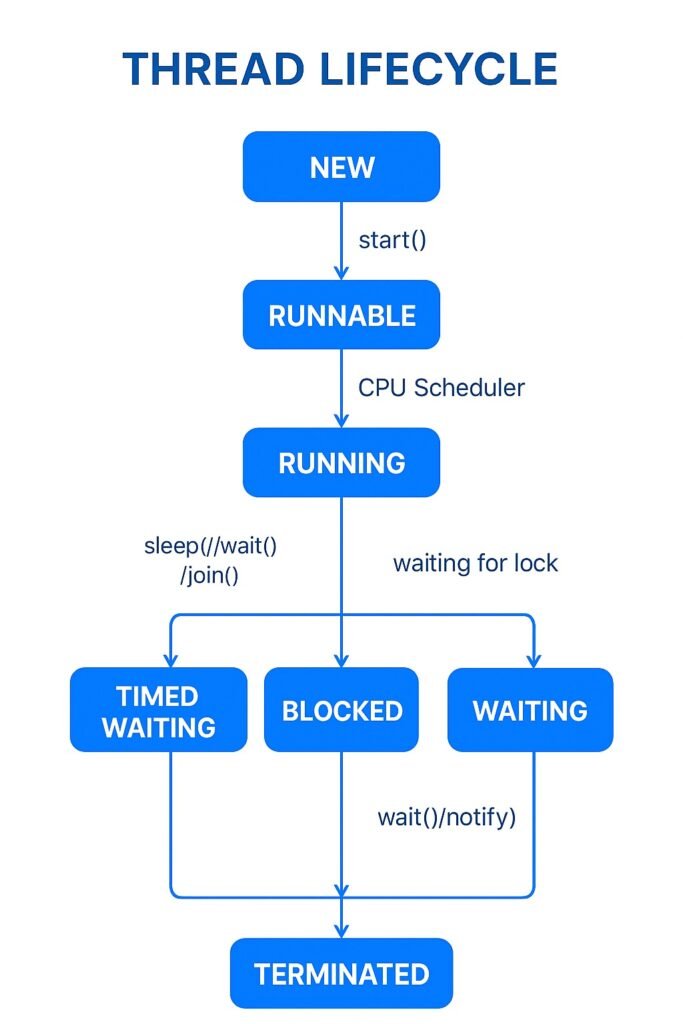
    In Java, a thread does not simply start and end. It passes through multiple states defined in the Thread.State enum. These states are managed by the Java Virtual Machine (JVM) and the thread scheduler (part of the JVM that decides which thread runs at a given time).

    A thread goes through these states:

    1. NEW

    • A thread is created but not yet started using the start() method.
    • Example: Thread t = new Thread();

    2. RUNNABLE

    • After start() is called, the thread is ready to run and waiting for CPU scheduling.
    • It does not mean the thread is running immediately — only that it’s eligible to run.

    3. RUNNING

    • When the thread scheduler picks the thread from the runnable pool, it starts execution.
    • Only one thread per CPU core can be in the running state at a time.

    4. WAITING / BLOCKED / TIMED_WAITING

    • WAITING → Thread waits indefinitely for another thread to notify it (using wait() / notify()).
    • BLOCKED → Thread is waiting to acquire a lock.
    • TIMED_WAITING → Thread is waiting for a specified period (using sleep(ms), join(ms), or wait(ms)).

    5. TERMINATED (Dead)

    • Once the thread finishes execution, it enters the terminated state.
    • A terminated thread cannot be restarted.

    Code Example – Demonstrating Thread States

    public class ThreadLifecycleDemo {
        public static void main(String[] args) throws InterruptedException {
            Thread t1 = new Thread(() -> {
                System.out.println("Thread is running...");
                try {
                    Thread.sleep(2000); // moves to TIMED_WAITING
                } catch (InterruptedException e) {
                    e.printStackTrace();
                }
                System.out.println("Thread finished execution");
            });
    
            System.out.println("State after creation: " + t1.getState()); // NEW
    
            t1.start();
            System.out.println("State after start(): " + t1.getState()); // RUNNABLE
    
            Thread.sleep(500);
            System.out.println("State while sleeping: " + t1.getState()); // TIMED_WAITING
    
            t1.join(); // wait for t1 to finish
            System.out.println("State after completion: " + t1.getState()); // TERMINATED
        }
    }
    

    Output:

    State after creation: NEW
    State after start(): RUNNABLE
    Thread is running...
    State while sleeping: TIMED_WAITING
    Thread finished execution
    State after completion: TERMINATED

    ✍️Key Notes

    • The thread scheduler decides which thread runs, and its behavior depends on the JVM and OS.
    • Once a thread is terminated, you cannot restart it — you must create a new thread object.
    • Understanding thread states is crucial for debugging concurrency issues.

    4. Thread Methods

    1. start()

    • Purpose: Launches a new thread.
    • How it works: Moves the thread from the NEW state → RUNNABLE state. The JVM’s thread scheduler then decides when to move it into the RUNNING state.
    • Note: You should never call run() directly because it won’t create a new thread — it will just execute in the current thread.

    2. run()

    • Purpose: Contains the logic/code that the thread will execute.
    • How it works: When start() is called, the JVM internally invokes the run() method.
    • Example: In your code, the lambda expression () -> { ... } is the body of the run() method.

    3. sleep(ms)

    • Purpose: Temporarily pauses the thread execution for the specified time (in milliseconds).
    • How it works: Moves the thread from RUNNINGTIMED_WAITING state.
    • After the sleep duration expires, the thread goes back to RUNNABLE.

    4. join()

    • Purpose: Allows one thread to wait for another thread to finish before proceeding.
    • How it works: If the main thread calls t1.join(), it goes into a WAITING state until t1 finishes execution.

    5. isAlive()

    • Purpose: Checks if a thread is still active (either RUNNABLE, RUNNING, or WAITING).
    • Returns:
      • true → thread is alive.
      • false → thread has finished execution (TERMINATED).

    Example

    public class ThreadMethods {
        public static void main(String[] args) throws InterruptedException {
            Thread t1 = new Thread(() -> {
                try {
                    Thread.sleep(1000);  // Thread goes to TIMED_WAITING
                    System.out.println("Thread work done");
                } catch (InterruptedException e) {
                    e.printStackTrace();
                }
            });
    
            t1.start();   // Thread moves from NEW → RUNNABLE
            t1.join();    // Main thread waits until t1 finishes
            System.out.println("Main thread ends");
        }
    }
    

    Step-by-Step Execution

    1. t1 is created → NEW state.
    2. t1.start() → moves to RUNNABLE (waiting for CPU).
    3. Scheduler picks t1RUNNING.
    4. Inside run(), Thread.sleep(1000) → goes to TIMED_WAITING for 1 second.
    5. After 1 second, back to RUNNABLE, then RUNNING again → prints "Thread work done".
    6. Meanwhile, main thread calls t1.join() → goes into WAITING until t1 finishes.
    7. Once t1 finishes → main resumes and prints "Main thread ends".

    5. Synchronization

    Why synchronization is needed ?

    When multiple threads access the same mutable data concurrently, you can get race conditions and data corruption. Many seemingly simple operations (like count++) are actually compound operations — they involve multiple CPU / JVM steps:

    count++ expands to:

    1. Read count from memory into a register.
    2. Add 1.
    3. Write the new value back to memory.

    If two threads do these steps concurrently, their reads/writes can interleave and one update can be lost (a lost update). That’s why we must coordinate access to shared state — i.e., synchronize

    📌 What synchronized Does — Real-Life Example

    Imagine you and your friend both want to use the same notebook to write.

    • If you both write at the same time, the text will overlap and become messy.
    • To avoid this, you decide:
      👉 Only one person at a time can hold the notebook and write.
      👉 The other person has to wait until the notebook is free.

    That’s exactly what happens with synchronized in Java:

    • Other threads wait outside until it’s free.
    • Only one thread at a time can enter the synchronized method/block.

    5.a. Using synchronized keyword

    class Counter {
        private int count = 0;
    
        public synchronized void increment() {
            count++;
        }
    
        public int getCount() {
            return count;
        }
    }
    
    public class SyncExample {
        public static void main(String[] args) throws InterruptedException {
            Counter counter = new Counter();
    
            Thread t1 = new Thread(() -> {
                for (int i = 0; i < 1000; i++) counter.increment();
            });
    
            Thread t2 = new Thread(() -> {
                for (int i = 0; i < 1000; i++) counter.increment();
            });
    
            t1.start();
            t2.start();
    
            t1.join();
            t2.join();
    
            System.out.println("Final Count: " + counter.getCount());
        }
    }
    

    6. Deadlock

    Deadlock happens when two or more threads wait indefinitely for resources locked by each other.

    Example

    public class DeadlockExample {
        public static void main(String[] args) {
            final String resource1 = "Resource1";
            final String resource2 = "Resource2";
    
            Thread t1 = new Thread(() -> {
                synchronized (resource1) {
                    System.out.println("Thread 1 locked resource 1");
                    try { Thread.sleep(100);} catch (Exception e) {}
                    synchronized (resource2) {
                        System.out.println("Thread 1 locked resource 2");
                    }
                }
            });
    
            Thread t2 = new Thread(() -> {
                synchronized (resource2) {
                    System.out.println("Thread 2 locked resource 2");
                    try { Thread.sleep(100);} catch (Exception e) {}
                    synchronized (resource1) {
                        System.out.println("Thread 2 locked resource 1");
                    }
                }
            });
    
            t1.start();
            t2.start();
        }
    }
    

    7. Executors and Thread Pools

    Instead of creating threads manually, Java provides the Executor Framework for better performance and resource management.

    Example – Fixed Thread Pool

    import java.util.concurrent.ExecutorService;
    import java.util.concurrent.Executors;
    
    public class ExecutorExample {
        public static void main(String[] args) {
            ExecutorService executor = Executors.newFixedThreadPool(2);
    
            for (int i = 1; i <= 5; i++) {
                int taskId = i;
                executor.submit(() -> {
                    System.out.println("Task " + taskId + " running in " + Thread.currentThread().getName());
                });
            }
    
            executor.shutdown();
        }
    }
    

    8. Advanced Concurrency Utilities (java.util.concurrent)

    • Locks (ReentrantLock) → More flexible than synchronized.
    • CountDownLatch → Wait for multiple threads to finish.
    • CyclicBarrier → Wait until a group of threads reach a barrier point.
    • Semaphore → Limit number of threads accessing a resource.
    • Concurrent CollectionsConcurrentHashMap, CopyOnWriteArrayList, etc.

    Example – CountDownLatch

    import java.util.concurrent.CountDownLatch;
    
    public class CountDownLatchExample {
        public static void main(String[] args) throws InterruptedException {
            CountDownLatch latch = new CountDownLatch(3);
    
            for (int i = 1; i <= 3; i++) {
                int taskId = i;
                new Thread(() -> {
                    System.out.println("Task " + taskId + " completed");
                    latch.countDown();
                }).start();
            }
    
            latch.await(); // Main thread waits
            System.out.println("All tasks completed. Main thread continues.");
        }
    }
    

    Conclusion

    Concurrency and multithreading in Java enable developers to build faster, scalable, and more responsive applications. From creating simple threads to using advanced utilities like CountDownLatch and thread pools, Java provides a powerful concurrency toolkit.

    Key takeaways:

    • Use threads for parallelism and responsiveness.
    • Always manage synchronization to avoid race conditions.
    • Use Executor Framework instead of manually managing threads.
    • Avoid deadlocks by designing lock acquisition carefully.
    • Leverage java.util.concurrent utilities for advanced concurrency management.
  • StringBuffer in Java: Complete Guide with Code Examples

    Introduction

    In Java, handling strings efficiently is crucial, especially when frequent modifications are involved. The StringBuffer class is a powerful alternative to String for such scenarios. Unlike String, which is immutable, StringBuffer allows modification of string content without creating a new object every time, making it ideal for performance-critical applications.

    What is StringBuffer in Java?

    StringBuffer is a thread-safe, mutable sequence of characters provided by Java in the java.lang package. It allows modification of strings (append, insert, delete, reverse, etc.) without creating new objects, which improves memory efficiency and performance.

    Key Characteristics

    • Mutable: The content can be changed.
    • Thread-safe: Methods are synchronized, making it suitable for multi-threaded environments.
    • Efficient for frequent modifications.

    String vs StringBuffer vs StringBuilder

    FeatureStringStringBufferStringBuilder
    MutabilityImmutableMutableMutable
    Thread SafetyNot Thread-safeThread-safeNot Thread-safe
    PerformanceLess efficient in loopsSlower than StringBuilder but thread-safeFast and efficient for single-threaded use cases

    Creating a StringBuffer Object

    StringBuffer sb1 = new StringBuffer(); // Creates an empty buffer with default capacity (16)
    StringBuffer sb2 = new StringBuffer("Hello"); // Creates buffer initialized with "Hello"
    StringBuffer sb3 = new StringBuffer(50); // Creates empty buffer with specified capacity
    

    Common StringBuffer Methods and Examples

    1. append()

    Appends the specified string to this buffer.

    StringBuffer sb = new StringBuffer("Hello");
    sb.append(" World");
    System.out.println(sb); // Output: Hello World
    

    2. insert()

    Inserts the specified string at the specified index.

    StringBuffer sb = new StringBuffer("Hello World");
    sb.insert(5, ",");
    System.out.println(sb); // Output: Hello, World
    

    3. replace()

    Replaces characters from start index to end index with a new string.

    StringBuffer sb = new StringBuffer("Hello World");
    sb.replace(6, 11, "Java");
    System.out.println(sb); // Output: Hello Java
    

    4. delete()

    Deletes characters from start index to end index.

    StringBuffer sb = new StringBuffer("Hello Java");
    sb.delete(5, 10);
    System.out.println(sb); // Output: Hello
    

    5. reverse()

    Reverses the sequence of characters.

    StringBuffer sb = new StringBuffer("Hello");
    sb.reverse();
    System.out.println(sb); // Output: olleH
    

    6. capacity() and ensureCapacity()

    • capacity(): Returns current capacity.
    • ensureCapacity(int minCapacity): Increases capacity if needed.
    StringBuffer sb = new StringBuffer();
    System.out.println(sb.capacity()); // Default is 16
    sb.ensureCapacity(50);
    System.out.println(sb.capacity()); // At least 50
    

    Scenario Examples

    Scenario 1: Building a Large String Efficiently

    StringBuffer sb = new StringBuffer();
    for (int i = 0; i < 1000; i++) {
        sb.append(i).append(", ");
    }
    System.out.println(sb.substring(0, 50) + "...");
    

    Why StringBuffer?
    Using String would create a new object on each iteration, leading to performance overhead.

    Scenario 2: Multi-threaded Environment

    public class StringBufferExample {
        private static StringBuffer buffer = new StringBuffer();
    
        public static void main(String[] args) throws InterruptedException {
            Thread t1 = new Thread(() -> buffer.append("A"));
            Thread t2 = new Thread(() -> buffer.append("B"));
    
            t1.start();
            t2.start();
    
            t1.join();
            t2.join();
    
            System.out.println(buffer.toString()); // Output: AB or BA (depends on thread scheduling)
        }
    }
    

    When to Use StringBuffer vs StringBuilder

    • Use StringBuffer when working in multi-threaded environments where thread safety is needed.
    • Use StringBuilder when thread safety is not required for better performance.

    ✍️Important Points to Remember

    • StringBuffer is synchronized, making it thread-safe.
    • Always prefer StringBuilder for non-concurrent scenarios due to better performance.
    • StringBuffer’s capacity grows automatically but can be managed using ensureCapacity().

    🎯Conclusion

    StringBuffer is a powerful tool in Java for mutable and thread-safe string manipulation. Understanding its methods and appropriate use cases is key to writing efficient Java applications.

  • Complete Guide to Java StringBuilder with Examples & Best Practices

    Introduction

    In Java, StringBuilder is a mutable sequence of characters. Unlike String, which is immutable, StringBuilder allows us to modify the content of the string without creating new objects every time we update it. This makes StringBuilder ideal for scenarios where we need to perform many modifications on strings, such as in loops or intensive string manipulations.

    Why StringBuilder?

    • Performance: Repeated string concatenation using String results in the creation of many temporary objects, leading to memory and CPU overhead.
    • Mutability: StringBuilder offers methods to modify the string directly, improving efficiency.
    • Use Case: It’s especially useful in scenarios like loops, building large strings, and where thread safety is not a concern (use StringBuffer if thread safety is required).

    Key Features of StringBuilder

    • Mutable sequence of characters.
    • Not synchronized (faster than StringBuffer).
    • Provides methods like append(), insert(), delete(), reverse(), and replace().

    How to Create a StringBuilder Object

    StringBuilder sb1 = new StringBuilder(); // Creates an empty StringBuilder
    StringBuilder sb2 = new StringBuilder("Initial text"); // Creates StringBuilder with initial content
    

    Commonly Used Methods of StringBuilder

    1. append()

    Appends the specified string or data to the current sequence.

    StringBuilder sb = new StringBuilder("Hello");
    sb.append(" World");
    System.out.println(sb.toString()); // Output: Hello World
    

    2. insert()

    Inserts the specified string at the given index.

    StringBuilder sb = new StringBuilder("Hello World");
    sb.insert(5, ",");
    System.out.println(sb.toString()); // Output: Hello, World
    

    3. replace()

    Replaces a substring with the specified string.

    StringBuilder sb = new StringBuilder("Hello World");
    sb.replace(6, 11, "Java");
    System.out.println(sb.toString()); // Output: Hello Java
    

    4. delete()

    Deletes a substring between the specified indices.

    StringBuilder sb = new StringBuilder("Hello Java World");
    sb.delete(5, 10);
    System.out.println(sb.toString()); // Output: Hello World
    

    5. reverse()

    Reverses the characters in the sequence.

    StringBuilder sb = new StringBuilder("Hello");
    sb.reverse();
    System.out.println(sb.toString()); // Output: olleH
    

    6. length() and capacity()

    • length() returns the number of characters.
    • capacity() returns the allocated storage size.
    StringBuilder sb = new StringBuilder();
    System.out.println("Length: " + sb.length());    // 0
    System.out.println("Capacity: " + sb.capacity()); // Default capacity, usually 16
    

    Performance Comparison: String vs StringBuilder

    public class PerformanceTest {
        public static void main(String[] args) {
            long startTime = System.currentTimeMillis();
            String str = "";
            for (int i = 0; i < 10000; i++) {
                str += "a";  // Inefficient due to creating new String objects each time
            }
            long endTime = System.currentTimeMillis();
            System.out.println("String concatenation time: " + (endTime - startTime) + " ms");
    
            startTime = System.currentTimeMillis();
            StringBuilder sb = new StringBuilder();
            for (int i = 0; i < 10000; i++) {
                sb.append("a");  // Efficient as it modifies the same object
            }
            endTime = System.currentTimeMillis();
            System.out.println("StringBuilder append time: " + (endTime - startTime) + " ms");
        }
    }
    

    Typically, StringBuilder performs much faster.

    When to Use StringBuilder vs StringBuffer vs String

    FeatureStringStringBuilderStringBuffer
    MutabilityImmutableMutableMutable
    Thread-SafeYesNoYes
    PerformanceLow (for frequent modifications)HighModerate
    Use CaseStatic textSingle-threaded modificationsMulti-threaded modifications

    🎯Conclusion

    StringBuilder is a powerful and efficient class for string manipulation in Java, particularly useful in situations where performance matters. Understanding its key methods helps in writing more efficient and cleaner code compared to using the String class for every small string modification.

  • String Template in Java 21 – A Complete Guide

    ✅ What is a String Template in Java 21?

    A String Template is a structured way to define a string with embedded expressions, which are evaluated and inserted in a safe and readable way. It improves code clarity and avoids issues like manual escaping or mistakes in formatting.

    ✔️ Syntax Example of String Template (Java 21)

    String name = "Ashish";
    int age = 30;
    
    String result = STR."My name is \{name} and I am \{age} years old.";
    System.out.println(result);
    
    • STR."..." is a string template literal.
    • Inside the template, expressions are written as \{expression}.
    • At compile-time, these expressions are evaluated and injected into the string.

    ✅ Advantages of String Templates

    FeatureBenefit
    Easier SyntaxCleaner and readable syntax compared to concatenation or String.format().
    Compile-Time SafetyErrors in embedded expressions are caught at compile time.
    Automatic EscapingNo need to manually handle escaping of quotes or special characters.
    Structured FormattingIdeal for complex multi-line templates.

    ✔️ Example Compared to Earlier Approaches

    ➤ Pre-Java 21 (Traditional way):

    String name = "Ashish";
    int age = 30;
    
    // Using concatenation
    String result1 = "My name is " + name + " and I am " + age + " years old.";
    
    // Using String.format
    String result2 = String.format("My name is %s and I am %d years old.", name, age);
    
    System.out.println(result1);
    System.out.println(result2);
    

    ➤ Java 21 String Template Way:

    String name = "Ashish";
    int age = 30;
    
    String result = STR."My name is \{name} and I am \{age} years old.";
    System.out.println(result);
    

    ✅ Key Differences Between String Template and Earlier Approaches

    AspectPre-Java 21Java 21 String Template
    SyntaxVerbose (concatenation, String.format)Cleaner and easier to read
    SafetyRuntime errors if format string is wrongCompile-time checks
    EscapingManual, error-proneHandled automatically
    PerformanceModerate, because of repeated concatenationsEfficient at compile time
    Multi-line stringsComplicated, need workaroundsSupported naturally with templates
    ReusabilityHarderTemplates can be reusable components

    ✅ When to Prefer String Templates?

    • For dynamic string generation in a readable and safe way.
    • When working with multi-line strings (e.g., generating HTML or JSON templates).
    • When avoiding manual concatenation and improving code maintainability.

    ⚠️ Important Note

    • String Templates in Java 21 are still in Preview Mode.
    • You need to enable preview features to use them:
      javac --enable-preview and java --enable-preview.

    ✅ Conclusion

    String Templates in Java 21 represent a modern, safe, and clean way of working with dynamic strings compared to the older cumbersome ways. It simplifies code, reduces bugs, and improves readability.

    Let me know if you want me to provide a detailed blog-style explanation with examples and use-cases.

  • Class and Object in Java – A Complete Beginner’s Guide

    In Java, Object-Oriented Programming (OOP) plays a crucial role in structuring applications using real-world concepts. The two most fundamental concepts of OOP are Class and Object. Understanding these is essential for every Java developer.

    ✅ What is a Class in Java?

    A Class is a blueprint or template for creating objects. It defines the properties (attributes or fields) and behaviors (methods) that the objects created from the class will have.

    🔍 Key Points About Class:

    • Acts like a template.
    • Defines fields (variables) and methods (functions).
    • Does not consume memory directly.

    ✅ Class Syntax Example:

    public class Car {
        // Fields (Properties)
        String color;
        String model;
        int year;
    
        // Method (Behavior)
        public void displayDetails() {
            System.out.println("Model: " + model);
            System.out.println("Color: " + color);
            System.out.println("Year: " + year);
        }
    }
    

    ✅ What is an Object in Java?

    An Object is an instance of a class. It occupies memory and holds actual values for the fields defined in the class. Through the object, you can access the methods and variables defined in the class.

    ✅ Object Creation Example:

    public class Main {
        public static void main(String[] args) {
            // Creating an object of the Car class
            Car myCar = new Car();
    
            // Assign values to the fields
            myCar.model = "Toyota Camry";
            myCar.color = "Red";
            myCar.year = 2022;
    
            // Call method using the object
            myCar.displayDetails();
        }
    }
    

    ✅ Output:

    Model: Toyota Camry
    Color: Red
    Year: 2022
    

    ✅ Class vs Object – Quick Comparison

    ClassObject
    Blueprint of real-world entityActual entity created from the class
    Contains fields and methodsHolds data and behavior of the instance
    No memory allocationMemory is allocated when object is created
    Syntax: class ClassName { ... }Syntax: ClassName obj = new ClassName();

    ✅ Why Use Class and Object?

    • Encapsulation: Organizes data and behavior in one unit.
    • Reusability: Once the class is created, multiple objects can be created and reused.
    • Abstraction: Internal implementation is hidden; you interact only via methods.
    • Real-World Representation: Classes represent real-world entities, making it easy to model complex problems.

    ✅ Example With Multiple Objects

    public class Main {
        public static void main(String[] args) {
            Car car1 = new Car();
            car1.model = "Honda Civic";
            car1.color = "Blue";
            car1.year = 2020;
    
            Car car2 = new Car();
            car2.model = "Ford Mustang";
            car2.color = "Black";
            car2.year = 2021;
    
            System.out.println("Car 1 Details:");
            car1.displayDetails();
    
            System.out.println("\nCar 2 Details:");
            car2.displayDetails();
        }
    }
    

    ✅ Key Concepts to Remember

    • A class defines what an object will look like and what it can do.
    • An object is a real instance of the class that holds actual values and can perform actions (methods).
    • You can create multiple objects from the same class, each with its own state.

    ✅ Conclusion

    Understanding Class and Object is the first step toward mastering Java’s object-oriented programming. It allows you to model real-world entities and perform structured programming with easy code reusability and better maintainability.

  • String vs StringBuffer vs StringBuilder in Java Guide

    When working with text data in Java, there are three commonly used classes to handle strings:

    1. String
    2. StringBuffer
    3. StringBuilder

    Each of these serves a different purpose and has its own advantages and limitations. Understanding when and how to use them is key for writing efficient Java programs.

    ✅ 1. String

    • Immutable Object: Once a String object is created, its value cannot be changed.
    • Every modification creates a new String object in memory.
    • Useful when the string content doesn’t change often.

    🔧 Example:

    public class StringExample {
        public static void main(String[] args) {
            String text = "Java Knowledge Base";
            System.out.println("Original String: " + text);
    
            // Concatenation creates a new String object
            text = text + " - Learn Java Effectively";
            System.out.println("Modified String: " + text);
        }
    }
    

    ✅ Output:

    Original String: Java Knowledge Base
    Modified String: Java Knowledge Base - Learn Java Effectively
    

    Key Point: Inefficient for many modifications due to creation of new objects and higher memory consumption.

    ✅ 2. StringBuffer

    • Mutable Class: Allows modification of the string content without creating new objects.
    • Thread-Safe: All methods are synchronized.
    • Suitable when thread safety is required.

    🔧 Example:

    public class StringBufferExample {
        public static void main(String[] args) {
            StringBuffer textBuffer = new StringBuffer("Java Knowledge Base");
            System.out.println("Original StringBuffer: " + textBuffer);
    
            // Append text
            textBuffer.append(" - Learn Java Effectively");
            System.out.println("Modified StringBuffer: " + textBuffer);
    
            // Insert text
            textBuffer.insert(5, " Awesome");
            System.out.println("After Insert: " + textBuffer);
        }
    }
    

    ✅ Output:

    Original StringBuffer: Java Knowledge Base
    Modified StringBuffer: Java Knowledge Base - Learn Java Effectively
    After Insert: Java Awesome Knowledge Base - Learn Java Effectively
    

    Key Point: Suitable for multi-threaded environments but slightly slower than StringBuilder.

    ✅ 3. StringBuilder

    • Mutable Class: Like StringBuffer, but not synchronized (not thread-safe).
    • Faster than StringBuffer due to the lack of synchronization.
    • Recommended when working in a single-threaded context.

    🔧 Example:

    public class StringBuilderExample {
        public static void main(String[] args) {
            StringBuilder textBuilder = new StringBuilder("Java Knowledge Base");
            System.out.println("Original StringBuilder: " + textBuilder);
    
            // Append text
            textBuilder.append(" - Learn Java Effectively");
            System.out.println("Modified StringBuilder: " + textBuilder);
    
            // Insert text
            textBuilder.insert(5, " Awesome");
            System.out.println("After Insert: " + textBuilder);
        }
    }
    

    ✅ Output:

    Original StringBuilder: Java Knowledge Base
    Modified StringBuilder: Java Knowledge Base - Learn Java Effectively
    After Insert: Java Awesome Knowledge Base - Learn Java Effectively
    

    Key Point: Best choice when working in a single-threaded environment and performance is critical.

    ⚔️ Comparison Table

    FeatureStringStringBufferStringBuilder
    MutabilityImmutableMutableMutable
    Thread SafetyNot applicableThread-safe (synchronized)Not thread-safe
    PerformanceSlow for modificationsSlower than StringBuilderFast (better performance)
    Use CaseStatic text or rarely changedMulti-threaded contextSingle-threaded context
    Memory UsageHigh (creates new objects)ModerateModerate

    ✅ Conclusion

    • Use String when the string content does not change.
    • Use StringBuffer when you need thread safety.
    • Use StringBuilder for efficient single-threaded string manipulation