In Java, String is a widely used class that represents a sequence of characters. Strings are immutable objects, meaning once created, their values cannot be changed.
There are two common ways to initialize a String in Java:
- Using String Literal
- Using
newKeyword
1️⃣. String Initialization using String Literal
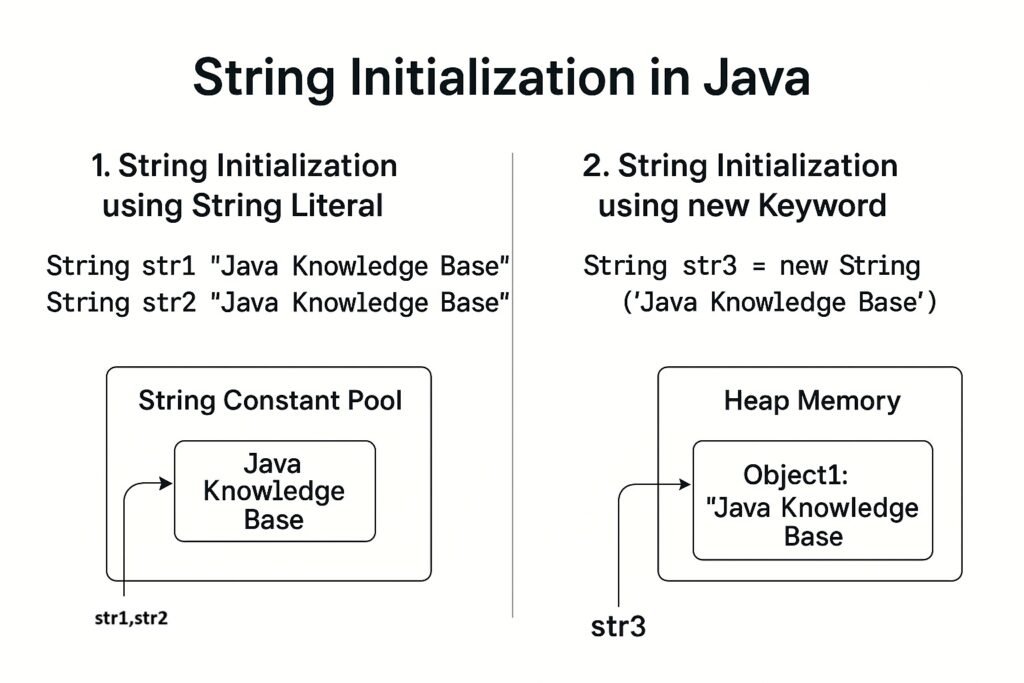
When you initialize a string using a literal, Java checks the 👉String Constant Pool first.
If the string already exists in the pool, Java reuses it. Otherwise, a new string is created in the pool.
✔️ Syntax:
String str1 = "Java Knowledge Base";✔️ Example:
public class StringInitializationExample {
    public static void main(String[] args) {
        String str1 = "Java Knowledge Base";
        String str2 = "Java Knowledge Base";

        System.out.println(str1 == str2);  // Output: true
    }
}
👉 Explanation:
- Both
str1andstr2point to the same object in the String Pool. - The
==operator returnstruebecause they reference the same memory location.
2️⃣. String Initialization using new Keyword
When using the new keyword, Java creates a new String object in the heap memory, even if an identical string exists in the pool.
✔️ Syntax:
String str3 = new String("Java Knowledge Base");✔️ Example:
public class StringInitializationExample {
    public static void main(String[] args) {
        String str1 = "Java Knowledge Base";
        String str3 = new String("Java Knowledge Base");

        System.out.println(str1 == str3);  // Output: false
    }
}
👉 Explanation:
str1points to the String Pool object.str3points to a different object in the heap.- The
==operator returnsfalsebecause they reference different memory locations.
⚡ Key Differences Between Literal and new Keyword Initialization
| Property | String Literal | new Keyword |
|---|---|---|
| Memory Location | String Pool | Heap |
| Memory Reuse | Yes | No |
| Performance | Faster | Slightly slower due to object creation |
Comparison (==) Result | true (if same content) | false (different objects) |
✅ Image Diagram
Here is a simple diagram illustrating the two types of initialization:
3️⃣. String Declaration
When you declare a string variable without assigning any value, it just reserves a reference in memory but doesn’t point to any object yet.
✔️ Syntax:
String str;✔️ Example:
public class StringDeclarationExample {
    public static void main(String[] args) {
        String str;  // Only declared, not initialized

        // System.out.println(str); // ❌ Compilation Error: variable str might not have been initialized
    }
}
👉 Important Points:
- For local variables, Java does NOT assign a default value, so accessing
strwithout initializing it causes a compilation error. - For instance (class member) variables, Java automatically assigns
nullby default.
✅ Example with Class Member:
public class Example {
    String str;  // Class member variable

    public void printString() {
        System.out.println(str);  // Output: null
    }

    public static void main(String[] args) {
        Example example = new Example();
        example.printString();
    }
}
👉 Output:
null4️⃣. Empty String
An empty string is a string that contains no characters but is a valid String object in memory.
It is explicitly initialized as "" (double quotes with no characters inside).
✔️ Syntax:
String emptyStr = "";
✔️ Example:
public class EmptyStringExample {
    public static void main(String[] args) {
        String emptyStr = "";  // Initialized as an empty string

        System.out.println("Length of emptyStr: " + emptyStr.length());  // Output: 0
        System.out.println("Empty String: '" + emptyStr + "'");          // Output: ''
    }
}
👉 Key Points:
emptyStris a valid object.- Its length is 0.
- You can safely call methods on it, like
length(),isEmpty(), etc.
5️⃣. Null Value
A null string is a reference that does NOT point to any object in memory.
It indicates the absence of any string object.
✔️ Syntax:
String nullStr = null;✔️ Example:
public class NullStringExample {
    public static void main(String[] args) {
        String nullStr = null;

        System.out.println(nullStr);  // Output: null

        // The following line throws NullPointerException
        // System.out.println(nullStr.length());
    }
}
👉 Important Notes:
- You can safely print a null string reference: it prints
null. - But calling methods on it (like
.length(),.isEmpty()) will throw a NullPointerException.
✅ Comparison Table: Empty String vs Null Value
| Property | Empty String ("") | Null Value (null) |
|---|---|---|
| Memory Allocation | Yes (an object in memory) | No object, just a reference |
| String Length | 0 | Accessing length causes NullPointerException |
| Usage Example | String s = ""; | String s = null; |
| Method Calls | Safe (e.g., s.length()) | Unsafe (throws NullPointerException) |
| Purpose | Represents no characters | Represents absence of object |
✅ Best Practices
- Use empty strings (
"") when you want to represent an empty text field or no characters. - Use null values when the reference should be uninitialized or explicitly indicate “no object”.
- Always perform null checks before invoking methods on a String variable to avoid exceptions.
✅🚨 Key Points:
| Scenario | Example Code |
|---|---|
| Declaration only | String str; (Must be initialized before use) |
| Empty String | String emptyStr = ""; |
| Null Value | String nullStr = null; |
Understanding the difference helps in writing robust and error-free code.
🎯Conclusion
- Prefer using String literals when possible to save memory and improve performance.
- Use the
newkeyword when a distinct String object is required.