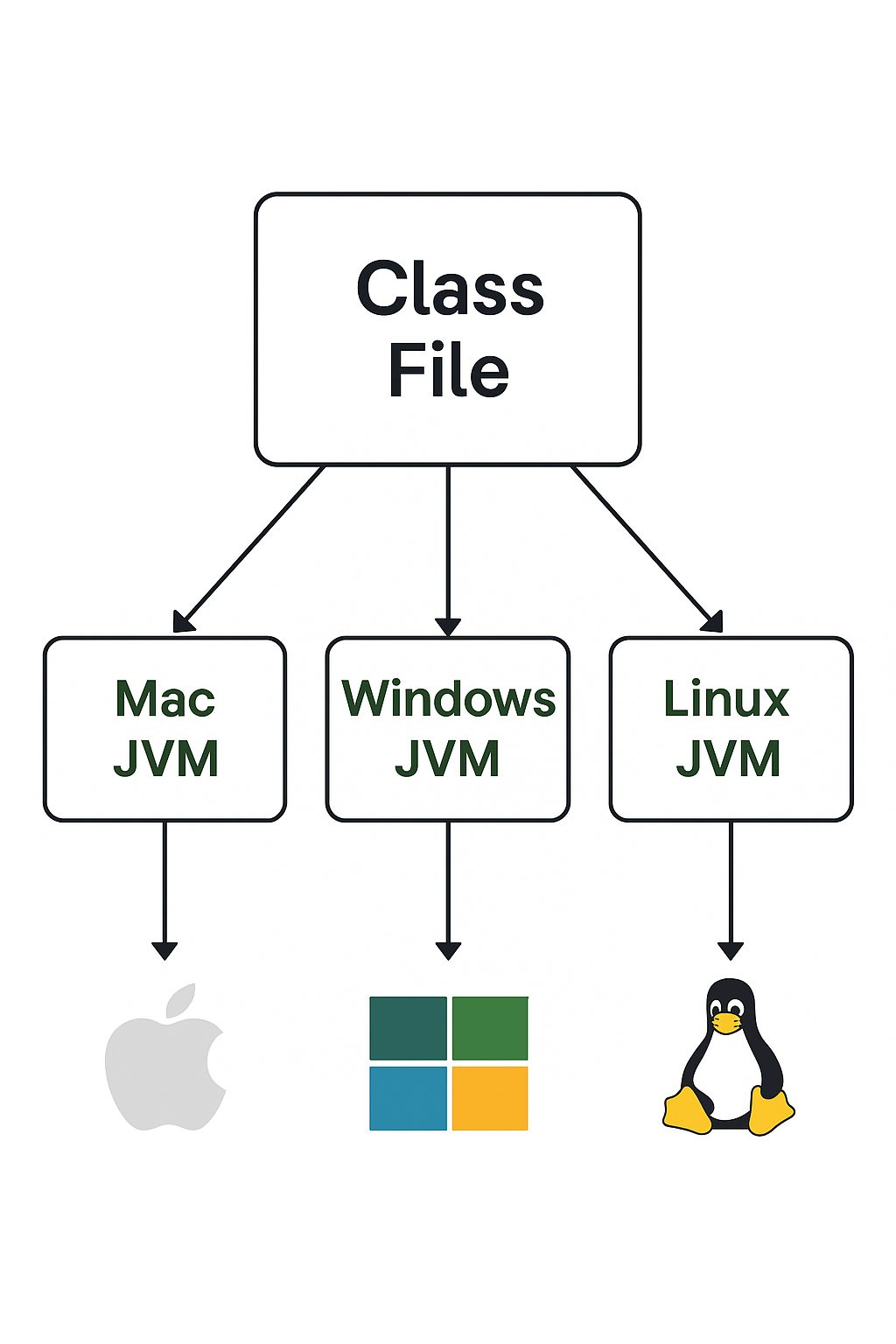
The Java Virtual Machine (JVM) is a virtual machine that provides the runtime environment to execute Java bytecode. The JVM does not understand Java source code directly. That’s why .java files are first compiled into .class files containing bytecode, which the JVM can interpret and execute.This bytecode is platform-independent and can run on any machine with a compatible JVM. The JVM is responsible for controlling the execution of every Java program and enables important features such as automatic memory management and security.
The JVM architecture consists of several key components that work together to execute Java programs:
1.Class Loader
The Class Loader loads classes into memory for execution.
There are three main types of class loaders:
Boot Strap ClassLoader → Loads core Java classes from rt.jar file (inside JRE/lib). It has the highest priority.
Extension ClassLoader – → Loads classes from the ext directory (jre/lib/ext).
Application (System) ClassLoader → Loads classes from the application’s classpath (environment variables, project paths, etc.).
3.Method Area
Stores class-level data such as class structures, metadata, method code, and static variables. There is only one Method Area per JVM instance.
3.Heap
Stores all Java objects, their instance variables, and arrays. The heap is shared among all threads, and hence the data stored here is not thread-safe by default.
4.JVM Stack
Each thread has its own JVM stack, created when the thread starts. It stores:
Local variables
Partial results
Method call frames (each frame holds data, local variables, and references to objects in the heap
5.Program Counter (PC) Register
Each thread has its own PC register. It holds the address of the current JVM instruction being executed.
6.Native Method Stack
Contains instructions for native methods (non-Java code, usually written in C/C++). It supports interaction between Java applications and platform-specific native libraries.
7.Execution Engine
The Execution Engine runs the bytecode. It consists of:
Interpreter → Executes bytecode line by line (simple but slower).
JIT (Just-In-Time) Compiler → Improves performance by compiling frequently used bytecode into native machine code.
Garbage Collector (GC) → Automatically manages memory by removing unused objects from the heap
8.Native Method Interface (JNI)
Acts as a bridge between Java code and native applications/libraries (C, C++, etc.), allowing Java to call platform-specific methods.
9.Native Method Libraries
A collection of native libraries required by the Execution Engine. These are loaded and linked using the JNI.
📝Key Features of JVM
Provides platform independence by executing bytecode on any system.
Ensures memory management with garbage collection.
Handles runtime exceptions automatically.
Supports integration with native libraries through JNI.
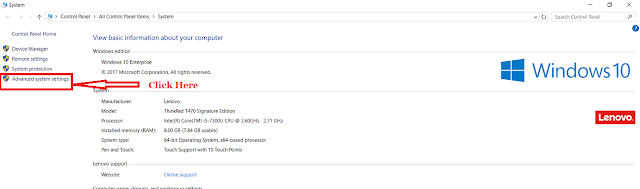
✅Go to My Computer / This PC icon on your desktop (or File Explorer). Right-click on it and select Properties.
✅In the System window, click on Advanced system settings.
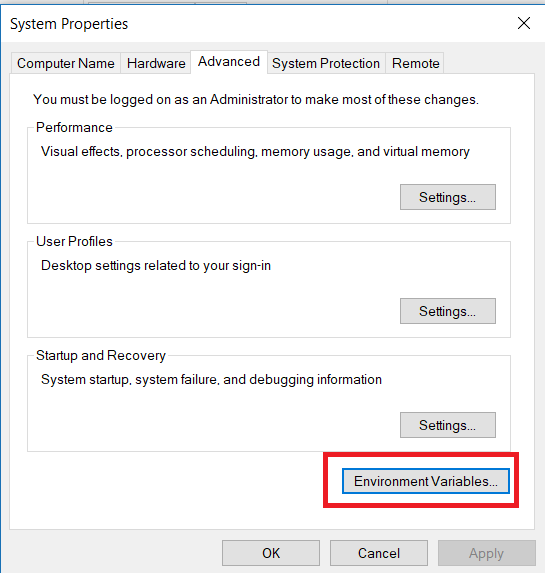
✅In the System Properties dialog box, click on the Advanced tab.
✅Click the Environment Variables button.
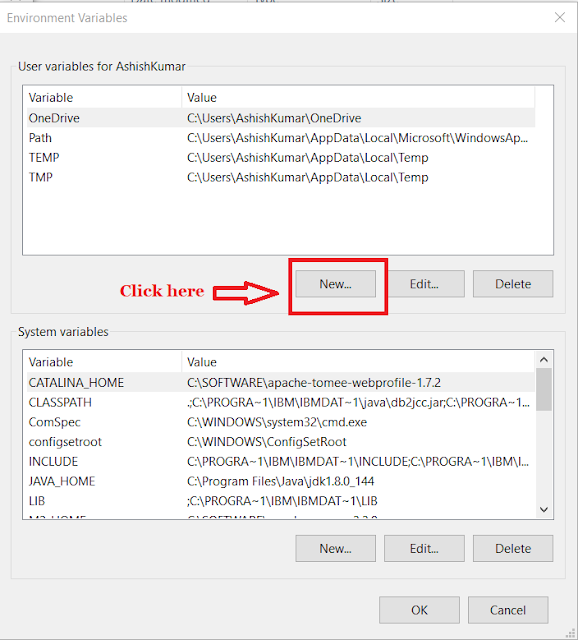
✅Under System Variables, click on the New button.
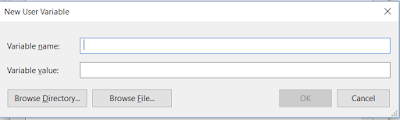
✅A dialog box will appear. Don’t close it.
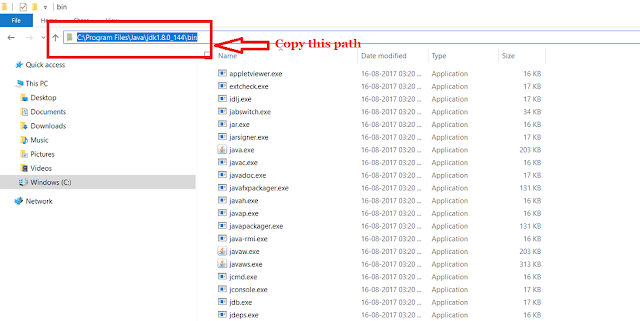
✅Open My Computer / This PC → C:\Program Files\Java\jdk1.8.0_144\bin (navigate to your installed JDK folder). Copy this full path:
C:\Program Files\Java\jdk1.8.0_144\bin
✅Go back to the New System Variable dialog box.In Variable Name, type : Path and In Variable Value, paste the copied path:
C:\Program Files\Java\jdk1.8.0_144\bin
👉 If there are already other values in the Path variable, don’t delete them — instead, click Edit and add a semicolon (;) at the end of the existing values, then paste your Java path.
TheisEnum() method in Java, available in the java.lang.Class class, is used to check whether a given Class object represents an enumeration type.
If the class represents an enum, the method returns true, otherwise, it returns false.
This method is particularly useful in reflection-based programming, where enums need to be verified or processed dynamically (for example, in frameworks, libraries, or configuration systems).
Syntax :
public boolean isEnum()
✅Parameters
This method takes no parameters.
✅Returns
true → if the class object represents an enum type.
false → if the class object is not an enum type.
Understanding of isEnum():
The method allows developers to check at runtime whether a class is an enum.This can be very useful when you want to dynamically handle enums (for example, iterating through their constants, generating dropdown options, or validating user inputs).
Example 1: Basic Usage
public class IsEnumExample {
    public static void main(String[] args) {
        Class<PaymentStatus> clazz = PaymentStatus.class;
        boolean result = clazz.isEnum();

        System.out.println("Is PaymentStatus an enum? " + result);
    }

    public enum PaymentStatus {
        PENDING, PROCESSING, SUCCESS, FAILED
    }
}
Output :
Is PaymentStatus an enum? true
✅👉 Here, PaymentStatusis an enum, so isEnum() returns true.
Example 2: Checking a Non-Enum Class
public class NonEnumExample {
    public static void main(String[] args) {
        Class<Integer> clazz = Integer.class;
        boolean result = clazz.isEnum();

        System.out.println("Is Integer an enum? " + result);
    }
}
Output:
Is Integer an enum? false
Note :👉 Since Integeris not an enum, the result is false.
📝Key Ponts:
The Class.isEnum() method provides a reliable way to identify enums at runtime.
It returns true for enums and false otherwise.
It’s often used in reflection-based frameworks to dynamically handle enums for configuration, validation, or UI generation.
This makes it an important tool when building generic and reusable libraries.
Enums were introduced in Java 5 (JDK 1.5) as a way to define a collection of named constants in a type safe manner. Unlike enums in older languages (like C or C++), Java enums are far more powerful since they are implemented using class concepts and can contain constructors, methods, and variables.
✅What is an Enum?
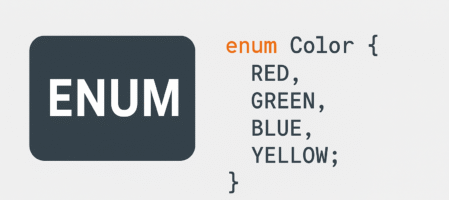
Enum is a special data type used to define a group of named constants.
Each enum constant is implicitly:
public, static, and final.
Enums make the code readable, maintainable, and less error-prone compared to using intor Stringconstants.
Example :
enum Month {
  JAN,FEB,MAR,DEC;
}
✅Internal Implementation of Enum
Internally, an enum is implemented as a class.
Every enum constant is a reference variable that points to its own enum object.
You can think of enums as a fixed set of static final objects.
Enum Declaration and Usage :
enum Month{
    JAN, FEB, MAR, DEC; // semicolon at the end is optional if no extra members
}

class Test {
    public static void main(String[] args) {
        Month mon = Month.FEB;
        System.out.println(mon);
    }
}
Output:
FEB
👉 Note: Since enum constants are implicitly static, we can access them using EnumName.CONSTANT.
✅Enum with Switch Statement :
Before Java 5, switchallowed only byte,short,char,int(and their wrappers). From Java 5 onwards, enumtypes can also be used in a switch.
enum PaymentStatus {
    PENDING, PROCESSING, SUCCESS, FAILED;
}

class Test {
    public static void main(String[] args) {
        PaymentStatus status = PaymentStatus.PROCESSING;

        switch (status) {
            case PENDING:
                System.out.println("Payment is pending. Please wait...");
                break;
            case PROCESSING:
                System.out.println("Payment is being processed. Do not refresh the page.");
                break;
            case SUCCESS:
                System.out.println("Payment successful! Thank you for your purchase.");
                break;
            case FAILED:
                System.out.println("Payment failed. Please try again.");
                break;
            default:
                System.out.println("Unknown payment status.");
        }
    }
}
Example:
Output :
Payment is being processed. Do not refresh the page.
👉 Every caselabel must be a valid enum constant, otherwise you’ll get a compile-time error.
✅Enum and Inheritance
Every enum in Java is implicitly a child of java.lang.Enum.
Hence, enums cannot extend other classes.
Enums are implicitly final, so they cannot be extended.
But enums can implement interfaces.
✅Useful Enum Methods
values() – returns all constants as an array.
ordinal() – returns the index (zero-based position) of the constant.
valueOf(String name) – returns the enum constant with the specified name
Enum values():
The values() method is a built-in static method that is automatically added by the Java compiler for every enum. 👉 It returns an array of all the constants defined in the enum, in the order they are declared.
Return type: EnumType[]
📌 Syntax :
public static EnumType[] values()
✅ Why Use values()?
To iterate over all enum constants.
Useful when you want to display options, validate input, or implement logic based on all possible values.
Example :
public enum Day {
    MONDAY, TUESDAY, WEDNESDAY, THURSDAY, FRIDAY, SATURDAY, SUNDAY;
}

public class EnumExample {
    public static void main(String[] args) {
        Day[] days = Day.values();  // Calls the values() method

        for (Day day : days) {
            System.out.println(day);
        }
    }
}
The ordinal() method is a built-in method provided by Java for enum constants. 👉 It returns the position (index) of the enum constant in its declaration, starting from 0.
Return type: int
📌 Syntax :
int ordinal()
✅ Why Use ordinal()?
To get the relative position of a constant in the enum.
It is helpful when you need the position or order of the enum constant (e.g., for iteration, comparison, or sorting purposes). ⚠️ However, avoid using ordinal() for persistent logic (e.g., storing in databases) because adding or reordering constants changes ordinal values.
Example :
public enum Priority {
    LOW, MEDIUM, HIGH, CRITICAL;
}
public class OrdinalExample {
    public static void main(String[] args) {
        for (Priority level : Priority.values()) {
            System.out.println(level + " has ordinal: " + level.ordinal());
        }
    }
}
Output :
LOW has ordinal: 0
MEDIUM has ordinal: 1
HIGH has ordinal: 2
CRITICAL has ordinal: 3
📌 Notes :
⚠️ Don’t use ordinal() for business logic that persists data (e.g., database values), because adding/reordering enum constants changes their ordinal values, which breaks the logic.
valueOf(String name)
The valueOf(String name) method is a static method automatically provided by the Java compiler for every enum. 👉 It returns the enum constant that exactly matches the given string name
Returns the enum constant with the specified name.
The name must exactly match the declared constant (case-sensitive).
Return type: EnumType
Use case: Useful for converting a string into the corresponding enum constant.
📌 Syntax :
public static EnumType valueOf(String name)
✅ Why Use valueOf(String name) in Enum?
The valueOf(String name) method is used to convert a String into its corresponding Enum constant.
✅ Key Use Cases:
User Input Conversion When a user provides input as a string (e.g., from a form, API, or command line), you can convert it to the corresponding enum constant for type-safe processing.
Configuration Parsing Configuration files often store values as strings. Using valueOf(), you can convert these string values into enums for easy and reliable usage in your code.
Validation Instead of using complex if-else chains to validate a string against a predefined set of constants, valueOf() allows direct validation by attempting the conversion (and handling exceptions if invalid).
Example :
public enum Day {
    MONDAY, TUESDAY, WEDNESDAY, THURSDAY, FRIDAY, SATURDAY, SUNDAY;
}

public class ValueOfExample {
    public static void main(String[] args) {
        String input = "FRIDAY";

        // Convert String to Enum constant
        Day day = Day.valueOf(input);

        System.out.println("Enum constant from String: " + day);
    }
}
Output :
Enum constant from String: FRIDAY
⚠️ Important Note:
✔ The input string must match the enum constant name exactly (case-sensitive).
❌ Otherwise, it throws IllegalArgumentException
"monday" (lowercase) would fail because enum names are case-sensitive.
null input throws NullPointerException.
✅ So yes, valueOf(String name) is always available for enums in Java, either via the compiler-generated method or the generic Enum.valueOf() method.
📌Note :
ordinal() is defined in the java.lang.Enum class.
valueOf(String) is also defined in the Enum class.
values() is not defined in Enum; instead, it is a synthetic method automatically generated by the compiler for each enum type. That’s why you won’t find it in the JDK source of Enum.
✅ Key Differences :
Feature
ordinal()
valueOf(String name)
values()
Purpose
Returns index (position) of constant
Returns enum constant by its name
Returns an array of all enum constants
Return Type
int
Enum type itself
Enum array (EnumType[])
Input
No input (called on enum constant)
Takes String argument
No input (called on enum type)
Example Usage
Day.MONDAY.ordinal()→0
Day.valueOf("MONDAY") → Day.MONDAY
Day.values() → [MONDAY, TUESDAY, …]
Risk
Changes if enum order is modified
Throws IllegalArgumentException if not found
None (safe, but array order depends on enum order)
✅Enum with Constructors and Fields
Enums in Java are more powerful than simple lists of constants.
👉 You can define fields, constructors, and methods inside an enum to associate additional data with each constant.
👉Each enum constant is actually an object, and constructors are executed at class loading time.
✅ Why Use Enum Fields and Constructors?
To store additional information (metadata) for each enum constant.
Helps model real-world entities more effectively.
Makes the code cleaner, avoids external mappings (e.g., maps or switch cases).
📌 Syntax
public enum EnumName {
  CONSTANT1(value1),
  CONSTANT2(value2);

  private DataType field; // Field to store additional data
  // Constructor
  EnumName(DataType field) {
    this.field = field;
  }

  // Getter
  public DataType getField() {
    return field;
  }
}
Example :
Step 1 – Define the Enum(UserRole.java)
public enum UserRole {
    ADMIN(1, "Full access to all system features"),
    MODERATOR(2, "Can manage user content and moderate discussions"),
    USER(3, "Standard user with limited access"),
    GUEST(4, "Read-only access to public content");

    private final int accessLevelCode;
    private final String description;

    // Constructor
    UserRole(int accessLevelCode, String description) {
        this.accessLevelCode = accessLevelCode;
        this.description = description;
    }

    // Getters
    public int getAccessLevelCode() {
        return accessLevelCode;
    }

    public String getDescription() {
        return description;
    }
}
Step 2 – Using the Enum in Application(UserAccessTest.java)
public class UserAccessTest {
    public static void main(String[] args) {
        UserRole userRole = UserRole.MODERATOR;

        System.out.println("User Role: " + userRole);
        System.out.println("Access Level Code: " + userRole.getAccessLevelCode());
        System.out.println("Description: " + userRole.getDescription());

        // Display all Access Levels
        System.out.println("\nAll Access Levels:");
        for (UserRole role : UserRole.values()) {
            System.out.printf("%s (%d): %s%n",
                role, role.getAccessLevelCode(), role.getDescription());
        }
    }
}
Output :
User Role: MODERATOR
Access Level Code: 2
Description: Can manage user content and moderate discussions

All Access Levels:
ADMIN (1): Full access to all system features
MODERATOR (2): Can manage user content and moderate discussions
USER (3): Standard user with limited access
GUEST (4): Read-only access to public content
📌 Note :
👉 You cannot create enum objects manually (new UserRole() is not allowed). They are created internally at load time.
👉 This way, each UserRole constant represents a real application role with an access level (like permissions in a system).
✅ Why Is This Useful in Real Applications?
Instead of hardcoding access levels, this enum stores both a code (levelCode) and a description.
Helps manage user permissions in a type-safe and centralized way.
Easy to display in UI (dropdowns) or use in logic:
if (userAccess == AccessLevel.ADMIN) {
    System.out.println("Grant full system access");
}
📌Note : Using fields and constructors in enums makes your code cleaner and models real-world scenarios more effectively than plain enums or constants.
✅Enum with Methods
An enum in Java can have fields, constructors, and methods just like a regular class.
👉 Methods allow adding behavior to enums, making them powerful for modeling real-world concepts.
👉Enums can override methods just like classes.
✅ Why Use Methods in Enum?
To provide logic related to the enum constants.
Avoids switch-case or if-else statements scattered across the code.
Encourages encapsulation and clean code structure.
📌 Syntax :
public enum EnumName {
    CONSTANT1, CONSTANT2;

    // Custom method
    public ReturnType methodName() {
        // Logic
    }
}
Enum Example with Methods and Override
public enum NotificationType {
    EMAIL {
        @Override
        public void send() {
            System.out.println("Sending Email Notification...");
        }
    },
    SMS {
        @Override
        public void send() {
            System.out.println("Sending SMS Notification...");
        }
    },
    PUSH {
        // Uses default implementation
    };

    // Default behavior
    public void send() {
        System.out.println("Sending Push Notification...");
    }
}
//Main class
public class Test {
    public static void main(String[] args) {
        for (NotificationType type : NotificationType.values()) {
            type.send();
        }
    }
}
Each enum constant (EMAIL, SMS) overrides the send() method with its own implementation.
The PUSH constant uses the default implementation of send().
This pattern is useful when different constants require different behaviors.
✅Static Import with Enum
What Is Static Import in Java?
Normally, to access enum constants, you use the full reference like:
Day.MONDAY
👉 The static import feature allows you to import static members (including enum constants) directly, so you don’t need to prefix them with the enum type every time.
👉 You can use static imports to avoid qualifying enum constants.
✅ Why Use Static Import with Enum?
👉 Improves code readability by avoiding repetitive enum type references.
👉 Makes code cleaner when using enums frequently (like in switch cases or comparisons).
📌 Syntax of Static Import
import static packageName.EnumType.*;
This imports all enum constants statically.
Or, import a specific constant:
import static packageName.EnumType.CONSTANT_NAME;
Example :
package pack1;
public enum Fish {
    STAR, GUPPY;
}
package pack2;
import static pack1.Fish.*;

class A {
    public static void main(String[] args) {
        System.out.println(STAR);
        System.out.println(GUPPY);
    }
}
Valid imports:
import static pack1.Fish.*; ✅
import static pack1.Fish.STAR; ✅
Invalid imports:
import pack1.*; ❌
import pack1.Fish; ❌
📝Important
⚠️ Avoid overusing static imports for large enums in complex projects, as it can reduce code clarity if multiple enums have overlapping constant names.
✅ Recommended for enums with small, well-defined constants frequently used in the same context.
🎯Key Points (Latest Java Versions ✅)
Enums are type-safe constants.
They can have fields, methods, and constructors.
They cannot extend other classes, but can implement interfaces.
Enums are thread-safe since all constants are created at class loading.
Java is a programming language developed by James Gosling and his team at Sun Microsystems in 1995. Initially named Oak, after an oak tree outside Gosling’s office, it was later renamed Java due to trademark issues, with the new name inspired by Java coffee.
📌 Notes:
Development of Java started in 1991 under the “Green Project.”
It was officially released in 1995.
In 2010, Oracle Corporation acquired Sun Microsystems, and since then Oracle has been responsible for the continued development, stewardship, and support of Java.
The main goal of Java is “write once, run anywhere” (WORA) – meaning a program written in Java can run on multiple operating systems (such as Windows, Linux, and macOS) without modification, provided a compatible Java Virtual Machine (JVM) is available.
Java 21 (September 2023, LTS): The latest LTS version as of 2025, featuring Virtual Threads (Project Loom), record patterns, string templates, and significant JVM improvements.
Many enhanced versions of Java have been released over the years, bringing improvements in performance, security, scalability, cloud support, and developer productivity. (⚠️ Note: The latest long-term support (LTS) version as of 2025 is Java 21, released in September 2023.)
Setting Up the Java Environment
Learn how to set up the Java environment on your system to start building and running Java applications smoothly.
How to Download and Install Java Development Kit (JDK) and Java Runtime Environment (JRE)
Java was designed with the following important properties:
Simple
Platform Independent
Object-Oriented
Portable
Robust
Secure
Multithreaded
🔹Simple
Java is easy to learn and has a clean, simple syntax, making it ideal for beginners. It removed complex features like pointers and operator overloading found in C and C++, which helps prevent errors. Java uses automatic 👉garbage collection, so developers don’t need to manually delete unused objects. This simplifies memory management and improves stability, making Java productive and reliable for various applications.
🔹 Platform Independent
Platform independence refers to the ability of a program to run on any operating system (Windows, Mac, Linux, etc.) without changes to the source code. Java achieves platform independence through the 👉Java Virtual Machine (JVM). The compiler converts Java code into bytecode, which can be executed on any machine that has a JVM installed. This is made possible by separating the compilation and execution environments using the platform-independent bytecode.
🔹Object-Oriented Programming Language
Java is an object-oriented programming language where everything is treated as an object. It organizes software by combining data and behavior into objects. Each object represents a real-world entity with attributes (data) and methods (behavior). This approach makes code more modular, reusable, and easier to maintain.
Java is portable because its compiled bytecode can be executed on any platform that supports the JVM. This means code written on one machine can run on another without modification.
🔹Robust
Java is considered robust because it has strong memory management, garbage collection, and exception handling, reducing the chances of crashes and errors.
🔹Secure
Java is designed with security in mind. Since it does not use pointers (which can lead to memory access vulnerabilities) and runs inside the JVM sandbox, it prevents unauthorized access and ensures a safer execution environment.
🔹Multithreaded
Java supports multithreading, allowing developers to write programs that can perform multiple tasks simultaneously.Threads in Java share a common memory area, making it efficient and suitable for high-performance applications.
📌 Important Notes:
Since Java 9, Oracle follows a time-driven release cycle with a new version every 6 months (March & September).
LTS (Long-Term Support) versions are released every 3 years (e.g., Java 8, 11, 17, 21). Enterprises typically adopt LTS versions for stability.
Java continues to be widely used in enterprise applications, Android development, cloud computing, big data, and microservices.