Recent Posts

  • Wrapper Class in Java

    1️⃣What is a Wrapper Class in Java?

    A Wrapper Class in Java is an object representation of primitive data types. Since Java is an object-oriented language, sometimes we need to treat primitive types like objects (e.g., when working with collections such as ArrayList).

    Primitive TypeCorresponding Wrapper Class
    byteByte
    shortShort
    intInteger
    longLong
    floatFloat
    doubleDouble
    charCharacter
    booleanBoolean

    2️⃣.Why Use Wrapper Classes?

    • Needed for working with Collections API (e.g., ArrayList<Integer>).
    • Provide utility methods (e.g., Integer.parseInt(), Double.toString()).
    • Allow converting between Strings and primitive types.
    • Offer methods for type conversions and constant values.

    3️⃣Autoboxing and Unboxing

    3.1 Autoboxing

    In Java, Autoboxing refers to the automatic conversion of a primitive type (like int, double, or boolean) into its corresponding Wrapper class object (Integer, Double, Boolean).

    This process happens automatically by the Java compiler, so you don’t need to manually wrap primitive values into objects. This is especially useful when you work with collections (like ArrayList) that can only store objects, not primitive types.

    How Does It Work?

    Let’s say you have a primitive int value, and you want to store it in an Integer object. Instead of calling a constructor or Integer.valueOf(), Java handles this for you automatically.

    Example:

    public class AutoboxingExample {
        public static void main(String[] args) {
            int num = 50;                 // Primitive int
            Integer obj = num;           // Autoboxing happens here
    
            System.out.println("Primitive int: " + num);
            System.out.println("Wrapper Integer: " + obj);
        }
    }
    

    👉 Explanation :

    • num is a primitive int with value 50.
    • When assigning num to obj of type Integer, Java automatically converts the primitive num into an Integer object.

    ⚡Behind the scenes, the compiler effectively does:

    Integer obj = Integer.valueOf(num);
    Why Is Autoboxing Useful?
    • It simplifies code readability by removing the need for explicit conversions.
    • Makes it easier to work with Java Collections (like ArrayList<Integer>) that only accept objects.
    • Prevents boilerplate code, keeping programs clean and concise.

    ⚠️ Important Note

    While autoboxing is convenient, be cautious when using it in performance-critical applications, especially in loops. Unnecessary creation of objects may increase memory usage and affect performance

    🚀 Autoboxing makes primitive and object interaction effortless, contributing to cleaner and easier-to-read Java code

    3.2 Unboxing

    In Java, Unboxing is the automatic conversion of a Wrapper class object (like Integer, Double, Boolean) back into its corresponding primitive type (int, double, boolean).

    This happens automatically when a wrapper object is used in a context where a primitive type is expected. The compiler takes care of extracting the primitive value from the object, so you don’t have to call methods like .intValue() explicitly.

    How Does It Work?

    Imagine you have an Integer object that holds the value 100. If you want to use this value in arithmetic calculations or any place where a primitive int is needed, Java will automatically extract the primitive value from the wrapper object.

    Example:

    public class UnboxingExample {
        public static void main(String[] args) {
            Integer obj = Integer.valueOf(100);   // Wrapper Integer object
    
            int num = obj;  // Unboxing happens here: Integer → int
    
            System.out.println("Wrapper Integer: " + obj);
            System.out.println("Primitive int: " + num);
        }
    }

    👉 What happens here:

    • obj is an Integer object storing the value 100.
    • When we assign obj to num, Java automatically performs unboxing, converting the object into the primitive int value.

    ⚡ Behind the scenes, the compiler effectively does:

    int num = obj.intValue();
    Why Is Unboxing Useful?
    • Simplifies code readability by avoiding explicit method calls like .intValue().
    • Makes arithmetic operations easy: you can use wrapper objects directly in expressions.
    • Supports seamless interaction between object-oriented APIs and primitive types.

    ⚠️ Important Consideration:
    Beware of null pointer exceptions when unboxing.
    If the wrapper object is null, unboxing it will throw a NullPointerException:

    Integer obj = null;
    int num = obj;  // Throws NullPointerException!

    🚀 Unboxing helps Java handle the transition from objects to primitive types automatically, making code easier to write and read, while keeping object-oriented benefits intact.

    4️⃣Converting Wrapper Class to Primitive Type

    A Wrapper Class (such as Integer, Double, or Boolean) wraps a primitive type into an object. However, sometimes you need to extract the primitive value from the wrapper object, for example, when performing arithmetic operations or passing values to methods that require primitives.

    How to Convert Wrapper Class to Primitive Type

    You can explicitly convert a wrapper object to its primitive type by using methods provided by the wrapper classes:

    Wrapper ClassMethod Example
    Integer.intValue()
    Double.doubleValue()
    Boolean.booleanValue()

    These methods return the underlying primitive value stored in the wrapper object.

    ✅ Example:

    Use methods like intValue(), doubleValue(), booleanValue() to extract the primitive value from a wrapper object.

    Example:

    public class WrapperToPrimitive {
        public static void main(String[] args) {
            Integer intObj = 123;               // Integer wrapper object
            int num = intObj.intValue();       // Extract int value
    
            Double doubleObj = 45.67;          // Double wrapper object
            double d = doubleObj.doubleValue(); // Extract double value
    
            Boolean boolObj = true;            // Boolean wrapper object
            boolean flag = boolObj.booleanValue(); // Extract boolean value
    
            System.out.println("int: " + num);
            System.out.println("double: " + d);
            System.out.println("boolean: " + flag);
        }
    }
    

    👉 In this example:

    • intObj.intValue() extracts the primitive int from the Integer object.
    • doubleObj.doubleValue() extracts the primitive double.
    • boolObj.booleanValue() extracts the primitive boolean.
    When Is This Useful?
    • When working in older Java versions (before autoboxing/unboxing was introduced).
    • When you want to explicitly extract a primitive value to avoid any confusion.
    • When working with APIs that require primitive arguments.

    ⚠️ Important Note:
    If the wrapper object is null, calling .intValue(), .doubleValue(), or .booleanValue() will throw a NullPointerException.

    Example of what to avoid:

    Integer obj = null;
    int num = obj.intValue();  // Throws NullPointerException!
    

    🚀 Explicit conversion from a Wrapper Class to its primitive type gives you full control and ensures that your program behaves predictably when mixing objects and primitives.


    5️⃣Converting Primitive Type to Wrapper Class

    In Java, Wrapper Classes provide an object representation of primitive types like int, double, or boolean. Sometimes, it is necessary to convert primitive types into their corresponding wrapper objects explicitly, especially when working with collections such as ArrayList, or when an API requires an object type.

    How Does This Conversion Work?

    There are two main approaches to convert a primitive type into its corresponding Wrapper Class object:

    1. Using valueOf() Method (Recommended)
      • This is the preferred way because it may cache frequently used values (e.g., small integers), which improves performance.
    2. Using Wrapper Class Constructor (Deprecated in some versions)
      • Example: new Integer(10) works but is discouraged in favor of Integer.valueOf(10).

    Example:

    public class PrimitiveToWrapper {
        public static void main(String[] args) {
            int num = 10;
            Integer intObj = Integer.valueOf(num);  // Converts int → Integer
    
            double d = 99.99;
            Double doubleObj = Double.valueOf(d);  // Converts double → Double
    
            boolean flag = false;
            Boolean boolObj = Boolean.valueOf(flag);  // Converts boolean → Boolean
    
            System.out.println("Integer Object: " + intObj);
            System.out.println("Double Object: " + doubleObj);
            System.out.println("Boolean Object: " + boolObj);
        }
    }

    👉 In this example:

    • Integer.valueOf(num) converts the primitive int num = 10 into an Integer object.
    • Double.valueOf(d) converts the primitive double d = 99.99 into a Double object.
    • Boolean.valueOf(flag) converts the primitive boolean flag = false into a Boolean object.
    Why Use valueOf() Instead of Constructors?
    • Performance Benefits: The valueOf() method can cache common values, such as integers from -128 to 127, which reduces memory usage and improves performance.
    • Best Practice: Using valueOf() is now preferred over using constructors like new Integer(num).

    Example :

    Integer a = Integer.valueOf(100);
    Integer b = Integer.valueOf(100);
    System.out.println(a == b);  // true, because of caching
    
    Integer x = Integer.valueOf(200);
    Integer y = Integer.valueOf(200);
    System.out.println(x == y);  // false, because 200 is outside cache range
    When Is Conversion Needed?
    • Adding numbers to a collection like ArrayList<Integer>:
    • Passing objects where APIs expect a Number, Object, or other wrapper type.
    <code>ArrayList<Integer> numbers = new ArrayList<>(); int primitiveNum = 5; numbers.add(Integer.valueOf(primitiveNum)); // Explicit conversion</code>

    ⚠️ Important Note:
    Thanks to Autoboxing, explicit calls to valueOf() are often unnecessary in modern Java. The compiler automatically converts primitive types to their wrapper equivalents when needed.

    Example with Autoboxing:

    Integer intObj = 10;  // Autoboxing automatically calls Integer.valueOf(10)

    However, understanding explicit conversion is useful for clarity, performance considerations, and when reading legacy code.

    🚀 Converting primitive types to Wrapper Classes allows you to take advantage of Java’s object-oriented features while working safely and efficiently with APIs that require objects.


    6️⃣ Usage of Wrapper Classes

    Wrapper classes in Java play a crucial role whenever we need to treat primitive types as objects. Here are two of the most important real-world use cases for Wrapper Classes explained in detail.

    6.1 Working with Collections (e.g., ArrayList)

    Java Collections (like ArrayList, HashMap, etc.) work with objects only, not primitive types. Since primitives such as int, double, and boolean are not objects, we use their corresponding Wrapper Classes (Integer, Double, Boolean) when storing them in collections.

    Example: Storing Integers in an ArrayList
    import java.util.ArrayList;
    
    public class WrapperWithCollection {
        public static void main(String[] args) {
            ArrayList<Integer> numbers = new ArrayList<>();
    
            // Autoboxing automatically converts primitives to wrapper objects
            numbers.add(10);  // int → Integer
            numbers.add(20);
    
            // When retrieving elements, unboxing happens automatically
            int sum = numbers.get(0) + numbers.get(1);
    
            System.out.println("Sum: " + sum);  // Output: Sum: 30
        }
    }
    

    👉 How It Works:

    • numbers.add(10); → The primitive int value 10 is autoboxed to an Integer object and stored in the ArrayList.
    • numbers.get(0) → Retrieves an Integer object, which is unboxed back to a primitive int when used in arithmetic.
    Why Is This Important?
    • Collections work with objects, so Wrapper Classes allow primitives to fit in.
    • Autoboxing and Unboxing simplify the code by handling conversions automatically.
    • Avoids manually creating objects like new Integer(10).

    6.2 Parsing Strings to Primitive Types

    When working with user input or data from external sources (e.g., files, APIs), values are often in String form. To use these values in calculations, they must be converted into primitive types.

    Example: Converting String to Primitives
    public class StringToPrimitive {
        public static void main(String[] args) {
            String strInt = "100";
            int num = Integer.parseInt(strInt);  // Converts String → int
    
            String strDouble = "99.99";
            double d = Double.parseDouble(strDouble);  // Converts String → double
    
            System.out.println("Parsed int: " + num);      // Output: Parsed int: 100
            System.out.println("Parsed double: " + d);    // Output: Parsed double: 99.99
        }
    }
    

    👉 How It Works:

    • Integer.parseInt(strInt) converts a numeric string into a primitive int.
    • Double.parseDouble(strDouble) converts a string representing a decimal into a primitive double.
    Why Is This Useful?
    • Essential for applications that receive numeric input as strings (e.g., user input forms).
    • Prevents manual parsing or errors by using built-in utility methods.
    • Works reliably and efficiently, ensuring type safety.

    🚀 By using Wrapper Classes, Java bridges the gap between primitive types and objects, enabling powerful functionality while maintaining simplicity through autoboxing and unboxing.


    7️⃣Summary Table of Common Wrapper Class Methods

    Wrapper ClassMethod ExamplePurpose
    IntegerInteger.parseInt("123")Convert String to int
    DoubleDouble.valueOf(3.14)Convert double primitive to Double object
    BooleanBoolean.parseBoolean("true")Convert String to boolean
    CharacterCharacter.toUpperCase('a')Character manipulation utility

    🎯 Conclusion

    Wrapper Classes are powerful tools in Java that bridge the gap between primitive types and objects. They enable convenient operations such as collection storage, type conversion, and utility functions. Autoboxing and unboxing make it seamless to switch between primitive types and their wrappers without explicit conversions in most cases.
  • Java Keywords

    In Java, keywords are reserved words that have a predefined meaning in the language. These words form the core building blocks of Java’s syntax and cannot be used as identifiers (such as variable names, class names, or method names).

    ✔️ Example :
    int age;

    In this statement, int is a keyword that tells the compiler the variable age is of integer type (32-bit signed two’s complement integer). We cannot use int as a variable name, class name, or method name. Attempting to do so results in a compilation error.

    What are Keywords in Java?

    A keyword is a word that is reserved by Java because it has a special function in the language. Java has a total of 53 keywords (as of Java SE 17), and they cannot be redefined by the user.

    Why Are Keywords Important?

    • Keywords define the structure and behavior of a Java program.
    • They instruct the compiler to perform specific actions.
    • Prevent the use of meaningful reserved words for other purposes, ensuring consistency.

    Classification of Java Keywords

    Let’s classify some of the most important Java keywords by their functionality:

    1️⃣ Access Modifiers

    In Java, Access Modifiers are keywords used to control the visibility and accessibility of classes, methods, and variables. They define which parts of your program can access a particular class member (variable, method, or constructor).

    • public, private, protected
    ✔️Example:
    public class MyClass {
        private int data;  // Private variable
    
        public void display() {  // Public method
            System.out.println(data);
        }
    }
    

    2️⃣ Class, Interface, Inheritance Related

    • class, interface, extends, implements

    Example:

    public interface Animal {
        void sound();
    }
    
    public class Dog implements Animal {
        public void sound() {
            System.out.println("Bark");
        }
    }
    
    public class AnimalTester {
        public static void main(String[] args) {
            Dog dog = new Dog();
            dog.sound();
        }
    }
    

    3️⃣ Data Type Keywords

    • int, boolean, char, double, float, long, short, byte

    Example:

    public class DataTypes {
        public static void main(String[] args) {
            int number = 100;
            double price = 99.99;
            boolean isAvailable = true;
            char grade = 'A';
    
            System.out.println("Number: " + number);
            System.out.println("Price: " + price);
            System.out.println("Available: " + isAvailable);
            System.out.println("Grade: " + grade);
        }
    }
    

    4️⃣ Control Flow Keywords

    • if, else, switch, case, default, for, while, do, break, continue, return

    Example:

    public class ControlFlowExample {
        public static void main(String[] args) {
            int number = 5;
    
            if (number > 0) {
                System.out.println("Positive Number");
            } else {
                System.out.println("Non-positive Number");
            }
    
            for (int i = 0; i < 3; i++) {
                System.out.println("Loop iteration: " + i);
            }
        }
    }
    

    5️⃣ Exception Handling Keywords

    • try, catch, finally, throw, throws

    Example:

    public class ExceptionExample {
        public static void main(String[] args) {
            try {
                int result = 10 / 0;
            } catch (ArithmeticException e) {
                System.out.println("Cannot divide by zero");
            } finally {
                System.out.println("Execution completed");
            }
        }
    }
    

    6️⃣ Object Creation and Memory Management

    • new, this, super

    Example:

    class Parent {
        Parent() {
            System.out.println("Parent constructor");
        }
    }
    
    class Child extends Parent {
        Child() {
            super();  // Calls Parent constructor
            System.out.println("Child constructor");
        }
    }
    
    public class ObjectCreation {
        public static void main(String[] args) {
            Child child = new Child();
        }
    }
    

    7️⃣ Concurrency Keywords

    • synchronized, volatile

    Example:

    class Counter {
        private int count = 0;
    
        public synchronized void increment() {
            count++;
        }
    
        public int getCount() {
            return count;
        }
    }
    

    8️⃣ Miscellaneous

    • static, final, abstract, const, native, strictfp, transient

    Example of final and static:

    public class ConstantsExample {
        public static final double PI = 3.14159;
    
        public static void main(String[] args) {
            System.out.println("Value of PI: " + PI);
        }
    }
    

    🚨 Keywords You Should Never Use as Identifiers

    int class = 10;   // ❌ Invalid — 'class' is a reserved keyword
    

    Complete List of Java Keywords (for Reference)

    There are 51 standard keywords in Java that cannot be used as identifiers.

    KeywordDescription
    abstractUsed with classes/methods. An abstract class cannot be instantiated directly. An abstract method must be implemented by a child class.
    assertEnables testing of assumptions in the program.
    booleanRepresents true or false values.
    breakTerminates a loop (for, while, do-while) or a switch block.
    byteStores integer values from -128 to 127.
    caseA block in a switch statement.
    catchHandles exceptions after a try block.
    charStores a single character.
    classDefines a class.
    constReserved keyword (use final instead).
    continueSkips the current iteration in a loop.
    defaultSpecifies the default block in switch, or default methods in interfaces.
    doExecutes a block repeatedly while a condition is true.
    double64-bit floating-point number.
    elseProvides alternative in if-else.
    enumDefines a type with a fixed set of constants.
    extendsInheritance from a superclass.
    finalPrevents reassignment of variables, method overriding, or subclassing.
    finallyCode that executes after a try-catch, regardless of outcome.
    float32-bit floating-point number.
    forLoop that executes a set of statements repeatedly.
    gotoReserved but not used.
    ifConditional branch.
    implementsImplements an interface.
    importImports classes, packages, or interfaces.
    instanceofChecks object type at runtime.
    int32-bit integer.
    interfaceDeclares an interface.
    long64-bit integer.
    nativeDeclares platform-dependent methods.
    newCreates new objects.
    packageDefines a package for organizing classes.
    privateAccess limited to the current class.
    protectedAccessible in current package or subclass.
    publicAccessible from anywhere.
    returnReturns a value from a method.
    short16-bit integer.
    staticBelongs to the class, not an instance.
    strictfpEnforces strict floating-point behavior.
    superRefers to parent class object.
    switchMultiple execution paths based on a variable.
    synchronizedEnsures thread safety.
    thisRefers to the current object.
    throwExplicitly throws an exception.
    throwsDeclares exceptions a method can throw.
    transientPrevents serialization of variables.
    tryWraps code expected to throw exceptions.
    voidMethod returns no value.
    volatileVariable is always read from main memory.
    whileLoops while condition is true.
    _ (Underscore)Since Java 9, used to prevent underscores as unused identifiers.

    ⚠️ Special Notes

    • The keywords const and goto are reserved but not currently used in Java.
    • The literals true, false, and null are not keywords but literals. Still, they cannot be used as identifiers.
    • Keywords such as strictfp, assert, and enum were added in later JDK versions:
      • strictfp → JDK 1.2
      • assert → JDK 1.4
      • enum → JDK 1.5
    • Newer Java features, such as sealed classes, records, and JPMS (Java Platform Module System), introduced contextual keywords.

    ▶️Contextual Keywords

    These words act as keywords in certain contexts but are valid as identifiers otherwise.

    KeywordDescription
    exportsUsed for exporting modules.
    moduleDeclares a module.
    non-sealedUsed with sealed classes.
    openDeclares an open module.
    opensExports a module for reflection.
    permitsDefines allowed subclasses for sealed classes.
    providesUsed in module definition to specify service providers.
    recordDefines a compact data class.
    requiresSpecifies dependencies between modules.
    sealedRestricts class extension.
    toUsed in module declarations.
    transitiveRequires transitive dependencies.
    usesSpecifies a service interface for the module system.
    varInferred local variable type.
    withUsed in module declarations.
    yieldReturns a value from a switch expression.

    ✔️Example of Contextual Keyword record

    public record Person(String name, int age) {}
    
    public class RecordExample {
        public static void main(String[] args) {
            Person person = new Person("Alice", 30);
            System.out.println(person.name() + " - " + person.age());
        }
    }
    

    🎯 Summary

    Java keywords are the backbone of the language’s syntax. Understanding them is essential for writing clean, efficient, and error-free code. By mastering how and where to use them, developers can write maintainable and optimized Java applications.

  • Java main() Method Interview Questions with Answers

    FAQ Section

    1. Why is the main() method public static void in Java?
    2. Can we overload the main() method in Java?
    3. Can the main() method be declared private, protected, or without any modifier?
    4. Is it possible to declare the main() method as non-static?
    5. Can we change the return type of the main() method?
    6. Can the main() method accept arguments other than String[]?
    7. Can a Java program run without the main() method?
    8. Can the main() method be declared final in Java?

    1. Why is the main() method public static?

    • Public → JVM needs to access it from outside the class.
    • Static → JVM can call it without creating an object of the class.
    public class Test {
        public static void main(String[] args) {
            System.out.println("Program starts here!");
        }
    }

    👉 If main() were not public, JVM would not be able to access it.
    👉 If it were not static, JVM would need to instantiate the class before calling it, which may not be possible.

    2. Can we overload the main() method in Java?

    ✅ Yes, you can overload main() with different parameter lists, but JVM always calls the standard one:

    public class Test {
        public static void main(String[] args) {
            System.out.println("Main with String[] called");
            main(10);  // You can call overloaded versions manually
        }
    
        public static void main(int x) {
            System.out.println("Overloaded main with int: " + x);
        }
    }

    Output :

    Main with String[] called
    Overloaded main with int: 10

    3. Can we declare the main() method as private, protected, or with no access modifier?

    ❌ No. JVM requires main() to be public. If you try other access modifiers, you get a runtime error:

    class Test {
        private static void main(String[] args) {
            System.out.println("Won’t run!");
        }
    }

    Output:

    Error: Main method not found in class Test

    4. Can we declare the main() method as non-static?

    ❌ No. If main() is not static, JVM cannot call it without creating an object.

    class Test {
        public void main(String[] args) { // non-static
            System.out.println("This won't run!");
        }
    }
    

    Output:

    Error: Main method is not static in class Test
    

    5. Can we change the return type of the main() method?

    ❌ No, it must be void.
    If you try to return something, JVM won’t recognize it as the entry point.

    class Test {
        public static int main(String[] args) {
            return 0; // Invalid main()
        }
    }
    

    Output:

    Error: Main method must return a value of type void
    

    6. Can the main() method take an argument other than String[]?

    ❌ No. JVM recognizes only String[] (or String... args using varargs).
    Other parameter types won’t work.

    class Test {
        public static void main(int[] args) { // Invalid signature
            System.out.println("Won’t run!");
        }
    }
    

    Valid alternative:

    public static void main(String... args) {
        System.out.println("Valid with varargs");
    }
    

    7. Can we run a Java class without the main() method?

    • In Java 7 and earlier, you could use a static block as an entry point.
    • From Java 8 onward, it is mandatory to have main(); otherwise, JVM throws an error.
    class Test {
        static {
            System.out.println("Static block executes");
            System.exit(0); // Exit without main()
        }
    }
    

    ✅ Works in Java 6/7
    ❌ Throws error in Java 8+


    8. Can we make the main() method final in Java?

    ✅ Yes, you can declare main() as final. It still runs normally because JVM only calls it, not overrides it.

    class Test {
        public final static void main(String[] args) {
            System.out.println("Main declared as final");
        }
    }
    

    Output:

    Main declared as final
    

    📌 Summary Table

    QuestionAnswer
    Why public static?JVM needs external access, static avoids object creation
    Overload main()?Yes, but JVM calls only main(String[] args)
    Private/protected main()?No, runtime error
    Non-static main()?No, JVM won’t run it
    Change return type?No, must be void
    Other args than String[]?No, only String[] or String...
    Run without main()?Possible in Java 7 or earlier using static block, not in Java 8+
    Final main()?Yes, works fine
  • Access specifiers in Java

    Introduction

    In Java, access specifiers (also called access modifiers) define the scope and visibility of classes, methods, variables, and constructors. They are an essential part of object-oriented programming because they enforce encapsulation, prevent misuse of code, and allow developers to design secure and maintainable applications.

    By controlling how different parts of a program interact, access specifiers help you decide who can see what in your code.

    What Are Access Specifiers?

    Access specifiers in Java are keywords that control the visibility of classes and their members. Their primary purpose is to:

    • Enforce encapsulation → Hide implementation details.
    • Provide controlled access → Expose only what is necessary.
    • Improve security → Prevent unauthorized use or modification.
    • Enhance maintainability → Reduce unintended dependencies.

    Types of Access Specifiers in Java

    Java provides four levels of access control:

    Default (Package-Private)

    • No keyword is used.
    • Accessible only within the same package.

    Private

    • Accessible only within the declared class.
    • Cannot be applied to top-level classes.

    Protected

    • Accessible within the same package and by subclasses, even if they are in different packages.
    • Useful in inheritance scenarios.

    Public

    • Typically used for APIs or classes designed for global use.
    • Accessible from anywhere, across all packages and classes.

    1. Default (Package-Private) Access

    If no access modifier is specified, Java applies default (package-private) access.

    class MyClass {
        void display() {
            System.out.println("Default access method");
        }
    }
    
    • When no access modifier is specified, it is considered the default access modifier, which allows access to class members only within the same package.
    • Useful for creating package-level APIs or services.

    2. Private Access

    Private members are strictly confined to their class.

    public class Example {
        private int age;
    
        private void printAge() {
            System.out.println("Age: " + age);
        }
    }
    
    • The private access modifier restricts access to a class, method, or variable within the same class only; it cannot be accessed from any other class.
    • Ideal for sensitive data (e.g., passwords, configurations).
    • Note: Top-level classes cannot be private.

    3. Protected Access

    Protected members are more permissive than private but still controlled.

    package animals;
    
    public class Animal {
        protected void sound() {
            System.out.println("Animal makes a sound");
        }
    }
    
    package pets;
    import animals.Animal;
    
    public class Dog extends Animal {
        public void bark() {
            sound(); // accessible because Dog is a subclass
        }
    }
    
    • The protected access modifier allows access to class members within the same package and also to subclasses in different packages.
    • Commonly used in inheritance for customization.

    4. Public Access

    Public members are universally accessible.

    public class User {
        public void login() {
            System.out.println("User logged in");
        }
    }
    
    • The public access modifier makes a class, method, or variable accessible from any other class, with no restrictions on its visibility.
    • Often used for entry points (e.g., main method), API methods, and utility classes.

    Scope and Usage Table

    SpecifierClassPackageSubclassWorld
    DefaultYesYesYes (same package)No
    PrivateYesNoNoNo
    ProtectedYesYesYes (even in other packages)No
    PublicYesYesYesYes

    Access Modifiers with Classes

    • public Class
    • A public class can be accessed from any other class, in any package.

    ✔️Example:

    // File: Vehicle.java
    public class Vehicle {
        public void display() {
            System.out.println("This is a public class.");
        }
    }
    
    // File: TestVehicle.java (in the same or different package)
    public class TestVehicle {
        public static void main(String[] args) {
            Vehicle v = new Vehicle();
            v.display();  // Accessible everywhere
        }
    }
    • Default Class (Package-Private)
    • If no modifier is specified, the class is package-private and accessible only within the same package.

    ✔️Example :

    // File: Engine.java
    class Engine {
        void showType() {
            System.out.println("This is a default class.");
        }
    }
    
    // File: TestEngine.java (Same Package)
    public class TestEngine {
        public static void main(String[] args) {
            Engine e = new Engine();
            e.showType();  // Accessible because it's in the same package
        }
    }

    👉 Classes cannot be declared private or protected.

    Access Modifiers with Interface

    By default, interface members (methods and variables) are public.

    • Methods are implicitly public abstract.
    • Variables are implicitly public static final.
    public interface Animal {
        // Implicitly public abstract method
        void sound();
    
        // Implicitly public static final variable
        int LEGS = 4;
    }
    
    public class Dog implements Animal {
        @Override
        public void sound() {
            System.out.println("Dog barks.");
        }
    
        public void showLegs() {
            System.out.println("Legs: " + LEGS);
        }
    }
    
    public class TestAnimal {
        public static void main(String[] args) {
            Dog dog = new Dog();
            dog.sound();      // Output: Dog barks.
            dog.showLegs();   // Output: Legs: 4
        }
    }

    👉 Access modifiers cannot restrict interface methods or variables further.

    Access Modifiers in Inheritance

    Inheritance allows a subclass to inherit fields and methods from a superclass. Access modifiers determine what can be inherited.

    ✔️Example of Access Modifier Effect in Inheritance

    public class Parent {
      public int publicVar = 1;
      protected int protectedVar = 2;
      int defaultVar = 3; // Package-private
      private int privateVar = 4;
    
      public void showAll() {
        System.out.println("Public: " + publicVar);
        System.out.println("Protected: " + protectedVar);
        System.out.println("Default: " + defaultVar);
        System.out.println("Private: " + privateVar);
      }
    }
    
    public class Child extends Parent {
      public void display() {
        System.out.println("Access publicVar: " + publicVar); // Accessible
        System.out.println("Access protectedVar: " + protectedVar); // Accessible
        System.out.println("Access defaultVar: " + defaultVar); // Accessible if same package
        // System.out.println("Access privateVar: " + privateVar);     // ❌ Not accessible
      }
    }
    
    public class TestInheritance {
      public static void main(String[] args) {
        Child c = new Child();
        c.display();
      }
    }

    Summary Table – Access Modifiers in Inheritance

    ModifierSame ClassSubclass (Same Package)Subclass (Different Package)Other Classes
    public
    protected
    default
    private

    Best Practices for Access Specifiers

    • Use private by default → Start with the most restrictive access and open up only if required.
    • Encapsulate sensitive data → Keep variables private and expose them via getters/setters if necessary.
    • Use protected carefully → Only for methods intended to be customized by subclasses.
    • Use public sparingly → Overexposing methods leads to tight coupling and harder maintenance.
    • Prefer default access → For internal classes and methods that should stay package-bound.

    Common Mistakes to Avoid

    • Declaring top-level classes as private/protected → Not allowed, only public or default is permitted.
    • Overusing public → Leads to poor encapsulation and fragile code.
    • Forgetting constructor visibility → A class with a private constructor cannot be instantiated from outside (common in Singleton design pattern).
    • Mixing access with unrelated logic → Choose access levels based on design needs, not convenience.

    Conclusion

    Access specifiers are a fundamental concept in Java that every developer must master. By carefully choosing the right modifier—private, default, protected, or public—you can design classes that are secure, extensible, and maintainable.

  • Complete Guide to Java Data Types – Primitive Types, Wrapper Classes, and Examples

    1. Introduction

    In Java, every variable has a data type, which defines both the kind of values it can store and the operations that can be performed on it. As a result, data types act as the foundation of Java programming because they ensure type safety while also supporting efficient memory management. Moreover, when you select the correct data type, your program runs more smoothly and consumes less memory. On the other hand, choosing the wrong type may waste resources or even cause errors during execution.

    2. Categories of Data Types in Java

    Java provides two main categories of data types:

    1. Primitive Data Types (built-in, predefined by Java)
    2. Non-Primitive Data Types (objects and references)

    3. Primitive Data Types in Java

    Java has 8 primitive data types. These are the simplest building blocks.

    Data TypeSizeDefault ValueRangeExample Usage
    byte8-bit0-128 to 127byte b = 100;
    short16-bit0-32,768 to 32,767short s = 3000;
    int32-bit0-2,147,483,648 to 2,147,483,647int num = 100000;
    long64-bit0Lhuge rangelong big = 1000000000L;
    float32-bit0.0f7 decimal digits precisionfloat pi = 3.14f;
    double64-bit0.0d15 decimal digits precisiondouble d = 3.14159265359;
    char16-bit‘\u0000’0 to 65,535 (Unicode)char c = ‘A’;
    boolean1 bit (JVM dependent)falsetrue / falseboolean flag = true;

    📝 Key Notes:

    • int works best for most integer calculations
    • When numbers go beyond the int range, switch to long
    • For decimal values, you can choose floator double, though double is usually preferred for higher precision.
    • A boolean is the right choice whenever you need to represent true/false conditions.

    4. Non-Primitive Data Types in Java

    Non-primitive (also called reference types) store memory addresses of objects instead of raw values.

    Examples include:

    • Strings (String name = "Java";)
    • Arrays (int[] numbers = {1,2,3};)
    • Classes (class Person { })
    • Interfaces
    • Objects created from custom classes

    💡 Non-primitive types are created by programmers and are not defined directly by the Java language, except String (which is special).

    5. Type Conversion in Java

    Java allows converting between compatible data types.

    Widening Conversion (Automatic / Implicit)

    Smaller → Larger type conversion happens automatically.
    Example:

    int num = 100;
    double d = num; // automatic conversion
    

    Narrowing Conversion (Explicit / Casting)

    Larger → Smaller type conversion requires explicit casting.

    double d = 9.78;
    int num = (int) d; // manual casting
    

    6. Wrapper Classes

    Every primitive type has a corresponding 👉wrapper class in java.lang package.
    These are used when working with collections or frameworks that require objects instead of primitives.

    PrimitiveWrapper
    byteByte
    shortShort
    intInteger
    longLong
    floatFloat
    doubleDouble
    charCharacter
    booleanBoolean

    Example:

    int num = 10;
    Integer obj = Integer.valueOf(num); // wrapping
    int n = obj; // unwrapping
    

    7. Memory Usage & Performance

    • Primitive types are stored directly in stack memory, fast and efficient.
    • Objects (non-primitives) are stored in heap memory, and variables hold references to them.
    • Choosing the right data type improves performance and reduces memory consumption.

    8. Real-World Examples

    • Banking application: Use long for account numbers, double for balance.
    • Gaming: Use float for character positions, boolean for game status.
    • Text Processing: Use String for player names, char for symbols.

    📝Summary

    • Java provides 8 primitive types and multiple non-primitive types.
    • On the other hand, primitives are fast and memory-efficient, while objects are powerful and flexible.
    • Always choose the appropriate type for efficiency.
    • Wrapper classes allow primitives to be used as objects.

    FAQ Section

    Q1: What are the 8 primitive data types in Java?
    They are byte, short, int, long, float, double, char, boolean.

    Q2: What is the difference between primitive and non-primitive data types in Java?
    Primitives store raw values, while non-primitives store references to objects.

    Q3: Why use double instead of float in Java?
    double is more precise (15 digits) compared to float (7 digits).

    Q4: Is String a primitive type in Java?
    No, String is a non-primitive type, but it’s treated specially in Java.

  • Structure of a Java program

    The structure of a Java program is organized into distinct components that work together to define how the program operates. At its core, every Java program includes a class definition, the main method, and the entry point for execution. In addition, programs often use packages and comments to improve organization and readability.

    1. General Structure of a Java Program

    A simple Java program typically includes:

    1. Package Declaration (optional)
    2. Import Statements (optional)
    3. Class Definition (mandatory)
    4. Main Method (mandatory for standalone execution)
    5. Statements and Expressions

    Example: Hello World Program

    // Step 1: Package Declaration (optional)
    package com.mypackagename;
    
    // Step 2: Import Statements (optional)
    import java.util. * ;
    
    // Step 3: Class Definition
    public class HelloWorld {
    
      // Step 4: Main Method
      public static void main(String[] args) {
    
        // Step 5: Statements
        System.out.println("Hello, World!");
      }
    }

    1. Package Declaration

    • Packages are used to organize classes.
    • Must be the first statement in the program (except comments).
    package com.mypackagename;

    2.Import Statements

    • Used to access classes from other packages.
    • Example:
    • You can also use import java.util.*; to import all classes from a package.
    import java.util.Scanner;

    3. Class Definition

    • A class in Java is a blueprint or template for creating objects.
    • It defines the data (fields or variables) and behavior (methods) of those objects.
    • In fact, every Java program must have at least one class. If declared public, the class can be accessed from other packages.
    • The class body is enclosed in curly braces {} and typically contains variables, constructors, and methods.

    Syntax Example:

    public class MyClass {
        // fields (data members)
        // methods (behavior)
    }

    4. Main Method

    • The main method is the entry point of any standalone Java application.
    • The JVM always starts program execution from this method.
    • It must follow the exact signature:
    public static void main(String[] args) {
        // code to execute
    }
    

    Explanation of keywords:

    • public → makes the method accessible to the JVM.
    • static → allows the method to be called without creating an instance of the class.
    • void → means the method does not return a value.
    • String[]→ is the data type used to represent an array of text values in Java. The square brackets [ ] indicate that it is an array type.
    • args → is the name of the method parameter of type String[]. This allows the main method to accept multiple text inputs (command-line arguments) when the program starts. These arguments are typically used to pass user input or configuration data to the program at runtime.

    Entry Point of Execution

    📌 Frequently asked questions about the Java main() method —👉 Click here to read more

    • When you run a Java program, the JVM looks for the main method inside the specified class.
    • The code inside main() is executed sequentially until the program finishes or terminates early.
    • Inside main, you can create objects, invoke other methods, or perform operations.

    5. Statements

    • Inside the main method, we write instructions.
    • Example:
    System.out.println("Hello, World!");

    6. Other Elements in Java Programs

    Comments:

    • Improve readability with // for single-line or /* ... */ for multi-line comments.
    // Single-line comment
    /* Multi-line 
       comment */
    

    Variables and Data Types

    • Store data values.
    int number = 10;
    

    Methods

    • Functions inside a class.
    public void greet() {
        System.out.println("Welcome to Java!");
    }
    

    Objects

    • Instances of a class used to call methods.
    HelloWorld obj = new HelloWorld();
    obj.greet();

    ✅ Example: A Simple Java Program

    package myapp;
    
    import java.util.Scanner;
    
    public class StructureExample {
        
        // method
        public void greet(String name) {
            System.out.println("Hello, " + name + "!");
        }
    
        // main method
        public static void main(String[] args) {
            Scanner sc = new Scanner(System.in);
            System.out.print("Enter your name: ");
            String name = sc.nextLine();
    
            // creating object
            StructureExample obj = new StructureExample();
            obj.greet(name);
        }
    }
    

    Explanation:

    • public class StructureExample : Defines a class named StructureExample. The file name must be HelloWorld.java.
    • public static void main(String[] args): This is the entry point method where the program begins execution.
    • System.out.println("Enter your name: ");: This statement prints the text “Hello, World!” to the console.

    📚 Steps to Compile and Run a Java Program

    Step 1: Save the Program

    Save your code to a file named StructureExample.java. In Java, the file name must always match the public class name.

    Step 2: Open Terminal or Command Prompt

    Navigate to the directory where the file is saved.

    Step 3: Compile the Program

    Run the following command to compile the Java file:

    javac StructureExample.java

    This will create a StructureExample.class file containing the bytecode.

    Step 4: Run the Compiled Bytecode

    Now, run the program with:

    java StructureExample

    Output:

    Enter your name: Ashish
    Hello, Ashish!

    📝 Summary

    In summary, the basic structure of a Java program includes a class definition to encapsulate data and behavior, and a main method that acts as the program’s entry point. Moreover, packages, imports, and comments improve maintainability and organization. Understanding this structure is essential for every beginner learning Java programming.

    FAQ Section:

    Q1: What is the main method in Java?
    It is the entry point where execution begins: public static void main(String[] args).

    Q2: Can a Java program run without a main method?
    No, a standalone program requires a main method.

    Q3: Why is class mandatory in Java?
    Because Java is object-oriented; everything must reside inside a class.

    Q4: Can we write multiple classes in one file?
    Yes, but only one public class is allowed, and the filename must match it.

  • Memory Management

    📚Common Causes of OutOfMemoryError(OOM)in JVM

    When the JVM runs out of memory and cannot allocate more objects or native resources, it throws an OutOfMemoryError. This error can occur in several scenarios. Therefore, understanding the root causes is important for diagnosing and fixing memory problems effectively.

    1. Java Heap Space Exhaustion

    • This occurs when the heap memory is full and no more objects can be allocated.
    • As a result, the Garbage Collector cannot free enough space to handle new allocations.
    • Common causes include:
      • Memory leaks, where objects are unintentionally held in memory.
      • Sudden spikes in object creation, which exceed the available heap.
      • Insufficient maximum heap size (-Xmx set too low).

    2. GC Overhead Limit Exceeded

    • This happens when the JVM spends too much time (>98%) on garbage collection but recovers very little memory (<2%).
    • In other words, the heap is almost full, and GC cannot reclaim enough space to keep the application running efficiently.

    3. Metaspace Exhaustion (Java 8 and later)

    • Metaspace stores class metadata, such as class definitions and methods.
    • Unlike the old PermGen, Metaspace grows dynamically. However, it can still run out of space if not managed properly.
    • Causes include:
      • Loading too many classes dynamically.
      • ClassLoader leaks, where classes are never unloaded.
    • In such cases, you may see the error: java.lang.OutOfMemoryError: Metaspace.

    4. Native Memory Exhaustion

    • The JVM also relies on native (off-heap) memory for several purposes, including:
      • Thread stacks
      • Direct byte buffers (DirectByteBuffer)
      • Code cache (JIT compiled code)
      • JNI/native library allocations
    • Causes: If these resources are overused, the JVM can fail. For example:-
      • Creating too many threads can cause unable to create new native thread.
      • Memory leaks in direct buffer allocations may also lead to OOM errors

    5. Array Size Limit Exceeded

    • The JVM has a platform-dependent maximum array size (close to Integer.MAX_VALUE, ~2 billion).
    • Consequently, requesting an array larger than this limit results in:
      • java.lang.OutOfMemoryError: Requested array size exceeds VM limit.

    6. Kernel or OS Memory Limits

    • Even if the JVM is configured with enough memory, the operating system or container may impose stricter limits.
    • For example:
      • Running in Docker/Kubernetes with strict memory quotas can trigger OOM errors.
      • OS-level restrictions on processes or threads may also prevent new allocations.

    📝Summary of Key Causes

    In summary, OutOfMemoryError in Java occurs when the JVM cannot allocate the required memory due to one of several reasons: heap space exhaustion, excessive GC activity, Metaspace leaks, native memory shortages, oversized arrays, or memory limits imposed by the OS or container. Therefore, by identifying the correct cause, developers can apply targeted fixes to resolve the issue

    📚Java Heap Sizing Best Practices with -Xms and -Xmx

    The JVM provides the flags -Xms (initial heap size) and -Xmx (maximum heap size) to control heap memory allocation. Proper sizing is critical because it directly impacts application performance, garbage collection behavior, and system stability.

    # JVM Heap Sizing Flags
    -Xms<size>   # Initial heap size (e.g., -Xms2G)
    -Xmx<size>   # Maximum heap size (e.g., -Xmx8G)
    

    1. Set Initial and Maximum Heap Size Appropriately

    • Use -Xms to define the initial heap size and -Xmx to set the maximum heap size.
    • In many cases, it is recommended to set both values to the same size (for example, -Xms4G -Xmx4G).
    • By doing so, you avoid heap resizing at runtime, which can otherwise introduce performance overhead.

    2. Size Heap Based on Application Needs and Physical Memory

    • The heap should be large enough to hold the application’s live data footprint, which reduces garbage collection frequency.
    • However, it should not be so large that it results in excessive GC pause times.
    • In addition, always ensure that the heap fits comfortably within the available physical memory to prevent OS-level swapping, which slows down performance significantly.

    3. Avoid Setting Heap Too Small

    • A heap that is too small leads to frequent full GCs and may trigger OutOfMemoryError exceptions.
    • Therefore, always monitor GC logs and heap usage metrics to make informed adjustments.

    4. Avoid Oversized Heap Without Proper GC Tuning

    • A very large heap can reduce GC frequency; however, it also increases pause times during collection.
    • Consequently, if you need very large heaps, you should use advanced collectors such as G1GC or ZGC.
    • Moreover, tune GC flags according to your application’s workload to balance throughput and latency.

    5. Rely on Profiling and Monitoring

    • Rather than guessing heap sizes, use profiling and monitoring tools (e.g., JVisualVM, JFR, or GC logs).
    • These tools provide insights into heap usage patterns, GC frequency, and pause durations.
    • As a result, you can make data-driven decisions when setting -Xms and -Xmx.

    6. Consider Platform Limitations

    • The maximum heap size depends on the underlying platform.
    • For example, 32-bit JVMs are limited in addressable memory compared to 64-bit JVMs.
    • Therefore, always check system and container limits before assigning a very large heap.

    📝 Summary

    In summary, optimal Java heap sizing with -Xms and -Xmx depends on balancing application needs, garbage collection performance, and system resources. Start by setting both flags to the same size, monitor heap behavior closely, and adjust based on profiling data rather than arbitrary values

  • Java Development Kit (JDK) and Java Runtime Environment (JRE) 

    To download and install the Java Development Kit ( JDK) and Java Runtime Environment (JRE), follow these step-by-step instructions for Windows, macOS, and Linux.The overall process is similar across all platforms, with minor differences in installation steps and setting up environment variables.

    What is JDK in Java?

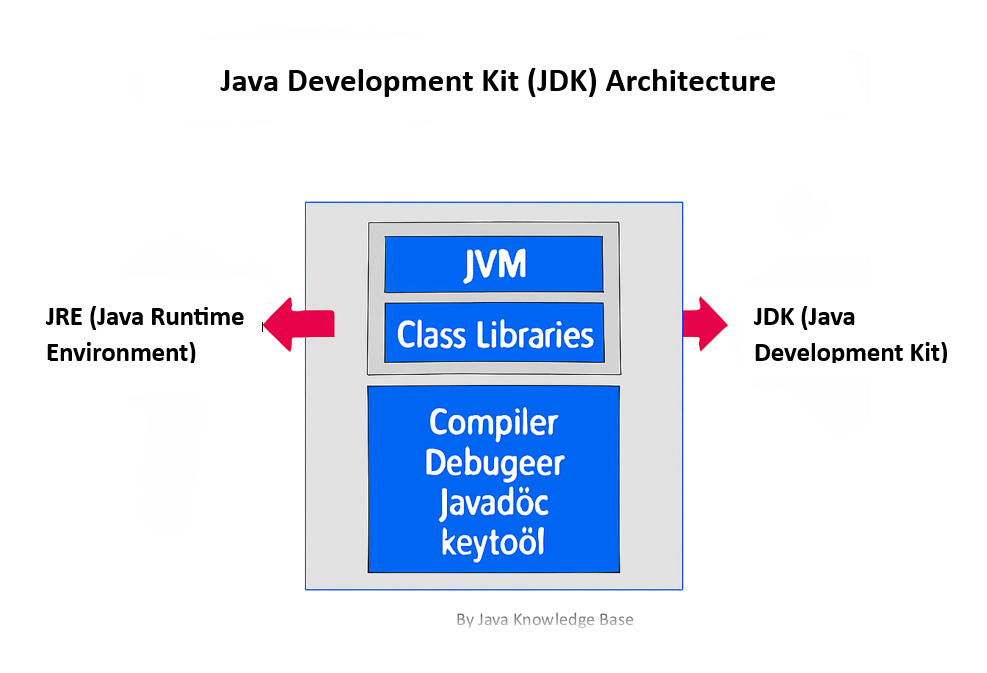
    The Java Development Kit (JDK) is a complete software development kit used to build Java applications. It includes:

    • Java Runtime Environment (JRE) – provides the libraries and tools to run Java programs.
    • Java Virtual Machine (JVM) – executes the compiled Java bytecode.
    • Development tools – such as the Java compiler (javac), debugger, and packaging utilities.

    In short, the JDK is more than just a runtime environment—it provides everything needed to develop, compile, and run Java programs.

    Why Do We Need JDK Instead of Just JRE?

    A common question developers ask is:
    👉 “To run Java programs, isn’t the JRE enough? Why do we need the complete JDK?”

    The answer:

    • The JRE is enough to run Java applications.
    • But to develop Java applications, you need tools like the compiler (javac), debugger, and other utilities that are only included in the JDK.

    That’s why programmers use the JDK for development and the JRE for execution.

    ✅The Architecture of JDK in Java

    The architecture of JDK consists of three essential components:

    1. JVM (Java Virtual Machine)
      • Provides a runtime environment for Java programs.
      • Converts compiled Java bytecode into machine code.
      • Powers Java’s famous feature: “Write once, run anywhere.”
    2. JRE (Java Runtime Environment)
      • Provides the core libraries, Java ClassLoader, and other components required to run applications.
      • It does not include development tools like the compiler.
    3. Development Tools (inside JDK)
      • Includes javac (Java compiler), jdb (debugger), jar (archiver), and other utilities required for building Java applications.

    Downloading Java JDK and JRE

    1. Visit the Official Website
    Go to the Oracle Java Downloads page or the OpenJDK official site. The current stable Java versions are JDK 21 (LTS) and JDK 23 (latest release).

    2. Choose Your Operating System
    Download the installer that matches your operating system:

    • Windows (.exe)
    • macOS (.dmg or .pkg)
    • Linux (.tar.gz or Debian package)

    3. Accept the License Agreement
    For Oracle JDK downloads, review and accept the license agreement before proceeding with the download.

    ✅ Installing Java JDK on Windows

    1. Run the Installer
    Double-click the downloaded .exe file to start the installation.

    2. Follow Installation Prompts
    Proceed with the setup wizard, selecting the default options unless you prefer a custom location. By default, Java is installed in:

    C:\Program Files\Java\jdk-xx
    

    3. Set the JAVA_HOME Environment Variable

    • Right-click This PCPropertiesAdvanced system settingsEnvironment Variables.
    • Add a new variable:
      • Name: JAVA_HOME
      • Value: path of your JDK installation (e.g., C:\Program Files\Java\jdk-21).
    • Edit the existing Path variable and add: %JAVA_HOME%\bin

    👉Follow this detailed guide on how to set up the Java PATH environment variable

    4. Verify Installation
    Open Command Prompt and run:

    java --version
    javac --version
    

    📌If both commands show the installed version, your Java JDK setup on Windows is complete.

    ✅ Installing Java JDK on macOS

    1. Run the Installer
    Open the downloaded .dmg or .pkg installer and follow the on-screen instructions to complete the installation.

    2. Configure Environment Variables
    To set up JAVA_HOME and update the PATH:

    • If using bash, open ~/.bash_profile
    • If using zsh (default on newer macOS), open ~/.zshrc

    Add:

    export JAVA_HOME=$(/usr/libexec/java_home)
    export PATH=$JAVA_HOME/bin:$PATH
    

    Save the file and reload it:

    source ~/.zshrc   # or source ~/.bash_profile
    

    ✅ Installing Java JDK on Linux

    1. Download the Package
    Choose the installer based on your Linux distribution:

    • Debian/Ubuntu: .deb package
    • RedHat/CentOS/Fedora: .rpm package
    • Generic: .tar.gz tarball

    2. Install via Terminal

    For Debian/Ubuntu:

    sudo dpkg -i jdk-xx_linux-x64_bin.deb
    

    For tar.gz (generic installation):

    tar -xvzf jdk-xx_linux-x64_bin.tar.gz
    sudo mv jdk-xx /opt/
    

    3. Configure Environment Variables
    Add the following lines to ~/.bashrc or ~/.zshrc:

    export JAVA_HOME=/opt/jdk-xx
    export PATH=$JAVA_HOME/bin:$PATH
    

    Reload the file:

    source ~/.bashrc   # or source ~/.zshrc
    

    4. Verify Installation
    Run the following commands to confirm Java is installed correctly:

    java --version
    javac --version

    ✅ Installing Java JRE

    On Windows

    Download the Java Runtime Environment (JRE) installer from the official Oracle Java Downloads page. Run the installer, follow the setup prompts, and configure the JRE path in System Environment Variables, similar to the JDK setup process.

    On macOS/Linux

    In most modern setups, the JRE is already bundled with the JDK. If you still need a standalone JRE, the process is similar: download the installer for your OS, complete the installation, set the JAVA_HOME environment variable, and verify the installation.


    📌 Important Notes

    • Most modern JDK packages include JRE by default, so a separate JRE installation is usually unnecessary.
    • Always download Java from official sources (Oracle or OpenJDK) to ensure security and long-term support.
    • Correct installation and environment variable setup ensure Java is ready for both development (JDK) and runtime (JRE) tasks on your system.
  • Complete Guide to Garbage Collection in Java

    What is Garbage Collection

    Garbage Collection (GC) is the process by which the JVM automatically frees up memory by removing objects that are no longer reachable in the program. It runs in the background along with the Java application, reclaiming unused memory to improve performance and avoid memory leaks.

    🔹Purpose of Garbage Collection in Java

    In Java, garbage collection (GC) is the process of automatically reclaiming memory by removing objects that are no longer reachable or needed by the application.

    • Java programs create many objects dynamically (using new).
    • Some of these objects may only be used temporarily. Once no references point to them, they become eligible for garbage collection.
    • Instead of requiring developers to explicitly free memory (like in C/C++ with free() or delete), Java’s GC automates memory cleanup.

    🔹Automated Nature of Garbage Collection

    • No manual deallocation: Developers don’t have to explicitly release memory. The Java Virtual Machine (JVM) handles it.
    • Background process: The GC runs in the background, periodically scanning the heap to find unused objects.
    • Reachability analysis: GC uses a graph of object references starting from “roots” (like local variables, static fields, and active threads). If an object cannot be reached from any root, it is considered garbage.
    • Algorithms: The JVM uses different GC algorithms (e.g., Mark-and-Sweep, G1, ZGC) depending on performance requirements.

    🔹Why Memory Management Matters

    Even though Java has automatic GC, memory issues can still occur if resources are not handled correctly:

    1. Avoiding OutOfMemoryError
      • If the heap fills up with objects that are still referenced (or not collected quickly enough), the JVM can throw an OutOfMemoryError.
      • Example: Loading millions of large objects without proper disposal can exhaust heap space.
    2. Preventing Memory Leaks
      • A memory leak happens when objects are no longer needed but still kept referenced (e.g., in collections like List or Map).
      • GC cannot collect these objects, leading to gradual memory exhaustion.
      • Example: Forgetting to remove old listeners, cache entries, or closing database connections.
    3. Application Performance
      • Efficient memory management ensures fewer GC pauses, smoother performance, and better scalability.
      • Poor management → frequent GC cycles, longer pauses, sluggish application behavior.

    📝 In short:
    Garbage collection in Java automates memory cleanup, reducing developer burden and errors. Still, developers must write mindful code to avoid memory leaks and manage resources properly, or they risk OutOfMemoryError and performance issues.

    🔹 JVM Memory Architecture Overview

    When a Java program runs, the JVM divides memory into different runtime areas. These ensure that objects, variables, and methods are managed efficiently.

    1. Heap Memory

    Heap is the runtime area where all objects are stored. It is shared among all threads.It is further divided into generations to optimize garbage collection:

    • Young Generation
      • Where new objects are created.
      • Further divided into:
        • Eden Space → New objects are allocated here first.
        • Survivor Spaces (S0, S1) → Objects that survive garbage collection in Eden are moved here.
      • Frequent garbage collections happen here (Minor GC).
    • Old Generation (Tenured)
      • Stores long-lived objects that survived multiple GC cycles.
      • Garbage collection here is less frequent but more expensive (Major GC / Full GC).
    • Metaspace (Java 8+)
      • Replaced PermGen.
      • Stores class metadata (class definitions, method info, static variables).
      • Grows dynamically, unlike the fixed-size PermGen.

    2. Stack Memory

    • Each thread has its own stack.
    • Stores:
      • Method call frames.
      • Local variables (including primitives).
      • References to objects (but not the objects themselves).
    • When a method is invoked, a new frame is pushed; when the method ends, the frame is popped.

    If stack space runs out (e.g., due to deep recursion), a StackOverflowError occurs.

    3. Other Areas (briefly)

    • Program Counter (PC) Register: Holds the address of the currently executing instruction for each thread.
    • Native Method Stack: Supports execution of native (non-Java) code.

    🔹 JVM Memory Structure Diagram

               +-------------------------+
               |     JVM Memory          |
               +-------------------------+
    
               +-------------------------+
               |       Heap Memory       |   (Shared across threads)
               |-------------------------|
               |   Young Generation      |
               |    - Eden Space         |
               |    - Survivor 0 (S0)    |
               |    - Survivor 1 (S1)    |
               |-------------------------|
               |   Old Generation        |
               |-------------------------|
               |   Metaspace (Java 8+)   |
               +-------------------------+
    
               +-------------------------+
               |    Stack Memory         |   (Per thread)
               |  - Method frames        |
               |  - Local variables      |
               |  - References           |
               +-------------------------+
    
               +-------------------------+
               | PC Register (per thread)|
               +-------------------------+
               | Native Method Stack     |
               +-------------------------+
    

    📝 In short:

    • Heap → Objects (Young: Eden + Survivor, Old, Metaspace).
    • Stack → Method calls, primitives, object references (thread-local).
    • Other parts like PC Register and Native Stack support execution.

    🔹Ways to Make an Object Eligible for Garbage Collection : 

    1. Nullifying the reference variable
    2. Reassign the reference variable
    3. Objects created inside a metho

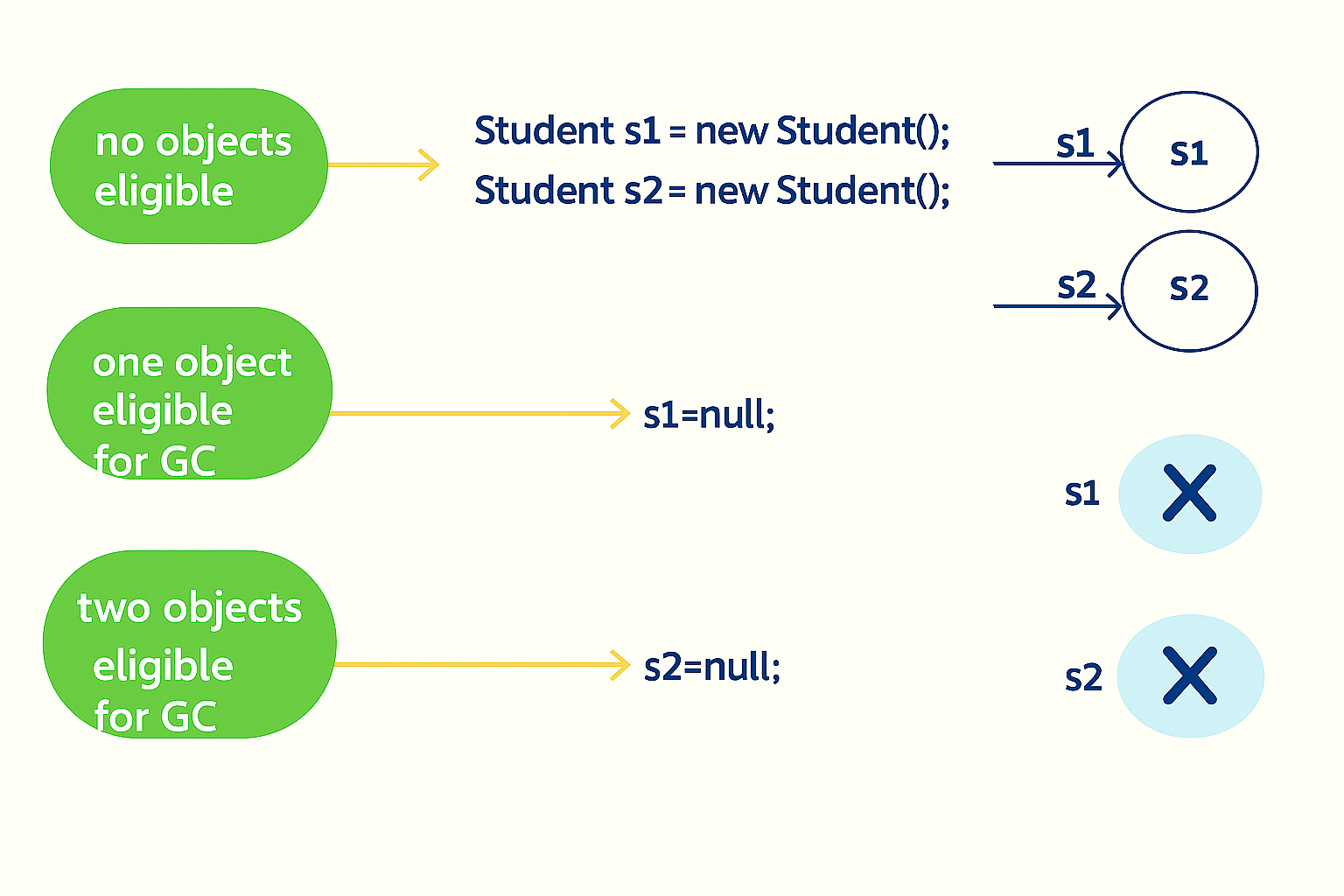
    1. Nullifying the reference variable

    If an object is no longer required, you can make it eligible for GC by assigning null to its reference variable:

    Student s1 = new Student();
    s1 = null; // Now eligible for GC

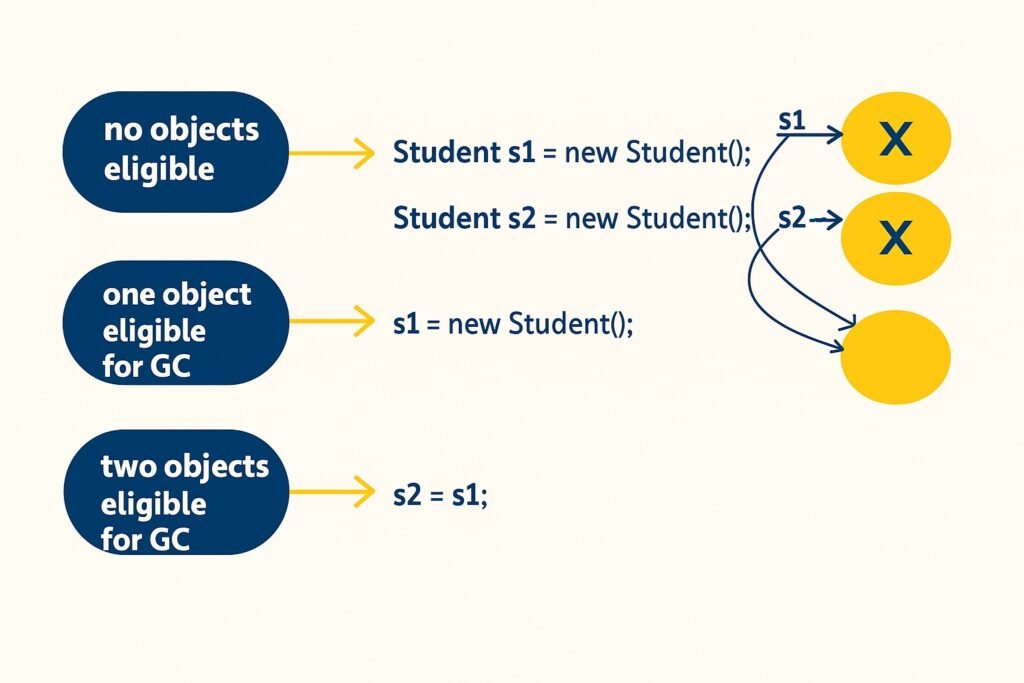
    2.Reassigning the reference variable

    If a reference variable is reassigned to point to another object, the old object becomes unreachable and eligible for Garbage Collection(GC).

    Student s1 = new Student();
    Student s2 = new Student();
    s1 = s2; // Old s1 object is now eligible for GC

    3.Objects created inside a method

    Objects created inside a method are eligible for Garbage Collection (GC) once the method completes, provided there are no references to them outside the method:

    void myMethod() {
    MyClass obj = new MyClass();
    // obj is eligible for GC after method execution
    } 
    

    Example:

    class MyClass {
        int id;
    
        MyClass(int id) {
            this.id = id;
            System.out.println("Object " + id + " created");
        }
    
        // finalize() is deprecated after Java 9, 
        // but here we use it only for demonstration
        @Override
        protected void finalize() throws Throwable {
            System.out.println("Object " + id + " is garbage collected");
        }
    }
    
    public class GCDemo {
        public static void main(String[] args) {
            createObject();
            
            // Requesting JVM to run GC
            System.gc();
    
            // Adding delay to give GC some time
            try { Thread.sleep(1000); } catch (InterruptedException e) {}
            
            System.out.println("End of main method");
        }
    
        static void createObject() {
            MyClass obj = new MyClass(1);
            // After this method ends, 'obj' goes out of scope
            // and becomes eligible for Garbage Collection
        }
    }
    

    Explanation

    1. Inside createObject()
      • obj is a local variable referring to a MyClass object.
      • When the method finishes, the variable obj goes out of scope.
    2. After method execution
      • No references to that object remain.
      • Hence, the object becomes eligible for Garbage Collection.
    3. System.gc() call
      • Requests JVM to run the GC.
      • If the JVM runs GC, the overridden finalize() method is called, and you’ll see:
    Object 1 is garbage collected

    Ways for Requesting the JVM to Run Garbage Collector

    Although you cannot force garbage collection, you can request it using the folowing methods:

    System.gc()

    A static method in the System class that requests GC.

    System.gc()

    System.gc() method is used to call the garbage collector to perform clean-up processing.

    Runtime.getRuntime().gc()

    The Runtime class, present in the java.lang package, is a singleton that provides the gc() method through the getRuntime() factory method.

    Runtime.getRuntime().gc();

    👉 Both methods are (System.gc() and Runtime.getRuntime().gc() )equivalent, but the JVM is not obligated to perform garbage collection immediately.

    Quest : Can Garbage Collection be forced?

    ❌ No. Garbage Collection cannot be forced. You can only request it, but the JVM decides when (or if) it will actually run.

    Finalization (⚠️ Deprecated)

    Before destroying an object, the Garbage Collector (GC) once invoked the finalize() method to perform cleanup activities.

    @Override
    protected void finalize() throws Throwable {
        // cleanup code
    }
    • The finalize() method is defined in the Object class:

    ⚠️ Note: Since Java 9, the finalize() method has been deprecated and its use is strongly discouraged. Developers should instead use alternatives such as try-with-resources or implement the AutoCloseable interface for cleanup tasks.

    • try-with-resources for automatic resource management, or
    • AutoCloseable interface for cleanup tasks.

    Memory Leak

    A memory leak occurs when an object is no longer needed by the application but is still being referenced. This prevents GC from reclaiming it, leading to unnecessary memory consumption.

    This results in unnecessary memory consumption and may cause the application to slow down or even crash.

    Common Causes of OutOfMemoryError(OOM) in JVM

    When the JVM runs out of memory and cannot allocate more objects or native resources, it throws an OutOfMemoryError. This can happen in several scenarios depending on how the application uses memory.

    • Java Heap Space Exhaustion
    • GC Overhead Limit Exceeded
    • Metaspace Exhaustion (Java 8 and later)
    • Native Memory Exhaustion
    • Array Size Limit Exceeded
    • Kernel or OS Memory Limits

    👉 To learn more about the different types of OutOfMemoryError and how to fix them, check out our detailed guide on OutOfMemoryError in Java.