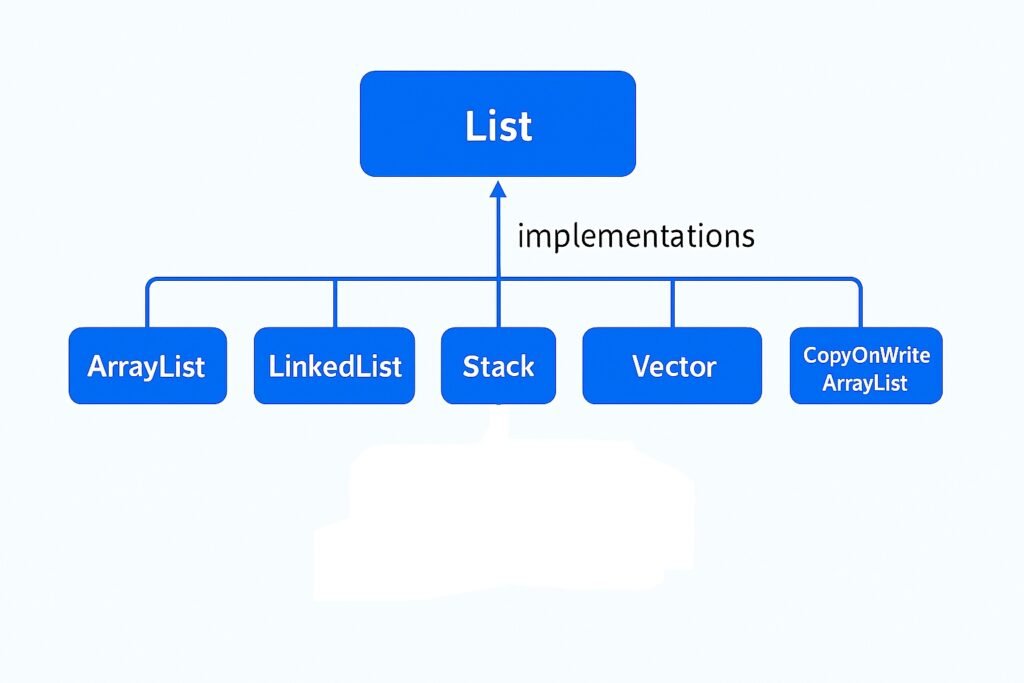
When working with the Java Collection Framework, two commonly used classes for storing dynamic data are ArrayList and LinkedList. Both implement the List interface but differ in internal implementation, performance, and use cases.
What is ArrayList?
ArrayList in Java is backed by a dynamic array.
It provides fast random access (O(1)) but slower insertions and deletions in the middle or beginning (O(n)).
Best choice when read-heavy operations are frequent.
What is LinkedList?
LinkedList is implemented as a doubly linked list of nodes.
Each node stores data along with references to the previous and next nodes.
It provides faster insertions and deletions (O(1) at head/tail) but slower random access (O(n)).
Best choice when insert/delete-heavy operations are frequent.
Key Differences between ArrayList and LinkedList in Java
1. Data Structure
Feature
ArrayList
LinkedList
Internal Structure
Resizable dynamic array
Doubly-linked list of nodes
Storage
Contiguous memory locations
Nodes connected via next and prev pointers
Memory Overhead
Less, only array elements
More, each node stores prev and next references
2. Performance / Time Complexity
Operation
ArrayList
LinkedList
Access by index (get)
O(1)
O(n)
Add at end (add(E e))
O(1) amortized
O(1)
Add at beginning (addFirst)
O(n)
O(1)
Add at specific index
O(n)
O(n)
Remove first/last element
O(n)/O(1)
O(1)
Remove by index/value
O(n)
O(n)
Search (contains, indexOf)
O(n)
O(n)
3. Iteration Performance
ArrayList: Iteration is faster due to contiguous memory (cache-friendly).
LinkedList: Iteration is slower since it traverses nodes one by one.
4. Use Cases
ArrayList
LinkedList
Frequent access by index
Frequent insertion/deletion at start/middle
Less memory overhead
More memory usage due to node pointers
Implementing random-access lists
Implementing Queue, Deque, Stack
5. Summary
ArrayList is backed by an array → good for read-heavy operations.
LinkedList is a doubly-linked list → good for insert/delete-heavy operations.
Choose based on operation frequency:
Frequent random access → ArrayList
Frequent add/remove from head/middle → LinkedList
Conclusion
Both ArrayList and LinkedList are powerful implementations of the List interface in Java. The choice depends on your use case:
The LinkedList class in Java is part of the java.util package.
It implements both the List and Deque interfaces, which means it can be used as a List, Queue, or Deque (Double Ended Queue).
Unlike ArrayList, which is backed by a dynamic array, LinkedList is backed by a doubly-linked list.
👉 Declaration:
LinkedList < Type > list = new LinkedList < >();
2. Internal Working of LinkedList
LinkedList in Java is implemented as a doubly-linked list, meaning each node contains references to both the previous and next nodes. This structure allows efficient insertion and deletion from both ends of the list.
Each element (called a Node) contains:
Data
Reference to the previous node
Reference to the next node
The LinkedList maintains head (first element) and tail (last element).
This structure allows efficient insertions and deletions but slower random access compared to ArrayList.
Diagram (for visualization):
Head <-> Node1 <-> Node2 <-> Node3 <-> Tail
3. Creating a LinkedList
import java.util.LinkedList;

public class Example {
    public static void main(String[] args) {
        LinkedList<String> list = new LinkedList<>();

        // Adding elements
        list.add("Apple");
        list.add("Banana");
        list.add("Mango");

        System.out.println(list); // [Apple, Banana, Mango]
    }
}
4. Commonly Used Constructors
LinkedList() → Creates an empty LinkedList
LinkedList(Collection<? extends E> c) → Creates a LinkedList containing elements of the given collection
5. Methods in LinkedList with Examples
(a) Adding Elements
list.add("Orange");         // add at end
list.addFirst("Grapes");    // add at beginning
list.addLast("Pineapple");  // add at end
list.add(2, "Kiwi");        // add at specific index
(b) Accessing Elements
System.out.println(list.get(0));       // by index
System.out.println(list.getFirst());   // first element
System.out.println(list.getLast());    // last element
(c) Updating Elements
list.set(1, "Strawberry"); // update at index
(d) Removing Elements
list.remove();            // removes first element
list.remove(2);           // removes element at index
list.remove("Mango");     // removes first occurrence
list.removeFirst();       // removes first element
list.removeLast();        // removes last element
(e) Searching Elements
System.out.println(list.contains("Apple")); // true/false
System.out.println(list.indexOf("Banana")); // returns index
System.out.println(list.lastIndexOf("Banana")); // last occurrence
(f) Iterating LinkedList
// Using for-each loop
for (String fruit: list) {
  System.out.println(fruit);
}

// Using iterator
Iterator < String > it = list.iterator();
while (it.hasNext()) {
  System.out.println(it.next());
}

// Using descending iterator
Iterator < String > descIt = list.descendingIterator();
while (descIt.hasNext()) {
  System.out.println(descIt.next());
}
(g) Queue & Deque Methods
Since LinkedList implements Deque:
list.offer("Watermelon");   // add at end
list.offerFirst("Papaya");  // add at beginning
list.offerLast("Guava");    // add at end

System.out.println(list.peek());       // view head
System.out.println(list.peekFirst());  // view first
System.out.println(list.peekLast());   // view last

System.out.println(list.poll());       // remove and return head
System.out.println(list.pollFirst());  // remove and return first
System.out.println(list.pollLast());   // remove and return last
6. Time Complexity of LinkedList Operations
Operation
Time Complexity
Add at beginning (addFirst)
O(1)
Add at end (addLast / add)
O(1)
Add at specific index
O(n)
Remove first/last
O(1)
Remove at index/value
O(n)
Get element by index
O(n)
Search (contains, indexOf)
O(n)
Iteration
O(n)
👉 When to use LinkedList?
When frequent insertions and deletions are needed.
Not suitable when frequent random access is required (use ArrayList instead).
7. LinkedList vs ArrayList
Feature
ArrayList
LinkedList
Data Structure
Dynamic Array
Doubly Linked List
Access Time (get)
O(1)
O(n)
Insert/Delete at end
O(1)
O(1)
Insert/Delete at start
O(n)
O(1)
Memory Usage
Less
More (extra node pointers)
8. Real-World Use Cases
Implementing Undo/Redo functionality (backed by LinkedList).
Navigation (next/previous pages) in browsers.
Queue/Deque implementations.
9. Conclusion
LinkedList is best for insertion/deletion-heavy operations.
For random access, prefer ArrayList.
Knowing both helps in choosing the right data structure for performance optimization.
List.of(...) (Java 9+) creates an unmodifiable list (no add/remove/set), and disallows null elements.
Arrays.asList(...) creates a fixed-size list backed by an array (supports set, but add/remove throw UnsupportedOperationException).
If you want a modifiable ArrayList, wrap either of these in new ArrayList<>(...) to copy elements into a regular, resizable ArrayList.
Initializing an ArrayList with Multiple Items
To initialize an ArrayList with multiple items in a single line, you can create a List of items using either Arrays.asList() or List.of() methods. Both methods return a list containing the items passed to the factory method.
In the following examples, we add two strings "A" and "B" to the ArrayList:
1. Using Arrays.asList()
import java.util.ArrayList;
import java.util.Arrays;
import java.util.List;

public class FromArraysAsList {
    public static void main(String[] args) {
        // Arrays.asList returns a fixed-size list backed by the provided array
        List<String> fixed = Arrays.asList("A", "B");

        // fixed.set(0, "X") is allowed (changes the backing array)
        fixed.set(0, "X");
        System.out.println(fixed); // [X, B]

        // fixed.add("D")  <-- throws UnsupportedOperationException

        // To get a fully modifiable ArrayList, copy it:
        ArrayList<String> list = new ArrayList<>(Arrays.asList("A", "B"));
        list.add("C");            // OK
        System.out.println(list); // [A, B, C]
    }
}
✔ Allows null values. ✔ Works in all Java versions (since Java 1.2).
✔Arrays.asList(new int[]{1,2,3}) produces a List<int[]> of size 1 (because the primitive array is treated as a single element). Use boxed types (Integer[]) or streams (IntStream) to avoid this.
2. Using List.of() (Java 9+)
import java.util.ArrayList;
import java.util.List;

public class FromListOf {
    public static void main(String[] args) {
        // List.of returns an unmodifiable List
        List<Integer> list= List.of("A", "B"); // Java 9+

        // Create a mutable ArrayList by copying
        ArrayList<Integer> mutable = new ArrayList<>(list);

        System.out.println(mutable); // ["A", "B"]
        mutable.add("C");              // works because `mutable` is an ArrayList
        System.out.println(mutable); // ["A", "B","C"]
    }
}
✔ More concise syntax. ❌ List.of(“A”, “B”, null) Does not allow null values (throws NullPointerException). ✔ List.of(...) list itself is unmodifiable — calling list.add("C") would throw UnsupportedOperationException.
Best practice (short)
Use List.of(...) for concise, immutable lists (configuration, constants) — Java 9+.
Use Arrays.asList(...) when you want a quick fixed-size list or when you already have an array and want a list view.
If you want a mutableArrayList, always wrap/copy:
ArrayList<T> mutable = new ArrayList<>(List.of(…)); // recommended (Java 9+) ArrayList<T> mutable2 = new ArrayList<>(Arrays.asList(…));
In Java, ArrayList is a part of the Collection Framework and is present in the java.util package. It is a resizable array implementation of the List interface. Unlike arrays, which have a fixed size, an ArrayList can dynamically grow or shrink as elements are added or removed.
1. Key Features of ArrayList
Dynamic Resizing – Automatically grows when elements exceed capacity and shrinks when elements are removed.
Indexed Access – Provides fast random access using an index (similar to arrays).
Duplicates Allowed – Stores duplicate elements as well as null values.
Maintains Insertion Order – Elements are stored in the order they are inserted.
Non-synchronized – Not thread-safe by default, but can be synchronized using Collections.synchronizedList().
Implements List Interface – Supports all list operations like insertion, deletion, traversal, and searching.
Heterogeneous Data – Technically possible (when using raw types), but not recommended. Best practice is to use generics.
2. Syntax of ArrayList in Java
To declare and initialize an ArrayList, you can use the following syntax:
// Creating an ArrayList of Integer type
ArrayList < Integer > arr = new ArrayList < Integer > ();
ArrayList<Integer> specifies that this list will store only Integer values.
new ArrayList<Integer>() creates a new empty ArrayList.
👉You can also create an ArrayList with other data types using generics:
ArrayList < String > names = new ArrayList < String > (); // Stores String values
ArrayList < Double > prices = new ArrayList < Double > (); // Stores Double values
ArrayList < Character > letters = new ArrayList < >(); // Diamond operator, type inferred
Note:
Since Java 7, you can use the diamond operator <> to avoid repeating the type on the right-hand side:
ArrayList<Integer> numbers = new ArrayList<>(); // Type is inferred as Integer
Generics enforce type safety, preventing accidental insertion of wrong types.
3. Declaration and Initialization
import java.util.ArrayList;

public class ArrayListExample {
    public static void main(String[] args) {
        // Creating an ArrayList of String type
        ArrayList<String> fruits = new ArrayList<>();

        // Adding elements
        fruits.add("Apple");
        fruits.add("Banana");
        fruits.add("Mango");
        fruits.add("Orange");

        System.out.println(fruits);
    }
}
Output:
[Apple, Banana, Mango, Orange]
4. Common Operations on ArrayList
The ArrayList class provides many useful methods to perform operations. Let’s look at the most commonly used ones with description and examples:
4.a. Adding Elements
The add() method is used to insert elements into the ArrayList.
You can add elements at the end or at a specific index.
ArrayList < String > fruits = new ArrayList < >();

fruits.add("Apple"); // Adds element at the end
fruits.add("Banana");
fruits.add(1, "Mango"); // Adds "Mango" at index 1
System.out.println(fruits);
Output:
[Apple, Mango, Banana]
4.b. Accessing Elements
The get(int index) method returns the element present at the given index.
Index starts from 0.
String fruit = fruits.get(1);
System.out.println("Element at index 1: " + fruit);
Output:
Element at index 1: Mango
4.c. Updating Elements
The set(int index, E element) method replaces the element at the specified index with a new value.
fruits.set(1, "Orange");   // Replaces "Mango" with "Orange"
System.out.println(fruits);
Output:
[Apple, Orange, Banana]
4.d. Removing Elements
The remove() method deletes elements by value or by index.
fruits.remove("Banana");   // Removes "Banana"
fruits.remove(0);          // Removes element at index 0
System.out.println(fruits);
Output:
[Orange]
4.e. Checking Size
The size() method returns the total number of elements in the list.
System.out.println("Size: " + fruits.size());
4.f. Iterating Over ArrayList
There are multiple ways to iterate over an ArrayList:
// Using for-each loop
for (String f : fruits) {
    System.out.println(f);
}

// Using for loop with index
for (int i = 0; i < fruits.size(); i++) {
    System.out.println(fruits.get(i));
}

// Using forEach() method with lambda
fruits.forEach(System.out::println);
4.g. Checking if Element Exists
The contains(Object o) method returns true if the element exists, otherwise false.
if (fruits.contains("Mango")) {
    System.out.println("Mango is in the list!");
}
4.h. Converting ArrayList to Array
The toArray() method converts an ArrayList into a normal array.
String[] arr = fruits.toArray(new String[0]);
for (String s : arr) {
    System.out.println(s);
}
Example – Full Program
import java.util.ArrayList;

public class ArrayListDemo {
    public static void main(String[] args) {
        ArrayList<String> fruits = new ArrayList<>();

        // Adding elements
        fruits.add("Apple");
        fruits.add("Banana");
        fruits.add("Mango");
        fruits.add("Orange");

        // Displaying ArrayList
        System.out.println("Fruits: " + fruits);

        // Accessing elements
        System.out.println("Element at index 1: " + fruits.get(1));

        // Updating element
        fruits.set(2, "Papaya");
        System.out.println("Updated Fruits: " + fruits);

        // Removing element
        fruits.remove("Orange");
        System.out.println("After removal: " + fruits);

        // Iterating
        System.out.println("Iterating with for-each loop:");
        for (String fruit : fruits) {
            System.out.println(fruit);
        }

        // Size of ArrayList
        System.out.println("Total Fruits: " + fruits.size());
    }
}
Output:
Fruits: [Apple, Banana, Mango, Orange]
Element at index 1: Banana
Updated Fruits: [Apple, Banana, Papaya, Orange]
After removal: [Apple, Banana, Papaya]
Iterating with for-each loop:
Apple
Banana
Papaya
Total Fruits: 3
5. When to Use ArrayList in Java
ArrayList is one of the most commonly used collection classes in Java, but it is not always the best choice for every scenario. Here’s when you should use it:
5.a. When You Need Dynamic Arrays
Unlike standard arrays in Java, the size of an ArrayListcan grow or shrink automatically.
Use ArrayList when you don’t know the number of elements in advance.
ArrayList allows duplicate elements and null values, unlike Set implementations.
Example:
ArrayList < String > list = new ArrayList < >();
list.add(null);
list.add("Apple");
list.add("Apple"); // Duplicates allowed
✅ When Not to Use ArrayList
Frequent insertions/deletions in the middle or start → Use LinkedList instead.
Thread-safe operations required → Use CopyOnWriteArrayList or Collections.synchronizedList().
Primitive types → Consider using arrays or IntStream/long[] for performance, as ArrayList<Integer> introduces boxing/unboxing overhead.
In short:
Use ArrayList when you need a dynamic, ordered, and index-based collection where additions/removals are mostly at the end, and you may allow duplicates and nulls.
6. ArrayList Complexity
ArrayList is backed by a dynamic array, so operations are indexed-based.
The ArrayList in Java is a powerful and flexible alternative to arrays, especially when you need dynamic resizing, indexed access, and frequent insertions/deletions. However, if thread-safety is required, you should consider using Collections.synchronizedList() or CopyOnWriteArrayList.
The List interface in Java represents an ordered collection that allows duplicate elements and provides positional access. It is a part of the java.util package and extends the Collection interface. Lists are commonly used when the order of elements matters, and when you need to access elements by their index position.
Key Characteristics of List:
Ordered Collection: Elements in a List are ordered, meaning they maintain the sequence in which they were inserted.
Allows Duplicates: A List can contain multiple occurrences of the same element.
Indexed Access: Elements can be accessed using an integer index, with the first element at index 0.
Null Elements: List implementations allow the inclusion of null elements.
Declaration of the Java List Interface
The List interface in Java is declared as follows:
public interface List<E> extends Collection<E> { }
It represents an ordered collection that allows duplicate elements and provides positional access.
Since List is an interface, we cannot instantiate it directly. Instead, we create an instance of a class that implements it, such as ArrayList, LinkedList, or Vector.
Example:
import java.util.List;
import java.util.ArrayList;

public class ListDemo {
    public static void main(String[] args) {
        // Instantiate a List using ArrayList
        List<String> list = new ArrayList<>();  // Using ArrayList
        list.add("Java");
        list.add("Python");
        list.add("C++");

        System.out.println(list); //Output: [Java, Python, C++]
    }
}
✅ Explanation:
List<String> → The generic type <String> specifies that this list will store String elements.
new ArrayList<>() → We are creating an ArrayList instance that implements the List interface.
Java provides several classes that implement the List interface, each with its own characteristics and use cases:
ArrayList: A resizable array implementation of the List interface. It allows fast random access and is efficient for storing and accessing data. However, adding or removing elements (except at the end) can be slow due to the need to shift elements.
LinkedList: A doubly-linked list implementation of the List interface. It allows for efficient insertion or removal of elements from both ends and from the middle of the list. However, it provides slower access to elements by index compared to ArrayList.
Vector: An older implementation of the List interface. It is similar to ArrayList but is synchronized, making it thread-safe. However, this synchronization comes with a performance cost.
Stack: A subclass of Vector that represents a last-in, first-out stack of objects. It provides methods like push(), pop(), and peek() to operate on the stack.
CopyOnWriteArrayList: A thread-safe variant of ArrayList where all mutative operations (like add, set, etc.) are implemented by making a fresh copy of the underlying array. This is useful when you have a list that is frequently read but infrequently modified.
Java List – Operations in Detail
The List interface in Java (part of the Collection Framework) represents an ordered collection that can contain duplicate elements. Common implementations: ArrayList, LinkedList, CopyOnWriteArrayList, Vector.
1. Creating a List
import java.util.*;

public class ListCreation {
    public static void main(String[] args) {
        List<String> list = new ArrayList<>();  // Using ArrayList
        list.add("Java");
        list.add("Python");
        list.add("C++");

        System.out.println(list); // [Java, Python, C++]
    }
}
2. Adding Elements
add(E e) → Adds element at the end.
add(int index, E e) → Inserts element at a specific index.
list.add("Go");            // Adds at end
list.add(1, "Kotlin");     // Inserts at index 1
3. Accessing Elements
get(int index) → Retrieves element at given index.
Convert to array, Get size of elements, Check if the list is empty
✅ In short: The List interface in Java provides powerful operations to manage ordered collections, making it one of the most widely used data structures in Java applications.
Java 25 doesn’t really introduce big changes around performance or immutability in Collections. Instead, it mainly brings usability, consistency, and convenience improvements (like getFirst(), getLast(), reversed(), and the standardized SequencedCollection APIs).
What’s New in Java 25 Collections?
1. Sequenced Collections Interfaces & Related Enhancements
Background: Introduced in Java 21 (JEP 431), SequencedCollection, SequencedSet, and SequencedMap were added to bring a uniform way of working with collections that have a defined encounter order (like List, LinkedHashSet, TreeMap, etc.).
What’s in Java 25:
Java 25 continues to evolve and stabilize these interfaces.
All ordered collections (List, Deque, LinkedHashSet, LinkedHashMap, TreeMap) now explicitly implement these new interfaces.
This means first element, last element, and reversed view operations are available consistently across ordered collections.
Example:
import java.util.*;

public class SequencedExample {
    public static void main(String[] args) {
        SequencedSet<String> names = new LinkedHashSet<>();
        names.add("Amit");
        names.add("Neha");
        names.add("Rajesh");

        System.out.println("First: " + names.getFirst());   // Amit
        System.out.println("Last: " + names.getLast());     // Rajesh

        System.out.println("Reversed view: " + names.reversed());
        // Output: [Rajesh, Neha, Amit]
    }
}
🔹 Before SequencedCollection, such operations were inconsistent:
Background: Many developers often needed the first or last element in a collection. Each collection type had different APIs, making code harder to generalize.
What’s in Java 25:
All sequenced collections (List, Deque, SequencedSet) expose:
🔹 Benefit: Cleaner, shorter, and more readable code without manual index math or custom reverse loops.
3. Collections.addAll(Collection<? super T>, T...) Overload
Background: Before Java 25, adding multiple elements required either Collections.addAll(collection, element1, element2, ...) or collection.addAll(List.of(...)).
What’s in Java 25:
Overloaded method now allows varargs directly with generics.
Simplifies bulk addition of elements into a collection.
Example:
import java.util.*;

public class AddAllExample {
    public static void main(String[] args) {
        List<String> fruits = new ArrayList<>();

        // New overload in Java 25
        Collections.addAll(fruits, "Apple", "Banana", "Mango", "Orange");

        System.out.println(fruits);
        // [Apple, Banana, Mango, Orange]
    }
}
🔹 Benefit: Less boilerplate, no need to wrap elements in List.of(...) or arrays.
4. View Collections & Reversed Views Formalized
Background: Java has long provided “views” — like subList(), unmodifiableList(), and synchronizedList().
What’s in Java 25:
The documentation and contracts for views are now more formalized.
SequencedCollection.reversed() explicitly guarantees a live view, meaning changes reflect both ways.
Here, reversedView is not a separate list. It’s a live mirror of the original, but in reverse order.
🔹 Benefit: No need to manually reverse with Collections.reverse(list) which creates a copy or mutates in place. Instead, reversed() provides a real-time, lightweight view.
What Might Be Coming / In Preview
These features aren’t specific to Collections but will affect how we use them.
1. Primitive Types in Patterns (JEP 507 – Preview)
What it is: JEP 507 lets primitive types appear in pattern contexts (top-level and nested), and extends instanceof and switch to work uniformly with primitive types. It is a preview language feature in Java 25 (third preview of this idea).
Example (Preview in Java 25):
public class PatternMatchingExample {
    public static void main(String[] args) {
        Object a = Integer.valueOf(42);
        Object b = Double.valueOf(42.5);

        if (a instanceof int ai) {
            System.out.println("a matched int: " + ai);
        } else {
            System.out.println("a did NOT match int");
        }

        if (b instanceof int bi) {
            System.out.println("b matched int: " + bi);
        } else {
            System.out.println("b did NOT match int");
        }
    }
}
Expected output
a matched int: 42
b did NOT match int
Integer.valueOf(42) matches int (boxing/unboxing + exact). Double.valueOf(42.5) does not match int because converting 42.5→int would lose information.
🔹 Impact on collections: If you retrieve from a List<Object> or generic collection, you can directly match primitive types instead of casting manually.
🔹 Before Java 25 (without primitive pattern matching)
If you had a List<Object> (a heterogeneous list), and you retrieved values, you couldn’t directly match primitives like int or long. You had to:
Check if the object was a wrapper class (Integer, Long, Double …).
Cast it.
Then unbox it manually.
Example (Java 21 or earlier):
List < Object > data = List.of(10, 20L, "hello");

for (Object o: data) {
  if (o instanceof Integer) {
    int i = (Integer) o; // manual cast + unboxing
    System.out.println("Integer: " + (i * 2));
  } else if (o instanceof Long) {
    long l = (Long) o; // manual cast + unboxing
    System.out.println("Long: " + (l + 100));
  }
}
👉 This is verbose, error-prone, and harder to read.
🔹 With Java 25 (primitive pattern matching)
Java 25 introduces primitive patterns (JEP 507, still in preview). Now you can directly match primitives like int, long, double in your code — even when the object comes from a List<Object> or generic collection.
Example:
List < Object > data = List.of(10, 20L, "hello");

for (Object o: data) {
  if (o instanceof int i) { //  direct match to int
    System.out.println("int: " + (i * 2));
  } else if (o instanceof long l) { //  direct match to long
    System.out.println("long: " + (l + 100));
  } else if (o instanceof String s) {
    System.out.println("String: " + s.toUpperCase());
  }
}
👉 No explicit casting or unboxing is required. The compiler does it safely for you.
🔹 Why this matters for Collections
Cleaner code: Collections often store Object (e.g., List<Object>, raw types, or generic wildcards). With primitive patterns, retrieval logic becomes concise.
Fewer bugs: No accidental ClassCastException or missing unboxing step.
Consistency: Works seamlessly in switch expressions and if statements across collection iteration.
Better readability: Code looks more declarative — “match an int” instead of “if Integer, then cast, then unbox”.
Switch with Pattern Matching in Java 25
Java 25 allows primitive types in pattern matching inside switch expressions/statements. You can now:
Match primitive values directly (int, long, double, etc.)
Use pattern variables inside the case block
Apply guards (when) to filter matched values
This makes switch more expressive and concise, especially for mixed-type collections or heterogeneous data.
1. Basic Syntax
switch (variable) {
case int i - >System.out.println("Matched int: " + i);
case long l - >System.out.println("Matched long: " + l);
case double d - >System.out.println("Matched double: " + d);
case String s - >System.out.println("Matched String: " + s);
default - >System.out.println("Unknown type/value");
}
Key points:
int i, long l, double d are pattern variables.
The switch now performs type checking + extraction in one step.
default handles unmatched types/values.
2. Using Guards with when
You can add a condition (when) to a case to filter matched values.
Object value = 25;

switch (value) {
    case int i when i > 0 -> System.out.println("Positive int: " + i);
    case int i when i < 0 -> System.out.println("Negative int: " + i);
    case long l -> System.out.println("Long value: " + l);
    case String s -> System.out.println("String value: " + s);
    default -> System.out.println("Other type/value");
}
Explanation:
case int i when i > 0 → matches only if value is an int and positive.
The pattern variable i can be used inside the case.
Multiple cases for the same primitive type are allowed with different guards.
3. Using Switch with Collections
Primitive pattern matching is especially useful for List<Object> or heterogeneous collections.
List < Object > items = List.of(1, 2L, 3.5, "hello");

for (Object o: items) {
  switch (o) {
  case int i - >System.out.println("int: " + i);
  case long l - >System.out.println("long: " + l);
  case double d - >System.out.println("double: " + d);
  case String s - >System.out.println("string: " + s);
  default - >System.out.println("unknown type: " + o);
  }
}
Output:
int: 1
long: 2
double: 3.5
string: hello
Benefit:
No manual casting/unboxing needed.
Cleaner and safer than traditional instanceof + cast logic.
4. Using Nested Patterns in Switch (with Records)
Java 25 also supports nested patterns, allowing extraction from record types with primitives.
record Point(int x, int y) {}

Object obj = new Point(5, 10);

switch (obj) {
    case Point(int x, int y) p -> System.out.println("Point at: " + x + ", " + y);
    default -> System.out.println("Not a Point");
}
Explanation:
The pattern Point(int x, int y) p checks if obj is a Point.
Extracts x and y as primitives.
p can still be used to refer to the original object if needed.
5. Advantages over traditional switch
Traditional switch
Switch with pattern matching (Java 25)
Only works with primitive values or enums
Works with objects, primitives, and records
Requires instanceof + cast
Type check + extraction in one concise statement
No guards on individual cases
Can use when to add conditions for more control
Hard to work with heterogeneous collections
Directly match mixed-type collections safely
6. Important Notes
Preview feature: This is still a preview in Java 25 → compile with --enable-preview.
Exactness rules: Primitive pattern matching only matches when a value can be safely narrowed without loss. For example: Object val = 100L; if (val instanceof int i) { ... } // matches only if 100L fits in int
Works seamlessly with collections: Heterogeneous List<Object> or arrays can be iterated with switch pattern matching, reducing boilerplate.
2. Other API Enhancements
Some API changes in Java 25 indirectly affect collections usage:
Better type inference for varargs and generics (making bulk operations simpler).
Documentation improvements making behavior of collection views, mutability, and concurrency guarantees clearer.
✅ In summary: Java 25 Collections Framework focuses on refining consistency (sequenced collections), convenience (getFirst(), getLast(), reversed()), and bulk operations (addAll). Preview features like primitive pattern matching will further simplify code when working with heterogeneous or generic collections.
Why Collections Came into Picture: ✍️In Java, arrays have a fixed size and lack built-in methods for easy manipulation like adding, removing, or searching elements. To overcome these limitations, the Collection Framework was introduced, providing dynamic data structures with rich utility methods. For a detailed understanding of arrays in Java, you can check Java Arrays Tutorial
The Java Collection Framework (JCF) is a unified architecture for storing and manipulating groups of objects. It provides ready-to-use data structures (like List, Set, Map, Queue) and algorithms (like sorting, searching, iteration).
Instead of writing complex data structures manually, Java developers can use these pre-built and optimized collections.
👉 The framework is part of java.util package and was introduced in Java 2 (JDK 1.2), but has been enhanced with each release up to the latest Java 25.
Why Use Collection Framework?
Reduces development effort → ready-to-use data structures.
At the heart of the Java Collections Framework are a set of key interfaces — Collection, List, Set, Queue, Deque, and Map. These interfaces establish the contracts that different collection classes must follow, providing guidelines for how data can be stored, accessed, and manipulated.
Represents an ordered collection that allows duplicate elements and provides positional access. Lists include dynamic arrays, linked structures, and legacy classes designed for sequential storage.
import java.util.*;

public class ListExample {
    public static void main(String[] args) {
        List<String> fruits = new ArrayList<>();
        fruits.add("Apple");
        fruits.add("Banana");
        fruits.add("Mango");
        fruits.add("Apple"); // allows duplicates

        System.out.println("Fruits List: " + fruits);
    }
}
2. Set Interface
Represents a collection that does not allow duplicate elements. Sets are used to model mathematical sets and may or may not preserve insertion order, depending on the implementation.
Popular Implementations:
HashSet
LinkedHashSet
TreeSet
CopyOnWriteArraySet
✅ Example:
import java.util.*;

public class SetExample {
    public static void main(String[] args) {
        Set<String> names = new HashSet<>();
        names.add("Simone");
        names.add("Jeremy");
        names.add("Simone"); // ignored

        System.out.println("Names: " + names);
    }
}
3. Queue Interface
Represents a collection designed for holding elements prior to processing. Queues typically follow FIFO (First-In-First-Out) order, but priority-based or custom orderings are also possible.
Popular Implementations:
LinkedList
PriorityQueue
ArrayDeque
ConcurrentLinkedQueue
LinkedBlockingQueue
✅ Example:
import java.util.*;

public class QueueExample {
    public static void main(String[] args) {
        Queue<Integer> queue = new LinkedList<>();
        queue.add(10);
        queue.add(20);
        queue.add(30);

        System.out.println("Queue: " + queue);
        System.out.println("Removed: " + queue.poll()); // removes first
        System.out.println("After removal: " + queue);
    }
}
4. Deque Interface
A double-ended queue that supports element insertion and removal at both ends. Deques can function as stacks (LIFO) or queues (FIFO), providing flexible access patterns.
Popular Implementations:
ArrayDeque.
ConcurrentLinkedDeque
LinkedBlockingDeque
LinkedList
✅ Example:
import java.util.*;

public class DequeExample {
    public static void main(String[] args) {
        Deque<String> dq = new ArrayDeque<>();
        dq.addFirst("Start");
        dq.addLast("End");

        System.out.println(dq);
    }
}
5. Map Interface
Represents a collection of key–value pairs, where keys are unique and each key maps to exactly one value. Maps are not true collections but provide a way to store and retrieve data based on unique identifiers.
Keys are unique, values can be duplicate.
Popular Implementations:
HashMap
LinkedHashMap
TreeMap
Hashtable
ConcurrentHashMap (thread-safe)
✅ Example:
import java.util.*;

public class MapExample {
    public static void main(String[] args) {
        Map<Integer, String> students = new HashMap<>();
        students.put(1, "Alice");
        students.put(2, "Bob");
        students.put(3, "Charlie");

        System.out.println("Students: " + students);
        System.out.println("Student with ID 2: " + students.get(2));
    }
}
6.Utility Class: Collections
The Collections class (part of java.util package) is a utility class that provides static methods to operate on or return collections.
It is different from the Collections Framework itself. The Collections Framework provides data structures (List, Set, Map, etc.), while the Collections class provides algorithms and helper methods to work with those data structures.
Key Features of Collections Class
Algorithms → Sorting, Searching, Shuffling, Reversing, Rotating, etc.
Synchronization Wrappers → Convert non-thread-safe collections into thread-safe ones.
HashMap in Java is a data structure that stores key-value pairs. It is part of the Java Collections Framework and provides constant-time performance O(1) for basic operations like get() and put(), assuming a good hash function.
1. Data Structure Used in HashMap
Internally, a HashMap is implemented as an array of buckets. Each bucket is a linked list (before Java 8) or a balanced tree (red-black tree) (from Java 8 onwards, if collisions become too many).
Node Structure
Each node stores:
hash → the hash code of the key
key → the key object
value → the associated value
next → reference to the next node in case of a collision
static class Node < K,V > implements Map.Entry < K,V > {
  final int hash;    // hash code of the key
  final K key;       // key object
  V value;           // value associated with the key
  Node < K,V > next; // link to the next node (for collisions)
  Node(int hash, K key, V value, Node < K, V > next) {
    this.hash = hash;
    this.key = key;
    this.value = value;
    this.next = next;
  }
}
So, at a high level:
The array holds buckets.
Each bucket is either empty or holds a chain/tree of nodes.
Each node stores the mapping (key → value) along with links for collision handling.
🔹3. Hashing in HashMap
Hashing is the process of converting an object into an integer using the hashCode() method.
hashCode() determines the bucket location where the key-value pair will be stored.
If two keys have the same hash code, they may go into the same bucket (collision).
To differentiate keys in the same bucket, HashMap also uses the equals() method.
Example – Custom Key Class
Suppose we want to store Employee details in a HashMap, where each Employee ID uniquely identifies the employee.
// EmployeeKey class used as HashMap key
class EmployeeKey {
    private int empId;
    private String department;

    EmployeeKey(int empId, String department) {
        this.empId = empId;
        this.department = department;
    }

    // Override hashCode for bucket calculation
    @Override
    public int hashCode() {
        // A robust hash: combine empId and department
        return 31 * empId + (department != null ? department.hashCode() : 0);
    }

    // Override equals to ensure key uniqueness
    @Override
    public boolean equals(Object obj) {
        if (this == obj) return true;
        if (obj == null || getClass() != obj.getClass()) return false;
        EmployeeKey other = (EmployeeKey) obj;
        return empId == other.empId &&
               (department != null && department.equals(other.department));
    }
}
Usage in HashMap
import java.util.HashMap;

public class EmployeeDemo {
    public static void main(String[] args) {
        // Create EmployeeKey-based HashMap
        HashMap<EmployeeKey, String> empMap = new HashMap<>();

        // Insert employee data
        empMap.put(new EmployeeKey(101, "HR"), "Alice");
        empMap.put(new EmployeeKey(102, "IT"), "Bob");
        empMap.put(new EmployeeKey(103, "Finance"), "Charlie");

        // Retrieve employee using same key
        System.out.println("Employee 101 in HR: " +
            empMap.get(new EmployeeKey(101, "HR")));

        // Try another department with same ID (different key)
        System.out.println("Employee 101 in IT: " +
            empMap.get(new EmployeeKey(101, "IT"))); // null
    }
}
Output
Employee 101 in HR: Alice
Employee 101 in IT: null
✔ Why this is better?
Shows how hashCode() and equals() must be implemented for correct key comparison.
Demonstrates different objects with same ID but different department being treated as different keys.
🔹3.a. hashCode() in Java
Defined in Object class → public native int hashCode();
The hashCode() method returns an integer value (hash code) for an object.
By default (from Object class), it gives a number based on the memory reference of the object.
You can override hashCode() in your class to provide your own logic (usually based on object fields).
In HashMap, HashSet, and other hash-based collections, hashCode() is used to decide which bucket (index) an object will be stored in.
The syntax of the hashCode() method in Java looks like this:
@Override
public int hashCode() {
    // Implementation to calculate and return the hash code
}
When we insert a key-value pair, HashMap does not directly use the hashCode() value as the array index. Instead, it applies a supplemental hash function and then calculates the index using the formula:
index = hashCode(key) & (n - 1)
where n is the capacity (default = 16).
Example
class Student {
    int id;
    String name;

    @Override
    public int hashCode() {
        return id; // simple implementation using 'id'
    }
}
Here, the student’s id is used to generate the hash code. So two students with the same id will go into the same bucket.
✅ In short: hashCode() gives an integer for every object. Hash-based collections (like HashMap) use it to find the storage location (bucket).
🔹3.b. equals() Method in Java
The equals() method is used to check if two objects are logically equal.
It is defined in the Object class, so every class in Java inherits it.
By default, Object.equals() compares memory references (i.e., checks if both references point to the same object).
👉 But in real-world applications, we often care about the content of objects, not just memory references. That’s why we override equals().
✅ Syntax
@Override
public boolean equals(Object obj) {
    // Implementation to compare the current object with another object
}
➤ Example Without Overriding
class Student {
    int id;
    String name;

    Student(int id, String name) {
        this.id = id;
        this.name = name;
    }
}

public class TestEquals {
    public static void main(String[] args) {
        Student s1 = new Student(1, "Ashish");
        Student s2 = new Student(1, "Ashish");

        System.out.println(s1.equals(s2)); // false ❌ (different memory locations)
    }
}
👉 Even though both students have the same data, equals() returns false because the default Object.equals() checks references.
➤ Example With Overriding
import java.util.Objects;

class Student {
    int id;
    String name;

    Student(int id, String name) {
        this.id = id;
        this.name = name;
    }

    @Override
    public boolean equals(Object obj) {
        if (this == obj) return true;              // same reference
        if (!(obj instanceof Student)) return false; // type check

        Student other = (Student) obj;             // cast
        return id == other.id && Objects.equals(name, other.name);
    }
}

public class TestEquals {
    public static void main(String[] args) {
        Student s1 = new Student(1, "Ashish");
        Student s2 = new Student(1, "Ashish");

        System.out.println(s1.equals(s2)); // true ✅ (same content)
    }
}
👉 Now equals() checks values (id and name) instead of memory. So two students with the same data are considered equal.
3.c. Default implementation and System.identityHashCode()
Object.hashCode()’s default implementation typically returns a value derived from the object identity (often related to the memory address or an internal identity hash). The exact mechanism is JVM-dependent.
System.identityHashCode(obj) returns the identity hash code one would get from Object even if the class overrides hashCode().
✍️ default identity hash codes are usually stable for the lifetime of the object within a single JVM run, but should not be treated as persistent identifiers across runs.
🔹4. How HashMap Usesequals()
When you put a key in HashMap, first it calls hashCode() to find the bucket.
If multiple keys go into the same bucket (collision), HashMap then uses equals() to compare the keys.
If equals() returns true, it treats them as the same key and replaces the value.
* Example with HashMap
import java.util.*;

class Employee {
    int id;
    String name;

    Employee(int id, String name) {
        this.id = id;
        this.name = name;
    }

    @Override
    public boolean equals(Object obj) {
        if (this == obj) return true;
        if (!(obj instanceof Employee)) return false;

        Employee other = (Employee) obj;
        return id == other.id && Objects.equals(name, other.name);
    }

    @Override
    public int hashCode() {
        return Objects.hash(id, name); // must override with equals()
    }
}

public class HashMapExample {
    public static void main(String[] args) {
        Map<Employee, String> map = new HashMap<>();

        Employee e1 = new Employee(101, "John");
        Employee e2 = new Employee(101, "John");

        map.put(e1, "Developer");
        map.put(e2, "Manager");

        System.out.println(map.size()); // 1 ✅ (same key because equals() is true)
        System.out.println(map.get(e1)); // Manager
    }
}
Output :
1
Manager
🔹5. Buckets, Load Factor, and Capacity in Detail
Bucket
A bucket is an element inside the internal array of a HashMap.Each bucket stores key-value pairs (as Node objects).If two different keys generate the same index (collision), they are stored in the same bucket using a Linked List or Balanced Tree (after Java 8, if collisions exceed a threshold).
👉 Example: If both "Ashish" and "Aryan" hash to index 5, both entries are stored in bucket 5.
Capacity
The capacity of a HashMap means the total number of buckets available.
The default capacity is 16.
When you create a new HashMap without specifying size:
HashMap<String, String> map = new HashMap<>();
Internally, it creates an array of 16 buckets.
👉 Capacity decides how many buckets are available to store key-value pairs.
Load Factor
The load factor is a measure of how full the HashMap can get before it needs to resize.
Default load factor = 0.75 (75%).
Formula:
threshold = capacity * load factor
Example: If capacity = 16 and load factor = 0.75, then threshold = 16 * 0.75 = 12.
This means when the number of stored entries goes beyond 12, the HashMap will automatically rehash (resize).
Rehashing (Resize Process)
When the threshold is crossed, the capacity of the HashMap is doubled.
For example:
Initial capacity = 16, threshold = 12.
If we insert the 13th element, capacity becomes 32, and all existing key-value pairs are rehashed (re-distributed into new buckets).
👉 Rehashing ensures that performance remains close to O(1) for get() and put() operations.
✅ Example to Understand
import java.util.HashMap;

public class HashMapBucketsExample {
    public static void main(String[] args) {
        HashMap<Integer, String> map = new HashMap<>();

        // inserting 13 elements (default threshold is 12)
        for (int i = 1; i <= 13; i++) {
            map.put(i, "Value " + i);
        }
    }
}
As soon as the 13th entry is inserted, rehashing happens.
New Capacity = 32, New Threshold = 32 * 0.75 = 24.
🔹6. Internal Working of put() Method
1️⃣Inserting First Key-Value Pair
map.put(new Key("apple"), 100);
Steps:
Calculate hash code of Key {"apple"} → assume 118.
Calculate index → 118 & (16-1) = Result: 6 (Convert Numbers to Binary and Apply Bitwise AND (&)
Create a Node object:
{ int hash = 118 Key key = {“apple”} Integer value = 100 Node next = null }
Place this object at index 6 (since no other entry is present there).
✍️Note : To calculate the bucket index, first subtract 1 from the capacity (n-1), convert both the hash code and (n-1) to binary, and then apply the bitwise AND (&) operation. For example:
So, the key with hash code 118 will be stored in bucket index 6.”
2️⃣ Inserting Second Key-Value Pair
map.put(new Key("banana"), 200);
Steps:
Calculate hash code of Key {"banana"} → assume 115.
Calculate index → 115 & (16 - 1) = 3.
Create a Node object:
{ int hash = 115 Key key = {“banana”} Integer value = 200 Node next = null }
👉 Place this object at index 3.
3️⃣ Inserting Third Key-Value Pair (Collision Example)
Bucket Selection → HashMap checks the bucket at that index.
If empty → insert new node.
If not empty (collision) → compare keys using equals().
If key already exists → replace value.
If different key → add new node to linked list / tree.
Treeification (Java 8+) → If a bucket contains more than 8 nodes, it is converted from linked list → red-black tree for faster lookup.
Collision Example
map.put(new Key("grapes"), 300);
Steps:
Calculate hash code of Key {"grapes"} → assume 118.
Calculate index → 118 & (16 - 1) = 6.
Create a Node object:
{ int hash = 118 Key key = {“grapes”} Integer value = 300 Node next = null }
👉 Now, index 6 is already occupied by "apple".
Check hashCode() and equals().
If both keys are the same → update the value.
Otherwise → link "grapes" node to "apple" node (using next reference).
So, at index 6, we now have a linked list:
👉 If another key with same hash is inserted → collision occurs → handled using LinkedList (JDK 7) or Balanced Tree (JDK 8+ if >8 entries).
✅Final HashMap buckets after these insertions:
Index 3 → banana=200
Index 6 → apple=100 → grapes=300
✍️Both apple and grapes will be stored in bucket[6]. If the keys are equal, the value is replaced; otherwise, they are linked together using the next reference.
HashMap Buckets After Insertions
Buckets (capacity = 16)

Index 0   : null
Index 1   : null
Index 2   : null
Index 3   : [banana=200]
Index 4   : null
Index 5   : null
Index 6   : [apple=100] -> [grapes=300]   (Collision handled via Linked List)
Index 7   : null
Index 8   : null
Index 9   : null
Index 10  : null
Index 11  : null
Index 12  : null
Index 13  : null
Index 14  : null
Index 15  : null
🔹6. Internal Working of get() Method
The get(K key) method is used to fetch the value associated with a given key. If the key does not exist, null is returned.
Example 1: Fetch the data for key "banana"
map.get(new Key("banana"));
Steps:
Calculate hash code of key "banana" → assume 115.
Calculate index → 115 & (16 - 1) = 3.
Go to index 3 of the bucket array.
Compare the key using equals() at index 3 with "banana".
If match found → return value.✅
👉 Output: 200
Example 2: Fetch the data for key "grapes"
map.get(new Key("grapes"));
Steps:
Calculate hash code of key {"grapes"} → assume 118.
Calculate index → 118 & (16 - 1) = 6.
Go to index 6 of the bucket array.
First element at index 6 is "apple". Compare keys using equals() with "grapes".
Not equal ❌ → move to next node.
Second element at index 6 is "grapes". Compare with "grapes".
Match found ✅.
Return value → 300.
👉 Output: 300
✍️Note: The keys are compared using the equals() method. If a match is found, the corresponding value is returned; otherwise, the traversal continues to the next node until either a match is found or null is reached.
👉 Time Complexity:
Best Case: O(1) (no collisions)
Worst Case: O(log n) (tree structure in case of too many collisions)
🔹7. Performance Characteristics
put() / get() → O(1) average, O(log n) worst-case (tree), O(n) worst (linked list with poor hash).
resize() → Expensive, so choose an initial capacity if possible.
Iteration → O(n), since all entries must be visited.
🔹8. Important Points
Keys must implement hashCode() and equals() properly.
HashMap allows one null key and multiple null values.
HashMap is not synchronized (use ConcurrentHashMap in multithreaded apps).
Iterators are fail-fast → they throw ConcurrentModificationException if structure changes during iteration.
For complete details and official documentation on Java HashMap, you can refer to the Oracle HashMap API
Serialization is the process of converting an object into a byte stream, and deserialization is reconstructing the object back from the stream.
For immutable classes, special care is needed because:
Fields are declared final.
We rely on deep copy and defensive copies to ensure immutability.
The Java deserialization mechanism bypasses the constructor — meaning your deep copy logic in the constructor won’t automatically run during deserialization.
✅ Problem Scenario
Imagine you have an immutable class with a mutable field (Date).
import java.io.Serializable;
import java.util.Date;

public final class Employee implements Serializable {
    private static final long serialVersionUID = 1L;

    private final String name;
    private final Date joiningDate; // mutable field

    public Employee(String name, Date joiningDate) {
        this.name = name;
        this.joiningDate = new Date(joiningDate.getTime()); // defensive copy
    }

    public String getName() {
        return name;
    }

    public Date getJoiningDate() {
        return new Date(joiningDate.getTime()); // defensive copy
    }
}
👉 During normal construction, joiningDate is safely deep-copied. 👉 But during deserialization, Java restores fields directly from the stream, bypassing the constructor — so no defensive copy is made.
This means the deserialized object might hold a direct reference to the original mutable object stored in the stream, breaking immutability.
✅ Solution: Custom readObject Method
To maintain immutability, override the readObject method and re-apply defensive copying:
private void readObject(java.io.ObjectInputStream in)
        throws java.io.IOException, ClassNotFoundException {
    in.defaultReadObject();

    // Defensive copy after deserialization
    if (joiningDate != null) {
        // Reflection sets final field, so we must ensure immutability manually
        java.lang.reflect.Field field;
        try {
            field = Employee.class.getDeclaredField("joiningDate");
            field.setAccessible(true);
            field.set(this, new Date(joiningDate.getTime())); // deep copy
        } catch (Exception e) {
            throw new java.io.InvalidObjectException("Failed to maintain immutability");
        }
    }
}
✅ Now even after deserialization, the joiningDate field is safely deep-copied.
✅ Alternative: readResolve Method
Another technique is using readResolve, which allows you to replace the deserialized object with a properly constructed one:
private Object readResolve() {
    // Recreate immutable object using constructor
    return new Employee(this.name, this.joiningDate);
}
✅ This ensures your constructor logic (including deep copy) is applied.
⚠️ Things to Be Careful About
Final Fields and Reflection
Java deserialization sets final fields via reflection, so ensure your custom logic (readObject or readResolve) maintains immutability.
Serialization Proxy Pattern (Best Practice)
Instead of allowing direct serialization of your immutable class, use a proxy object that handles serialization safely.
Example:
private Object writeReplace() {
    return new SerializationProxy(this);
}

private Object readResolve() {
    throw new java.io.InvalidObjectException("Proxy required");
}

private static class SerializationProxy implements Serializable {
    private final String name;
    private final Date joiningDate;

    SerializationProxy(Employee e) {
        this.name = e.name;
        this.joiningDate = e.joiningDate;
    }

    private Object readResolve() {
        return new Employee(name, joiningDate); // constructor ensures immutability
    }
}
✅ This is the safest approach for immutable classes.
🔑 Summary
Issue: Deserialization bypasses constructor, so deep copy logic isn’t applied.
Solution:
Use readObject to manually enforce immutability.
Or use readResolve to reconstruct via constructor.
Best practice: adopt Serialization Proxy Pattern for maximum safety.
Example: If a Date or ArrayList is passed to the constructor, the caller might still hold a reference to that object and modify it later.
Solution: Perform deep copy inside the constructor.
public final class Student {
    private final String name;
    private final Date dob; // mutable

    public Student(String name, Date dob) {
        this.name = name;
        this.dob = new Date(dob.getTime()); // defensive copy
    }
}
✅ This ensures the Student object has its own copy, independent of the caller’s object.
2. Returning Mutable Objects in Getters
If you directly return the mutable field, external code can modify it.
Example:
public Date getDob() {
    return dob; // ❌ exposes internal state
}
Instead, return a copy:
public Date getDob() {
    return new Date(dob.getTime()); // ✅ defensive copy
}
3. Collections as Fields
Arrays, Lists, Maps, and Sets are mutable. If directly exposed, immutability is lost.
Example:
public final class Department {
  private final List < String > employees;

  public Department(List < String > employees) {
    this.employees = new ArrayList < >(employees); // deep copy
  }

  public List < String > getEmployees() {
    return new ArrayList < >(employees); // defensive copy
  }
}
✅ Both constructor and getter ensure immutability.
4. Nested Mutable Objects
If your mutable field contains other mutable objects (like List<Person>), you need to ensure deep copying of each element, not just the collection.
Example:
public final class Team {
  private final List < Person > members;

  public Team(List < Person > members) {
    this.members = new ArrayList < >();
    for (Person p: members) {
      this.members.add(new Person(p)); // assume Person has copy constructor
    }
  }

  public List < Person > getMembers() {
    List < Person > copy = new ArrayList < >();
    for (Person p: members) {
      copy.add(new Person(p));
    }
    return copy;
  }
}
✅ Each Person is copied, ensuring no shared reference.
⚠️ What to Be Careful About
Shallow Copy vs Deep Copy
Shallow Copy: Copies only the reference (object identity remains shared).
Deep Copy: Copies the actual object state, ensuring no external modification.
Performance Overhead
Deep copying collections or nested objects can be costly in terms of memory and CPU.
If immutability isn’t critical, consider alternatives like unmodifiable collections (Collections.unmodifiableList()).
Unmodifiable Wrappers
Instead of deep copying, sometimes you can wrap collections in unmodifiable wrappers:
Example :
import java.util.Collections;

public final class Department {
  private final List < String > employees;

  public Department(List < String > employees) {
    this.employees = Collections.unmodifiableList(new ArrayList < >(employees));
  }

  public List < String > getEmployees() {
    return employees; // already unmodifiable
  }
}
✅ This prevents external modification but is lighter than full deep copy.
Serialization and Deserialization
When your immutable class is serialized and deserialized, ensure the deep copy logic is preserved (custom read methods if needed).
👉 “To dive deeper into how serialization affects immutability and how to preserve thread-safety with techniques like readObject, readResolve, and the Serialization Proxy Pattern, check out our detailed guide Serialization in Immutable Classes in Java.”
Thread Safety
Even with defensive copies, if you mistakenly expose a mutable reference, multiple threads can still modify the object → immutability breaks.
Always validate return values and constructor inputs.
📌 Quick Rules
Always deep copy mutable objects in both constructor and getters.
Prefer unmodifiable wrappers if deep copy is too costly.
Check nested mutable objects (not just top-level fields).
Use immutable alternatives whenever possible (LocalDate instead of Date, List.of() instead of ArrayList, etc.).
🔄 Deep Copy vs Unmodifiable Wrapper vs Immutable Alternative
Approach
Description
Pros
Cons
Best Use Case
Deep Copy
Creates a completely new copy of the mutable object (including nested objects).
✅ Guarantees full immutability ✅ Safe from external modification
When you must protect complex mutable data (e.g., deep object graphs, List<Person>)
Unmodifiable Wrapper
Wraps a mutable object in an unmodifiable view (Collections.unmodifiableList()).
✅ Lightweight ✅ Prevents modification through returned collection ✅ Faster than deep copy
❌ Underlying collection can still change if reference is modified elsewhere
When you only need to prevent external changes, not full immutability
Immutable Alternative
Use built-in immutable types (String, LocalDate, List.of(), Map.of()).
✅ No need for copying ✅ Thread-safe by design ✅ Cleaner code
❌ Not always available (older Java versions) ❌ May not cover all use cases
Prefer whenever possible (dates, simple collections, constants)
✅Real-World Example: Department Class with Immutable Handling
Suppose we have a Department that holds a list of employee names. We’ll implement immutability using:
Deep Copy
Unmodifiable Wrapper
Immutable Alternative
1️⃣ Deep Copy Approach
import java.util.ArrayList;
import java.util.List;

public final class DepartmentDeepCopy {
  private final List < String > employees;

  public DepartmentDeepCopy(List < String > employees) {
    // Deep copy the list
    this.employees = new ArrayList < >(employees);
  }

  public List < String > getEmployees() {
    // Return a new copy each time
    return new ArrayList < >(employees);
  }

  @Override
  public String toString() {
    return "DepartmentDeepCopy{" + "employees=" + employees + '}';
  }
}
✅ Fully immutable, but copying occurs both in constructor and getter → overhead for large lists.
2️⃣ Unmodifiable Wrapper Approach
import java.util.ArrayList;
import java.util.Collections;
import java.util.List;

public final class DepartmentUnmodifiable {
  private final List < String > employees;

  public DepartmentUnmodifiable(List < String > employees) {
    // Copy once, then wrap
    this.employees = Collections.unmodifiableList(new ArrayList < >(employees));
  }

  public List < String > getEmployees() {
    // Safe to return directly (already unmodifiable)
    return employees;
  }

  @Override
  public String toString() {
    return "DepartmentUnmodifiable{" + "employees=" + employees + '}';
  }
}
✅ Lightweight and prevents modification via returned list. ⚠️ But if the original employees list passed to the constructor is later modified, it won’t affect this class (because of the copy) → safe.
3️⃣ Immutable Alternative (Java 9+)
import java.util.List;

public final class DepartmentImmutableAlt {
  private final List < String > employees;

  public DepartmentImmutableAlt(List < String > employees) {
    // Directly create an immutable list
    this.employees = List.copyOf(employees);
  }

  public List < String > getEmployees() {
    return employees; // already immutable
  }

  @Override
  public String toString() {
    return "DepartmentImmutableAlt{" + "employees=" + employees + '}';
  }
}
✅ No need for manual copying or wrapping. ✅ Simple and efficient. ⚠️ Requires Java 9+ (List.copyOf() or List.of()).
🔎 Testing All Three
import java.util.ArrayList;
import java.util.List;

public class MainTest {
    public static void main(String[] args) {
        List<String> employees = new ArrayList<>();
        employees.add("Alice");
        employees.add("Bob");

        DepartmentDeepCopy dept1 = new DepartmentDeepCopy(employees);
        DepartmentUnmodifiable dept2 = new DepartmentUnmodifiable(employees);
        DepartmentImmutableAlt dept3 = new DepartmentImmutableAlt(employees);

        System.out.println(dept1);
        System.out.println(dept2);
        System.out.println(dept3);

        // Try modifying original list
        employees.add("Charlie");

        System.out.println("After modifying original list:");
        System.out.println(dept1); // Unchanged
        System.out.println(dept2); // Unchanged
        System.out.println(dept3); // Unchanged

        // Try modifying through getter
        try {
            dept1.getEmployees().add("David"); // modifies copy only
            dept2.getEmployees().add("David"); // throws UnsupportedOperationException
            dept3.getEmployees().add("David"); // throws UnsupportedOperationException
        } catch (Exception e) {
            System.out.println("Exception: " + e);
        }

        System.out.println("Final states:");
        System.out.println(dept1);
        System.out.println(dept2);
        System.out.println(dept3);
    }
}
✅ Output :
DepartmentDeepCopy{employees=[Alice, Bob]}
DepartmentUnmodifiable{employees=[Alice, Bob]}
DepartmentImmutableAlt{employees=[Alice, Bob]}
After modifying original list:
DepartmentDeepCopy{employees=[Alice, Bob]}
DepartmentUnmodifiable{employees=[Alice, Bob]}
DepartmentImmutableAlt{employees=[Alice, Bob]}
Exception: java.lang.UnsupportedOperationException
Final states:
DepartmentDeepCopy{employees=[Alice, Bob]}
DepartmentUnmodifiable{employees=[Alice, Bob]}
DepartmentImmutableAlt{employees=[Alice, Bob]}